Mesa学习笔记#1:Running MESA
Running MESA
关于如何使用MESA来演化一颗恒星。***$MESA_DIR***目录有许多子目录。这些子目录中的大多数都是模块(MESA中的“M”),它们提供一些特定的功能(例如,“kap”提供计算不透明度的例程)。最重要的模块是“star”,它包含一个模块,该模块知道如何将所有其他模块的功能放在一起,通过一个步骤推进一个star模型的状态,然后为下一步建立一个新的时间增量。基本上,这就是它的全部功能。
这里是为了一个可以用这些模块进行多步恒星演化的程序。这样的程序位于star/work目录中,我们将从那里开始。
1. Make a copy of the star/work directory
在主MESA目录之外的其他地方执行和存储工作。这将在将来的某个时候对新的MESA版本进行更新时简化工作。因此,每当启动一个新的MESA项目时,应该创建一个新的star/work目录副本。
cp -r $MESA_DIR/star/work tutorial
复制了工作副本,接下来开始编译其中的代码。
cd tutorial
./mk
2. Set up configuration files
工作目录已经包含了一组简单的配置文件,将从一个15太阳质量的恒星演化到零龄主序(核心氢点火)。现在,不需要编辑任何内容,查看一下这些文件。
2.1. inlist
这是MESA启动时读取的第一个内列表文件。文件inlist通常用于指示MESA读取一个或多个其他内链表文件。
恒星文件inlist包含五个部分 (technically fortran “namelists”) :
star_job - options for the program that evolves the star
eos -    options for the MESA eos module
kap - options for the MESA kap module
controls - options for the MESA star module
pgstar - options for    on-screen plotting
名称列表中定义都是这样的形式:
name = value ! comment
使用正常的fortran语法指定值。空行和注释行可以自由地包含在列表中。在包含名称-值对的行开始使用空格也是可以的,因此可以(也应该)缩进内容以使其更具可读性。
所有的控件在初始化时都有合理的默认值,因此只需要设置实际想要更改的那些。
! This is the first inlist file that MESA reads when it starts.

! This file tells MESA to go look elsewhere for its configuration
! info. This makes changing between different inlists easier, by
! allowing you to easily change the name of the file that gets read.

&star_job

    read_extra_star_job_inlist1 = .true.
    extra_star_job_inlist1_name = 'inlist_project'

/ ! end of star_job namelist


&eos

    read_extra_eos_inlist1 = .true.
    extra_eos_inlist1_name = 'inlist_project'

/ ! end of eos namelist


&kap

    read_extra_kap_inlist1 = .true.
    extra_kap_inlist1_name = 'inlist_project'

/ ! end of kap namelist


&controls

    read_extra_controls_inlist1 = .true.
    extra_controls_inlist1_name = 'inlist_project'

/ ! end of controls namelist


&pgstar

    read_extra_pgstar_inlist1 = .true.
    extra_pgstar_inlist1_name = 'inlist_pgstar'

/ ! end of pgstar namelist
2.2. inlist_project
我们将使用这些选项从一个前主序模型构建一个15倍太阳质量的恒星,然后在到达零龄主序(ZAMS)时停止演化。
! inlist to evolve a 15 solar mass star

! For the sake of future readers of this file (yourself included),
! ONLY include the controls you are actually using.  DO NOT include
! all of the other controls that simply have their default values.

&star_job
  ! see star/defaults/star_job.defaults

  ! begin with a pre-main sequence model
    create_pre_main_sequence_model = .true.

  ! save a model at the end of the run
    save_model_when_terminate = .false.
    save_model_filename = '15M_at_TAMS.mod'

  ! display on-screen plots
    pgstar_flag = .true.

/ ! end of star_job namelist


&eos
  ! eos options
  ! see eos/defaults/eos.defaults

/ ! end of eos namelist


&kap
  ! kap options
  ! see kap/defaults/kap.defaults
  use_Type2_opacities = .true.
  Zbase = 0.02

/ ! end of kap namelist


&controls
  ! see star/defaults/controls.defaults

  ! starting specifications
    initial_mass = 15 ! in Msun units
    initial_z = 0.02

  ! when to stop

    ! stop when the star nears ZAMS (Lnuc/L > 0.99)
    Lnuc_div_L_zams_limit = 0.99d0
    stop_near_zams = .true.

    ! stop when the center mass fraction of h1 drops below this limit
    xa_central_lower_limit_species(1) = 'h1'
    xa_central_lower_limit(1) = 1d-3

  ! wind

  ! atmosphere

  ! rotation

  ! element diffusion

  ! mlt

  ! mixing

  ! timesteps

  ! mesh

  ! solver
     ! options for energy conservation (see MESA V, Section 3)
     energy_eqn_option = 'dedt'
     use_gold_tolerances = .true.

  ! output

/ ! end of controls namelist
2.2. inlist_pgstar
这包含了屏幕上绘图的选项。
&pgstar
  ! see star/defaults/pgstar.defaults

  ! MESA uses PGPLOT for live plotting and gives the user a tremendous
  ! amount of control of the presentation of the information.

  ! show HR diagram
  ! this plots the history of L,Teff over many timesteps
    HR_win_flag = .true.

  ! set static plot bounds
    HR_logT_min = 3.5
    HR_logT_max = 4.6
    HR_logL_min = 2.0
    HR_logL_max = 6.0

  ! set window size (aspect_ratio = height/width)
    HR_win_width = 6
    HR_win_aspect_ratio = 1.0


  ! show temperature/density profile
  ! this plots the internal structure at single timestep
    TRho_Profile_win_flag = .true.

  ! add legend explaining colors
    show_TRho_Profile_legend = .true.

  ! display numerical info about the star
    show_TRho_Profile_text_info = .true.

  ! set window size (aspect_ratio = height/width)
    TRho_Profile_win_width = 8
    TRho_Profile_win_aspect_ratio = 0.75

/ ! end of pgstar namelist
3. Run MESA
现在运行代码就像输入一样简单:
./rn
MESA将通过终端输出保持更新:
     step    lg_Tmax     Teff     lg_LH      lg_Lnuc     Mass       H_rich     H_cntr     N_cntr     Y_surf   eta_cntr   zones  retry
   lg_dt_yr    lg_Tcntr    lg_R     lg_L3a     lg_Lneu     lg_Mdot    He_core    He_cntr    O_cntr     Z_surf   gam_cntr   iters
     age_yr    lg_Dcntr    lg_L     lg_LZ      lg_Lphoto   lg_Dsurf   C_core     C_cntr     Ne_cntr    Z_cntr   v_div_cs       dt_limit
__________________________________________________________________________________________________________________________________________________

        800   7.455602  2.821E+04   4.211546   4.211546  15.000000  15.000000   0.699864   0.001978   0.280000  -5.912231    873      0
   2.364495   7.455602   0.837935 -33.599828   3.029214 -99.000000   0.000000   0.279998   0.009380   0.020000   0.014924      3
 4.5570E+04   0.596891   4.432022 -11.138110 -99.000000  -9.090996   0.000000   0.002618   0.002085   0.020138  0.000E+00    varcontrol
MESA还将显示一些pgstar图,如下所示:
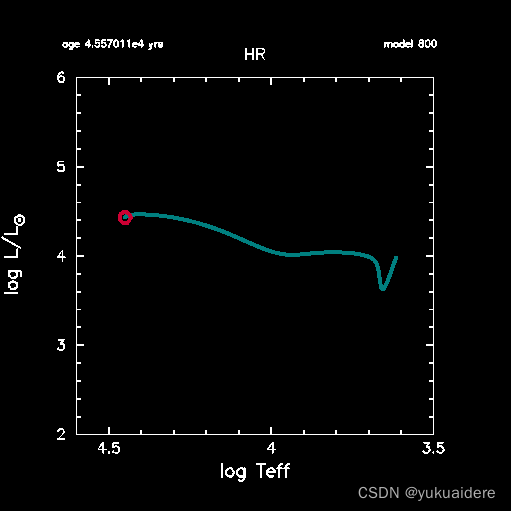
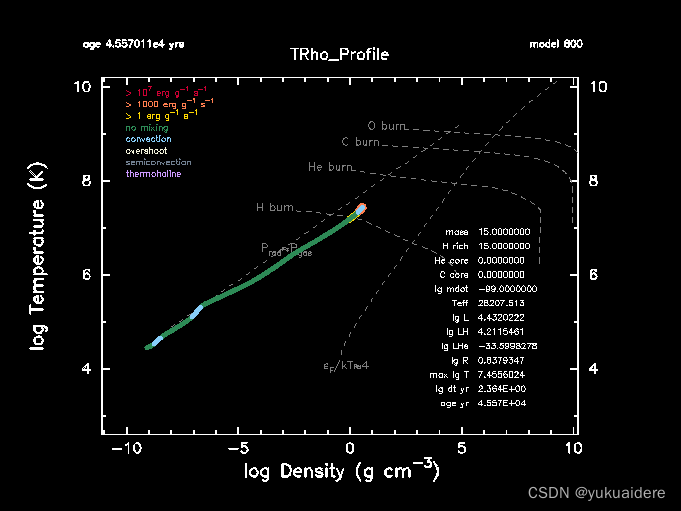
这应该运行大约850步,然后停止,并显示以下消息:
stop because Lnuc_div_L >= Lnuc_div_L_zams_limit
4. Resuming MESA
在整个运行过程中,并不局限于使用相同的参数设置。可以停止运行,编辑inlist文件,并使用新的设置重新启动。这种停止-重新启动机制经过精心构造,因此如果从中间状态重新启动而不更改任何控件,将得到完全相同的结果。要做到这一点,保存的信息必须是完整的,这意味着有很多信息。为了使其快速运行,重新启动信息被转储为二进制格式。这些二进制转储称为“照片”,并保存在具有相同名称的子目录中。
需要强调的是,照片不适合模特长期储存。特别是,当更新到新版本的MESA star时,应该预料到现有的照片文件将会过时。
如果在运行的终端输出中向后滚动,应该会发现如下一行(尽管MESA版本之间的数字可能略有不同):
save photos/x849 for model 849
指示在运行终止时自动保存其中一个快照。
在编辑器中打开inlist_project。可以看到有两个停止条件:
! stop when the star nears ZAMS (Lnuc/L > 0.99)
Lnuc_div_L_zams_limit = 0.99d0
stop_near_zams = .true.

! stop when the center abundance by mass of h1 drops below this limit
xa_central_lower_limit_species(1) = 'h1'
xa_central_lower_limit(1) = 1d-3
正如MESA在终止消息中指出的那样,我们停止是因为第一个条件(ZAMS自然是在h耗尽之前)。通过编辑inlist来关闭这个停止条件:
stop_near_zams = .false.
并保存inlist文件。
现在可以使用照片和新设置重新启动。试一试。
./re x849
这将恢复849型的运行,但这一次,当我们的其他条件满足时,当中心氢降到1e-3以下时,运行将停止。这将发生在975型左右。
5. Saving a model
照片文件是机器可读的二进制文件,它不是为可移植到不同的机器甚至不同版本的MESA而设计的。因此,我们需要另一种方法来保存模型,以便我们以后使用它,可能作为以后运行的初始模型,或者发送给某人,让他们与自己的MESA副本一起使用。
在运行结束时保存一个模型文件。转到inlist的&star_job部分的以下行:
! save a model at the end of the run
save_model_when_terminate = .false.
save_model_filename = '15M_at_TAMS.mod'
告诉MESA想在最后保存一个模型文件,方法是编辑inlist并将save_model_when_terminate更改为true。
保存文件,然后从与以前相同的位置重新启动MESA。
./re x849
这次当运行结束时,MESA将保存一个名为15M_at_TAMS.mod的模型。
6. Loading a model
现在可以开始研究恒星的后主序列演化,使用刚刚保存的模型开始一个新的MESA运行。为了做到这一点,列表可能是这样的:
&star_job
  ! see star/defaults/star_job.defaults

  ! start a run from a saved model
  load_saved_model = .true.
  load_model_filename = '15M_at_TAMS.mod'

  ! display on-screen plots
  pgstar_flag = .true.

/ !end of star_job namelist

&eos
  ! eos options
  ! see eos/defaults/eos.defaults

/ ! end of eos namelist


&kap
  ! kap options
  ! see kap/defaults/kap.defaults
  use_Type2_opacities = .true.
  Zbase = 0.02

/ ! end of kap namelist


&controls
  ! see star/defaults/controls.defaults

  ! options for energy conservation (see MESA V, Section 3)
  energy_eqn_option = 'dedt'
  use_gold_tolerances = .true.

  ! configure mass loss on RGB & AGB
  cool_wind_RGB_scheme = 'Dutch'
  cool_wind_AGB_scheme = 'Dutch'
  RGB_to_AGB_wind_switch = 1d-4
  Dutch_scaling_factor = 0.8

/ ! end of controls namelist
如果想尝试一下,请将前面的文本保存为工作目录中名为inlist_load的文件。确保文件以一个空白的新行结束。然后编辑主inlist文件,使它在inlist中各处使用inlist_load而不是inlist_project(即extra_star_job_inlist1_name和extra_controls_inlist1_name)。
然后继续:
./rn
MESA将使用新保存的文件启动。与照片不同,保存的模型没有系统内部状态的完整快照。照片保证给出相同的结果;保存的模型则不是。当运行已保存的模型时,与在保存之前的运行中看到的模型相比,可能会有微小的差异。差异应该是很小的。
7. Learning about the many MESA options
看完前面的列表后,更迫切的问题可能是“这些选项是从哪里来的?”以及“如何找到适合的选项?”
包含所有MESA选项及其默认值的描述的文件位于该目录中:
$MESA_DIR/star/defaults
选项是按它们所属的名称列表组织的。因此,文件controls.defaults包含控件名称列表中选项的讨论。
假设我们想更多地了解这个“Dutch_wind”是什么。在controls.defaults中搜索单词“Dutch”,很快就会找到这些选项的以下摘要。
! Dutch_scaling_factor
      ! ~~~~~~~~~~~~~~~~~~~~

      ! The "Dutch" wind scheme for massive stars combines results from several papers,
      ! all with authors mostly from the Netherlands.

      ! The particular combination we use is based on
      ! Glebbeek, E., et al, A&A 497, 255-264 (2009) [more Dutch authors!]

      ! For Teff > 1e4 and surface H > 0.4 by mass, use Vink et al 2001
      ! Vink, J.S., de Koter, A., & Lamers, H.J.G.L.M., 2001, A&A, 369, 574.

      ! For Teff > 1e4 and surface H < 0.4 by mass, use Nugis & Lamers 2000
      ! Nugis, T.,& Lamers, H.J.G.L.M., 2000, A&A, 360, 227
      ! Some folks use 0.8 for non-rotating mdoels (Maeder & Meynet, 2001).

      ! ::

    Dutch_scaling_factor = 0d0


      ! Dutch_wind_lowT_scheme
      ! ~~~~~~~~~~~~~~~~~~~~~~

      ! For Teff < 1e4

      ! Use de Jager if ``Dutch_wind_lowT_scheme = 'de Jager'``
      ! de Jager, C., Nieuwenhuijzen, H., & van der Hucht, K. A. 1988, A&AS, 72, 259.

      ! Use van Loon if ``Dutch_wind_lowT_scheme = 'van Loon'``
      ! van Loon et al. 2005, A&A, 438, 273.

      ! Use Nieuwenhuijzen if ``Dutch_wind_lowT_scheme = 'Nieuwenhuijzen'``
      ! Nieuwenhuijzen, H.; de Jager, C. 1990, A&A, 231, 134

      ! ::

    Dutch_wind_lowT_scheme = 'de Jager'
可以浏览.defaults文件,以熟悉可用的内容。选择的数量太多,可以使用test_suite。