安装
如果版本报错推荐安装以下版本
npm install echarts@4.8.0 --save

npm uninstall echarts//这个是卸载命令

以下安装成功后是局部引入:
多个Echart遍历生成
vue3+echart
单个页面多个图表循环渲染展示:

<template>
  <div class="main">
    <div class="section">
      <div class="section" v-for="(chartOption, index) in chartOptions" :key="index">
        <div :ref="el => chartRefs[index] = el" style="width:1400px;height: 400px"></div>
      </div>
    </div>
  </div>
</template>

<script lang='ts'>
import { ref, reactive, toRefs, onUnmounted, onMounted } from "vue";
import { useRouter, useRoute } from "vue-router"; //引入路由
import * as echarts from "echarts";
export default {
  name: "",
  setup() {
    let router = useRouter(),
    route = useRoute();
    // 图标数据
    const chartOptions: any = [
      {
        title: [
          {
            left: "left",
            text: "违规命中统计",
          }
        ],
        legend: {
          data: ['违规规则', 'Union Ads']
        },
        xAxis: {
          type: "category",
          data: ["Mon", "Tue", "Wed", "Thu", "Fri", "Sat", "Sun"],
        },
        yAxis: {
          type: "value",
        },
        series: [
          {
            name: '违规规则',
            data: [120, 200, 150, 80, 70, 110, 130],
            type: "bar",
            itemStyle: {
              color: "#23e3fb",
            },
          },
        ],
        tooltip: {
          // 这里暂时不设置 formatter
        }
      },
      {
        title: [
          {
            left: "left",
            text: "违规门店统计",
          }
        ],
        legend: {
          data: ['违规门店', 'Union Ads']
        },
        tooltip: {
          // 这里暂时不设置 formatter
        },
        xAxis: {
          type: "category",
          data: ["1", "2", "3", "4", "5", "6", "7"],
        },
        yAxis: {
          type: "value",
        },
        series: [
          {
            data: [120, 200, 150, 80, 70, 110, 130],
            type: "bar",
            name: '违规门店',
            itemStyle: {
              color: "#23e3fb",
            },
          },
        ],
      },
      {
        title: [
          {
            left: "left",
            text: "违规坐席统计",
          }
        ],
         legend: {
          data: ['违规坐席', 'Union Ads']
        },
        tooltip: {
          // 这里暂时不设置 formatter
        },
        xAxis: {
          type: "category",
          data: ["Mon", "Tue", "Wed", "Thu", "Fri", "Sat", "Sun"],
        },
        yAxis: {
          type: "value",
        },
        series: [
          {
            data: [120, 200, 150, 80, 70, 110, 130],
            type: "bar",
            name:'违规坐席'
          },
        ],
      },
    ];

    const data: any = reactive({
    });
    const chartRefs = ref<HTMLDivElement[]>([]);
    const charts = ref<echarts.ECharts[]>([]);
    onMounted(() => {
      chartOptions.forEach((option, index) => {
        if (chartRefs.value[index]) {
          const chart = echarts.init(chartRefs.value[index]);
          const finalOption = {
            ...option,
            tooltip: {
              ...option.tooltip,
            }
          };
          chart.setOption(finalOption);
          charts.value[index] = chart;
        }
      });
    });

    onUnmounted(() => {
      charts.value.forEach(chart => {
        if (chart) {
          chart.dispose();
        }
      });
    });

    const refData = toRefs(data);
    return {
      ...refData,
      chartOptions,
      chartRefs,
    };
  },
};
</script>

<style lang="scss" scoped>
</style>
自定义悬停tooltip效果
pie饼图表悬停展示百分百
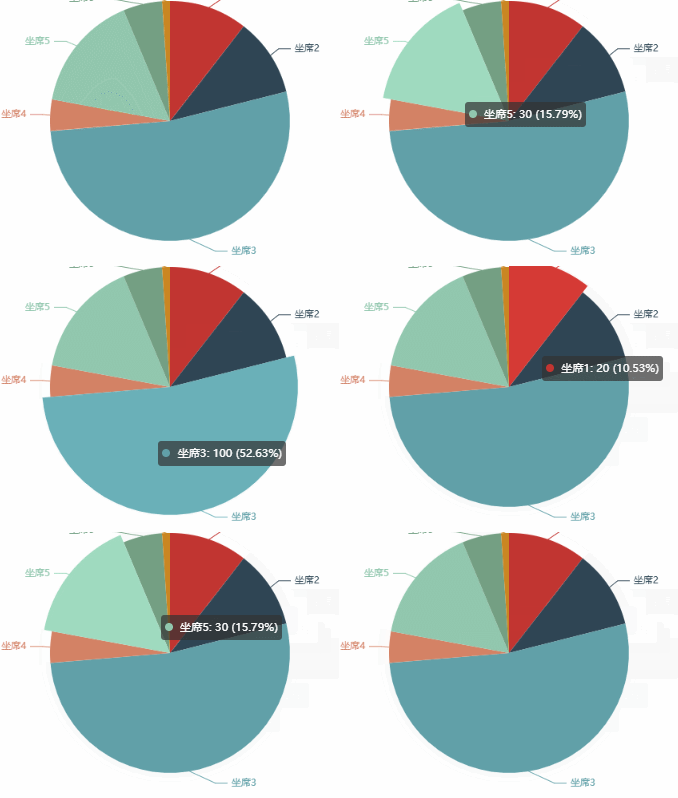
<template>
  <div class="main">
    <div class="section">
      <div class="section" v-for="(chartOption, index) in chartOptions" :key="index">
        <div :ref="el => chartRefs[index] = el" style="width:1400px;height: 400px"></div>
      </div>
    </div>
  </div>
</template>
<script lang='ts'>
import { ref, reactive, toRefs, onUnmounted, onMounted } from "vue";
import { useRouter, useRoute } from "vue-router"; //引入路由
import * as echarts from "echarts";
export default {
  name: "",
  setup() {
    let router = useRouter(),
    route = useRoute();
    // 图标数据
    const chartOptions: any = [
     {
      title: [
        {
          left: "left",
          text: "违规坐席统计",
        }
      ],
      tooltip: {
      trigger: 'item',
      formatter: function (params: any) {
     if (!params) {
      return '';
     }
      return `<div>
      <span style="display:inline-block;margin-right:5px;border-radius:10px;width:10px;height:10px;background-color:${params.color};"></span>
      ${params.name}: ${params.value} (${params.percent}%)
       </div>`;
      }
      },
      series: [
        {
          data: [
            { value: 20, name: '坐席1' },
            { value: 20, name: '坐席2' },
            { value: 100, name: '坐席3' },
            { value: 8, name: '坐席4' },
            { value: 30, name: '坐席5' },
            { value: 10, name: '坐席6' },
            { value: 2, name: '坐席7' }
          ],
          type: "pie",
          name: '违规坐席'
        },
      ],
    },
    ];

    const data: any = reactive({
    });
    const chartRefs = ref<HTMLDivElement[]>([]);
    const charts = ref<echarts.ECharts[]>([]);
    onMounted(() => {
      chartOptions.forEach((option, index) => {
        if (chartRefs.value[index]) {
          const chart = echarts.init(chartRefs.value[index]);
         chart.setOption(option);
          charts.value[index] = chart;
        }
      });
    });

    onUnmounted(() => {
      charts.value.forEach(chart => {
        if (chart) {
          chart.dispose();
        }
      });
    });

    const refData = toRefs(data);
    return {
   ...refData,
      chartOptions,
      chartRefs,
    };
  },
};
</script>

<style lang="scss" scoped>
</style>
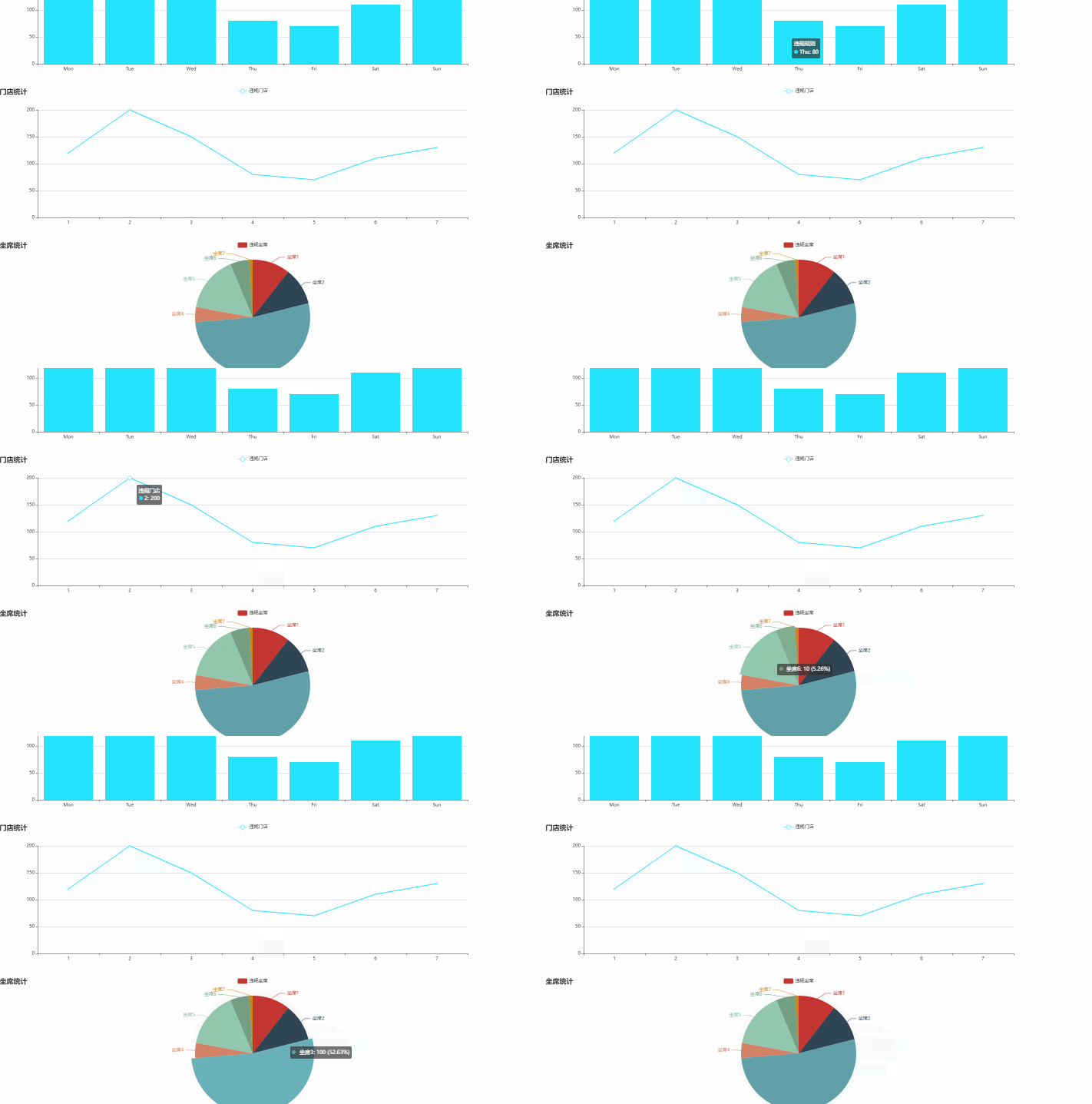
循环不同图表自定义tooltip悬停效果
柱状/折线/饼图不同图表
饼图悬停展示百分百 圆点动态随内容展示颜色
其他图表默认展示悬停内容 如图所示:
<template>
  <div class="main">
    <div class="section">
      <div class="section" v-for="(chartOption, index) in chartOptions" :key="index">
        <div :ref="el => chartRefs[index] = el" style="width:1400px;height: 400px"></div>
      </div>
    </div>
  </div>
</template>
<script lang='ts'>
import { ref, reactive, toRefs, onUnmounted, onMounted } from "vue";
import { useRouter, useRoute } from "vue-router"; //引入路由
import * as echarts from "echarts";
export default {
  name: "",
  setup() {
    let router = useRouter(),
    route = useRoute();
    // 图标数据
    const chartOptions: any = [
      {
        title: [
          {
            left: "left",
            text: "违规命中统计",
          }
        ],
        legend: {
          data: ['违规规则', 'Union Ads']
        },
        xAxis: {
          type: "category",
          data: ["Mon", "Tue", "Wed", "Thu", "Fri", "Sat", "Sun"],
        },
        yAxis: {
          type: "value",
        },
        series: [
          {
            name: '违规规则',
            data: [120, 200, 150, 80, 70, 110, 130],
            type: "bar",
            itemStyle: {
              color: "#23e3fb",
            },
          },
        ],
        tooltip: {
          // 这里暂时不设置 formatter
        }
      },
      {
        title: [
          {
            left: "left",
            text: "违规门店统计",
          }
        ],
        legend: {
          data: ['违规门店', 'Union Ads']
        },
        tooltip: {
          // 这里暂时不设置 formatter
        },
        xAxis: {
          type: "category",
          data: ["1", "2", "3", "4", "5", "6", "7"],
        },
        yAxis: {
          type: "value",
        },
        series: [
          {
            data: [120, 200, 150, 80, 70, 110, 130],
            type: "line",
            name: '违规门店',
            itemStyle: {
              color: "#23e3fb",
            },
          },
        ],
      },
     {
      title: [
        {
          left: "left",
          text: "违规坐席统计",
        }
      ],
      legend: {
        data: ['违规坐席']
      },
      tooltip: {
      trigger: 'item',
      formatter: function (params: any) {
     if (!params) {
      return '';
     }
      return `<div>
      <span style="display:inline-block;margin-right:5px;border-radius:10px;width:10px;height:10px;background-color:${params.color};"></span>
      ${params.name}: ${params.value} (${params.percent}%)
       </div>`;
      }
      },
      series: [
        {
          data: [
            { value: 20, name: '坐席1' },
            { value: 20, name: '坐席2' },
            { value: 100, name: '坐席3' },
            { value: 8, name: '坐席4' },
            { value: 30, name: '坐席5' },
            { value: 10, name: '坐席6' },
            { value: 2, name: '坐席7' }
          ],
          type: "pie",
          name: '违规坐席'
        },
      ],
    },
    ];

    const data: any = reactive({
    });
    const chartRefs = ref<HTMLDivElement[]>([]);
    const charts = ref<echarts.ECharts[]>([]);
    onMounted(() => {
      chartOptions.forEach((option, index) => {
        if (chartRefs.value[index]) {
          const chart = echarts.init(chartRefs.value[index]);
         chart.setOption(option);
          charts.value[index] = chart;
        }
      });
    });

    onUnmounted(() => {
      charts.value.forEach(chart => {
        if (chart) {
          chart.dispose();
        }
      });
    });

    const refData = toRefs(data);
    return {
   ...refData,
      chartOptions,
      chartRefs,
    };
  },
};
</script>

<style lang="scss" scoped>
</style>
点击单个图表可显示弹框
点击图表单个柱状图显示对应的表格弹框操作

<template>
<div class="main">
<div class="section">
<div class="section" v-for="(chartOption, index) in chartOptions" :key="index">
<div :ref="el => chartRefs[index] = el" style="width:1400px;height: 400px"></div>
</div>
<!-- 隐藏表格 -->
<div class="table-section">
<el-dialog v-model="showTable" title="" width="500" align-center>
<el-table :data="tableData" style="width: 100%" >
<el-table-column prop="name" label="名称" />
<el-table-column prop="value" label="值" />
<el-table-column label="编辑" >
<template #default="scope">
<el-button type="primary" @click="btnView(scope.row)">查看</el-button>
</template>
</el-table-column>
</el-table></el-dialog>
</div>
</div>
</div>
</template>
<script lang='ts'>
import { ref, reactive, toRefs, onUnmounted, onMounted } from "vue";
import { useRouter, useRoute } from "vue-router"; //引入路由
import * as echarts from "echarts";
export default {
name: "",
setup() {
let router = useRouter(),
route = useRoute();
// 图标数据
const chartOptions: any = [
{
title: [
{
left: "left",
text: "违规命中统计",
}
],
legend: {
data: ['违规规则', 'Union Ads']
},
xAxis: {
type: "category",
data: ["Mon", "Tue", "Wed", "Thu", "Fri", "Sat", "Sun"],
},
yAxis: {
type: "value",
},
series: [
{
name: '违规规则',
data: [120, 200, 150, 80, 70, 110, 130],
type: "bar",
itemStyle: {
color: "#23e3fb",
},
},
],
tooltip: {
// 这里暂时不设置 formatter
}
},
{
title: [
{
left: "left",
text: "违规门店统计",
}
],
legend: {
data: ['违规门店', 'Union Ads']
},
tooltip: {
// 这里暂时不设置 formatter
},
xAxis: {
type: "category",
data: ["1", "2", "3", "4", "5", "6", "7"],
},
yAxis: {
type: "value",
},
series: [
{
data: [120, 200, 150, 80, 70, 110, 130],
type: "bar",
name: '违规门店',
itemStyle: {
color: "#23e3fb",
},
},
],
},
{
title: [
{
left: "left",
text: "违规坐席统计",
}
],
legend: {
data: ['违规坐席', 'Union Ads']
},
tooltip: {
// 这里暂时不设置 formatter
},
xAxis: {
type: "category",
data: ["Mon", "Tue", "Wed", "Thu", "Fri", "Sat", "Sun"],
},
yAxis: {
type: "value",
},
series: [
{
data: [120, 200, 150, 80, 70, 110, 130],
type: "bar",
name:'违规坐席'
},
],
},
];
const initParams = (params: any) => {
let tooltipContent = '';
const bullet = '<span style="display: inline-block; width: 10px; height: 10px; background-color:#23e3fb; border-radius: 50%; margin-right: 5px;"></span>';
if (Array.isArray(params)) {
// 多个数据项
params.forEach((param) => {
tooltipContent += `${param.seriesName}<br/>${bullet}${param.name} ${param.value}<br/>`;
});
} else {
// 单个数据项
tooltipContent += `${params.seriesName}<br/>${bullet}${params.name} ${params.value}<br/>`;
}
return tooltipContent;
};
const data: any = reactive({
// chartOptions:chartOptions,//也可在这里赋值使用(也可定义并暴露出去)
showTable:false,//点击图标显示弹框表格
tableData:[]=[],//弹框表格数据
});
const chartRefs = ref<HTMLDivElement[]>([]);
const charts = ref<echarts.ECharts[]>([]);
const handleChartClick = (params: any) => {
data.showTable = true;
data.tableData = [
{ name: params.seriesName, value: params.value },
{ name: '日期', value: params.name },
// 可以根据需要添加更多字段
];
};
onMounted(() => {
chartOptions.forEach((option, index) => {
if (chartRefs.value[index]) {
const chart = echarts.init(chartRefs.value[index]);
const finalOption = {
...option,
tooltip: {
...option.tooltip,
formatter: initParams
}
};
chart.setOption(finalOption);
chart.on('click', handleChartClick);
charts.value[index] = chart;
}
});
});
onUnmounted(() => {
charts.value.forEach(chart => {
if (chart) {
chart.dispose();
}
});
});
const refData = toRefs(data);
return {
...refData,
chartOptions,
chartRefs,
initParams
};
},
};
</script>
<style lang="scss" scoped>
</style>
词图云

结合echarts的echarts-wordcloud使用 需要进行安装

npm install  echarts echarts-wordcloud --save
版本5+对应echarts-wordcloud版本2+
"echarts": "^5.5.1",
"echarts-wordcloud": "^2.1.0",
<template>
  <div ref="wordCloudRef" style="width: 600px; height: 400px;"></div>
</template>

<script setup>
import { onMounted, ref, watch } from 'vue';
import * as echarts from 'echarts/core';
import 'echarts-wordcloud';

const wordCloudRef = ref(null);
const wordCloudChart = ref(null);
const selectedWord = ref(null);

const wordCloudData = ref([
  { value: 67, name: '红腹角雉' },
  { value: 98, name: '麝牛' },
  { value: 97, name: '山舌鱼' },
  { value: 100, name: '羚羊' },
  { value: 37, name: '非洲王子' },
  { value: 83, name: '麋鹿' },
  { value: 60, name: '中华鲟' },
  { value: 42, name: '鮪鱼' },
  { value: 96, name: '射水鱼' },
  { value: 54, name: '果子狸' },
  { value: 33, name: '小春鱼' },
  { value: 84, name: '水獭' },
  { value: 86, name: '刺猬' }
]);

const initChart = () => {
  if (!wordCloudRef.value) return;

  wordCloudChart.value = echarts.init(wordCloudRef.value);
  const option = {
    series: [
      {
        type: 'wordCloud',
        gridSize: 20,
        sizeRange: [12, 50],
        rotationRange: [-90, 90],
        textStyle: {
          color: function () {
            return (
              'rgb(' +
              Math.round(Math.random() * 255) +
              ', ' +
              Math.round(Math.random() * 255) +
              ', ' +
              Math.round(Math.random() * 255) +
              ')'
            );
          },
        },
        data: wordCloudData.value,
      },
    ],
  };

  wordCloudChart.value.setOption(option);

  // 添加点击事件监听器
  wordCloudChart.value.on('click', (params) => {
    if (params.seriesType === 'wordCloud') {
      // alert(params.name)
      console.log('Clicked word:', params.name, 'with value:', params.value);
      selectedWord.value = params;
      updateSelectedWordStyle();//动态改变
    }
  });
};

const updateSelectedWordStyle = () => {
  if (!wordCloudChart.value || !selectedWord.value) return;

  const option = wordCloudChart.value.getOption();
  const series = option.series[0];

  series.data.forEach((item) => {
    if (item.name === selectedWord.value.name) {
      item.textStyle = {
        fontSize: 30, // 放大字体
        fontWeight: 'bold',
        color: '#FF0000', // 改变颜色
      };
    } else {
      delete item.textStyle; // 恢复其他项的默认样式
    }
  });

  wordCloudChart.value.setOption(option);
};

onMounted(() => {
  initChart();
});
</script>

<style scoped>
/* 可以在这里添加一些样式 */
</style>