c#基于ASP.NET Core实现WebAPI在阿里云上起TCP服务基于ModbuRtu协议与终端设备通信的完整过程
在物联网应用开发中,经常需要实现Web服务与终端设备之间的双向通信。本文将详细介绍如何使用ASP.NET Core开发一个部署在阿里云服务器上的Web API服务,同时建立TCP服务实现与4G终端设备的通信,通过ICCID对设备进行通道管理,以及服务器日记记录。
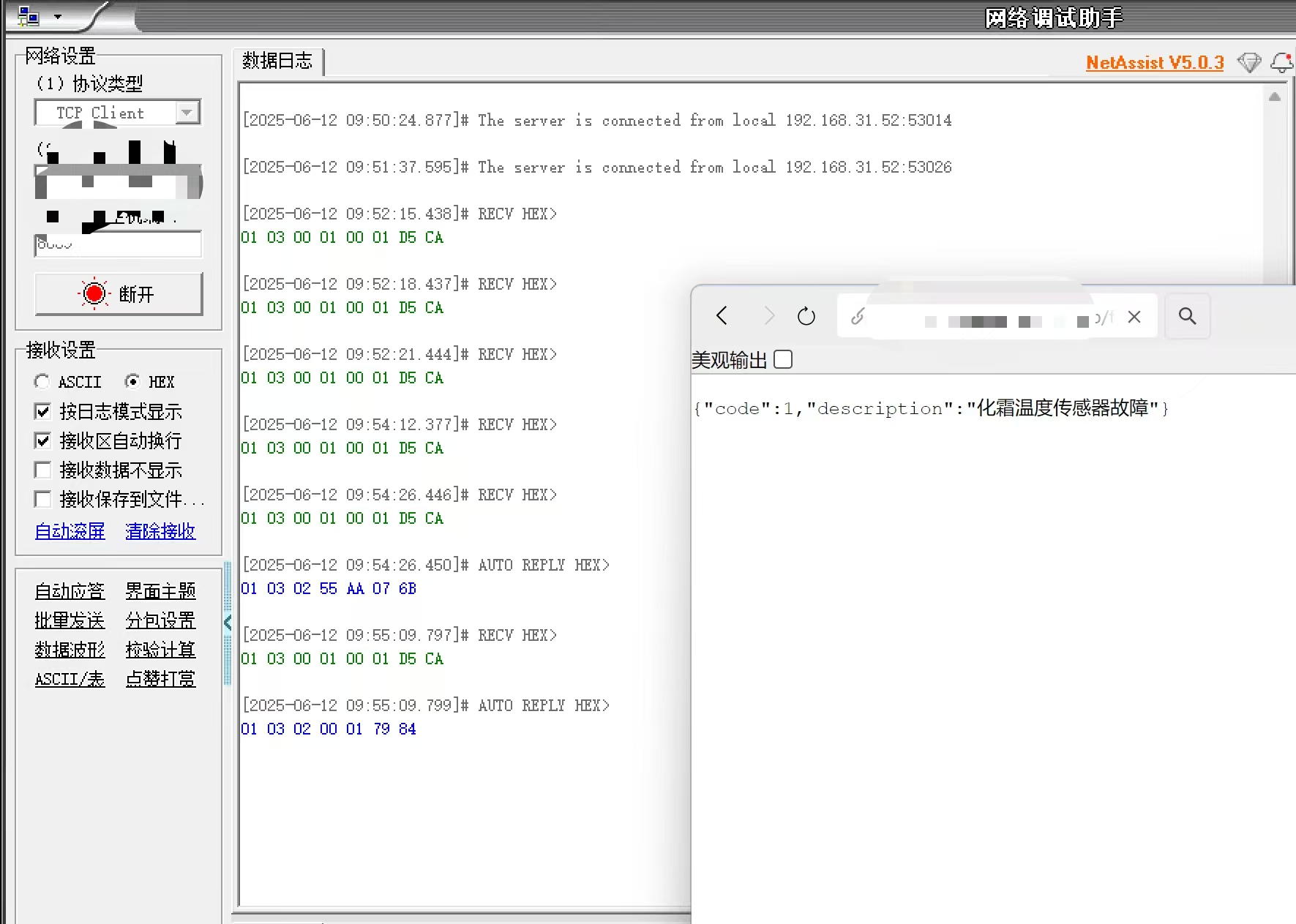
一、项目架构设计
1.1 系统组成
Web API层: 提供RESTful接口供小程序调用
TCP服务层: 处理与4G终端设备的通信
Modbus协议层: 实现工业设备通信协议
数据模型层: 定义系统数据结构
1.2 技术选型
.NET 6.0
ASP.NET Core Web API
TCP Socket通信
Modbus RTU over TCP协议
依赖注入框架
二、核心实现过程
2.1 项目配置与启动
首先在Program.cs中配置应用服务和启动参数:
var builder = WebApplication.CreateBuilder(args);

// 配置Kestrel使用HTTPS
builder.WebHost.ConfigureKestrel(serverOptions =>
{
    serverOptions.ListenAnyIP(443, listenOptions =>
    {
        listenOptions.UseHttps(new X509Certificate2("path/to/certificate.pfx", "password"));
    });
});

// 注册Modbus服务
builder.Services.AddSingleton<ModbusRtuOverTcp>();

// 添加控制器和Swagger
builder.Services.AddControllers();
builder.Services.AddEndpointsApiExplorer();
builder.Services.AddSwaggerGen();

var app = builder.Build();

// 中间件配置
app.UseHttpsRedirection();
app.UseAuthorization();
app.MapControllers();

// 启动TCP服务
app.Lifetime.ApplicationStarted.Register(() =>
{
    var tcpService = app.Services.GetRequiredService<ModbusRtuOverTcp>();
    tcpService.StartAsync(CancellationToken.None);
});

app.Run();
2.2 TCP服务实现
创建ModbusRtuOverTcp类,实现IHostedService接口作为后台服务运行:
public class ModbusRtuOverTcp : IHostedService, IDisposable
{
    private TcpListener _tcpListener;
    private CancellationTokenSource _cts;
    private readonly Dictionary<string, TcpClient> _ICCIDclients = new Dictionary<string, TcpClient>();
    private readonly ILogger<ModbusRtuOverTcp> _logger;
    private readonly SimpleHybirdLock _lock = new SimpleHybirdLock();

    public ModbusRtuOverTcp(ILogger<ModbusRtuOverTcp> logger)
    {
        _logger = logger;
    }

    // 启动TCP服务
    public Task StartAsync(CancellationToken cancellationToken)
    {
        _cts = CancellationTokenSource.CreateLinkedTokenSource(cancellationToken);
        _listeningTask = Task.Run(() => StartTcpServer(8092, _cts.Token));
        return Task.CompletedTask;
    }

    // TCP服务器主循环
    private async Task StartTcpServer(int port, CancellationToken token)
    {
        try
        {
            _tcpListener = new TcpListener(IPAddress.Any, port);
            _tcpListener.Start();
            _logger.LogInformation($"Server started on port {port}");

            while (!token.IsCancellationRequested)
            {
                var client = await _tcpListener.AcceptTcpClientAsync(token);
                client.ReceiveBufferSize = 256;

                // 在新线程中处理客户端连接
                Thread thread = new Thread(() => { HandleClient(client, token); });
                thread.IsBackground = true;
                thread.Start();
            }
        }
        catch (Exception ex)
        {
            _logger.LogError(ex, "TCP server error");
        }
    }

    // 处理客户端连接
    private void HandleClient(TcpClient client, CancellationToken token)
    {
        string iccid = null;
        try
        {
            NetworkStream stream = client.GetStream();
            byte[] buffer = new byte[256];

            // 读取设备标识(ICCID)
            int bytesRead = stream.Read(buffer, 0, buffer.Length);
            if (bytesRead == 0) return;

            iccid = Encoding.UTF8.GetString(buffer, 0, bytesRead).Trim('\0');
            if (iccid.Length != 20) return;

            // 存储或更新设备连接
            lock (_lock)
            {
                if (_ICCIDclients.TryGetValue(iccid, out TcpClient oldClient))
                {
                    try { oldClient.Close(); } catch { }
                }
                _ICCIDclients[iccid] = client;
            }

            _logger.LogInformation($"设备连接: {iccid}");

            // 主处理循环
            DateTime lastClearTime = DateTime.UtcNow;
            const int clearIntervalSeconds = 60;
            byte[] clearBuffer = new byte[1024];

            while (client.Connected && !token.IsCancellationRequested)
            {
                // 定时清空缓冲区
                if ((DateTime.UtcNow - lastClearTime).TotalSeconds >= clearIntervalSeconds)
                {
                    ClearReceiveBuffer(stream, clearBuffer);
                    lastClearTime = DateTime.UtcNow;
                }

                Thread.Sleep(100); // 避免CPU过高占用
            }
        }
        catch (Exception ex)
        {
            _logger.LogError(ex, "客户端处理错误");
        }
        finally
        {
            // 清理资源
            if (iccid != null)
            {
                lock (_lock)
                {
                    if (_ICCIDclients.TryGetValue(iccid, out TcpClient currentClient) && currentClient == client)
                    {
                        _ICCIDclients.Remove(iccid);
                    }
                }
            }
            try { client.Close(); } catch { }
        }
    }

    // 清空接收缓冲区
    private void ClearReceiveBuffer(NetworkStream stream, byte[] clearBuffer)
    {
        try
        {
            while (stream.DataAvailable)
            {
                stream.Read(clearBuffer, 0, clearBuffer.Length);
            }
        }
        catch (Exception ex)
        {
            _logger.LogError(ex, "清空缓冲区时出错");
        }
    }

    // 停止服务
    public Task StopAsync(CancellationToken cancellationToken)
    {
        _cts?.Cancel();
        _tcpListener?.Stop();
        return Task.CompletedTask;
    }

    public void Dispose()
    {
        _tcpListener?.Stop();
        _cts?.Dispose();
    }
}
2.3 Modbus协议实现
实现Modbus RTU over TCP协议的核心方法:
// 统一数据发送接收方法
private bool SendData(string ICCID, byte[] sendBytes, ref byte[] response)
{
    _lock.Enter();
    try
    {
        NetworkStream _stream;
        lock (_ICCIDclients)
        {
            if (!_ICCIDclients.ContainsKey(ICCID)) return false;
            _stream = _ICCIDclients[ICCID].GetStream();
        }

        // 清空接收缓冲区
        while (_stream.DataAvailable)
        {
            _stream.Read(new byte[256], 0, 256);
        }

        // 发送请求
        _stream.Write(sendBytes, 0, sendBytes.Length);

        // 接收响应
        var buffer = new byte[1024];
        using var ms = new MemoryStream();
        var timeout = Stopwatch.StartNew();

        while (timeout.ElapsedMilliseconds < ReceiveTimeout)
        {
            if (_stream.DataAvailable)
            {
                int bytesRead = _stream.Read(buffer, 0, buffer.Length);
                ms.Write(buffer, 0, bytesRead);

                // 检查最小长度和CRC
                if (ms.Length >= 5 && ValidateCrc(ms.ToArray()))
                {
                    response = ms.ToArray();
                    return true;
                }
            }
            else
            {
                Thread.Sleep(SleepInterval);
            }
        }
        return false;
    }
    catch (Exception ex)
    {
        _logger.LogError(ex, "发送数据失败");
        return false;
    }
    finally
    {
        _lock.Leave();
    }
}

// CRC校验
private bool ValidateCrc(byte[] data)
{
    if (data.Length < 2) return false;
    byte[] crc = Crc16(data, data.Length - 2);
    return crc[0] == data[^2] && crc[1] == data[^1];
}

// 读取保持寄存器功能码03H
public byte[] ReadKeepReg(string ICCID, int iDevAdd, int iAddress, int iLength)
{
    // 拼接报文
    ByteArray SendCommand = new ByteArray();
    SendCommand.Add(new byte[] { (byte)iDevAdd, 0x03, (byte)(iAddress / 256), (byte)(iAddress % 256) });
    SendCommand.Add(new byte[] { (byte)(iLength / 256), (byte)(iLength % 256) });
    SendCommand.Add(Crc16(SendCommand.array, 6));

    // 发送并接收响应
    int byteLength = iLength * 2;
    byte[] response = new byte[5 + byteLength];

    if (SendData(ICCID, SendCommand.array, ref response))
    {
        // 解析响应
        if (response[1] == 0x03 && response[2] == byteLength)
        {
            return GetByteArray(response, 3, byteLength);
        }
    }
    return null;
}

// 预置多个寄存器功能码10H
public bool PreSetMultiByteArray(string ICCID, int iDevAdd, int iAddress, byte[] SetValue)
{
    if (SetValue == null || SetValue.Length == 0 || SetValue.Length % 2 == 1)
    {
        return false;
    }

    int RegLength = SetValue.Length / 2;

    // 拼接报文
    ByteArray SendCommand = new ByteArray();
    SendCommand.Add(new byte[] { (byte)iDevAdd, 0x10, (byte)(iAddress / 256), (byte)(iAddress % 256) });
    SendCommand.Add(new byte[] { (byte)(RegLength / 256), (byte)(RegLength % 256) });
    SendCommand.Add((byte)SetValue.Length);
    SendCommand.Add(SetValue);
    SendCommand.Add(Crc16(SendCommand.array, 7 + SetValue.Length));

    // 发送并接收响应
    byte[] response = new byte[8];

    if (SendData(ICCID, SendCommand.array, ref response))
    {
        // 验证响应
        byte[] b = GetByteArray(response, 0, 6);
        byte[] crc = Crc16(b, 6);
        return ByteArrayEquals(GetByteArray(SendCommand.array, 0, 6), b) &&
               crc[0] == response[6] && crc[1] == response[7];
    }
    return false;
}
2.4 Web API控制器
实现RESTful API接口供外部调用:
[ApiController]
[Route("api/[controller]")]
public class TcpController : ControllerBase
{
    private readonly ModbusRtuOverTcp _modbusClient;

    public TcpController(ModbusRtuOverTcp modbusClient)
    {
        _modbusClient = modbusClient;
    }

    // 获取发酵室启用状态
    [HttpGet("fermentation-rooms/{ICCID}/{id}/enabled")]
    public IActionResult GetRoomEnabled(string ICCID, int id)
    {
        try
        {
            bool enabled = _modbusClient.GetFermentationRoomEnabled(ICCID, id);
            return Ok(new { RoomId = id, Enabled = enabled });
        }
        catch (Exception ex)
        {
            return StatusCode(500, new { error = ex.Message });
        }
    }

    // 获取故障状态
    [HttpGet("fault-status/{ICCID}")]
    public IActionResult GetFaultStatus(string ICCID)
    {
        try
        {
            var status = _modbusClient.ReadFaultStatus(ICCID);
            return Ok(status);
        }
        catch (Exception ex)
        {
            return StatusCode(500, new { error = ex.Message });
        }
    }

    // 获取发酵室完整状态
    [HttpGet("fermentation-rooms/{ICCID}/{id}/status")]
    public IActionResult GetRoomStatus(string ICCID, int id)
    {
        try
        {
            var status = _modbusClient.GetRoomStatus(ICCID, id);
            return Ok(status);
        }
        catch (Exception ex)
        {
            return StatusCode(500, new { error = ex.Message });
        }
    }

    // 发送控制命令
    [HttpPost("fermentation-rooms/{ICCID}/{id}/control")]
    public IActionResult SendControlCommand(string ICCID, int id, [FromBody] ControlCommandRequest command)
    {
        try
        {
            bool success = _modbusClient.SendControlCommand(ICCID, id, command);
            return Ok(new { Success = success });
        }
        catch (Exception ex)
        {
            return StatusCode(500, new { error = ex.Message });
        }
    }

    // 开门控制
    [HttpPost("opendoor/{ICCID}/{id}/control")]
    public IActionResult SendOpenDoorControlCommand(string ICCID, int id)
    {
        try
        {
            bool success = _modbusClient.SendControlDoorOpen(ICCID, id);
            return Ok(new { Success = success });
        }
        catch (Exception ex)
        {
            return StatusCode(500, new { error = ex.Message });
        }
    }

    // 关门控制
    [HttpPost("closedoor/{ICCID}/{id}/control")]
    public IActionResult SendCloseDoorControlCommand(string ICCID, int id)
    {
        try
        {
            bool success = _modbusClient.SendControlDoorClose(ICCID, id);
            return Ok(new { Success = success });
        }
        catch (Exception ex)
        {
            return StatusCode(500, new { error = ex.Message });
        }
    }
}
2.5 数据模型定义
定义系统使用的数据模型:
public static class DataModels
{
    // 控制命令请求
    public class ControlCommandRequest
    {
        public bool LockDoor { get; set; }
        public bool LockTank { get; set; }
        public int BrewType { get; set; }
        public bool EnableDispensing { get; set; }
        public int DispenseVolume { get; set; }
    }

    // 故障状态
    public class FaultStatus
    {
        public int Code { get; set; }
        public string Description { get; set; }
    }

    // 发酵室状态
    public class FermentationRoomStatus
    {
        public int RoomId { get; set; }
        public int WorkStatus { get; set; }
        public decimal Temperature { get; set; }
        public int RemainingVolume { get; set; }
        public bool DoorLocked { get; set; }
        public bool TankLocked { get; set; }
    }

    // 字节顺序配置
    public enum DataFormat
    {
        ABCD,
        CDAB,
        BADC,
        DCBA
    }
}
三、部署与配置
3.1 服务器环境配置
阿里云ECS服务器配置:
选择合适规格的ECS实例
配置安全组开放443(HTTPS)和8092(TCP)端口
申请域名并配置DNS解析
SSL证书配置:
申请SSL证书或使用自签名证书
将证书文件上传到服务器指定位置
在代码中配置证书路径和密码
3.2 应用部署
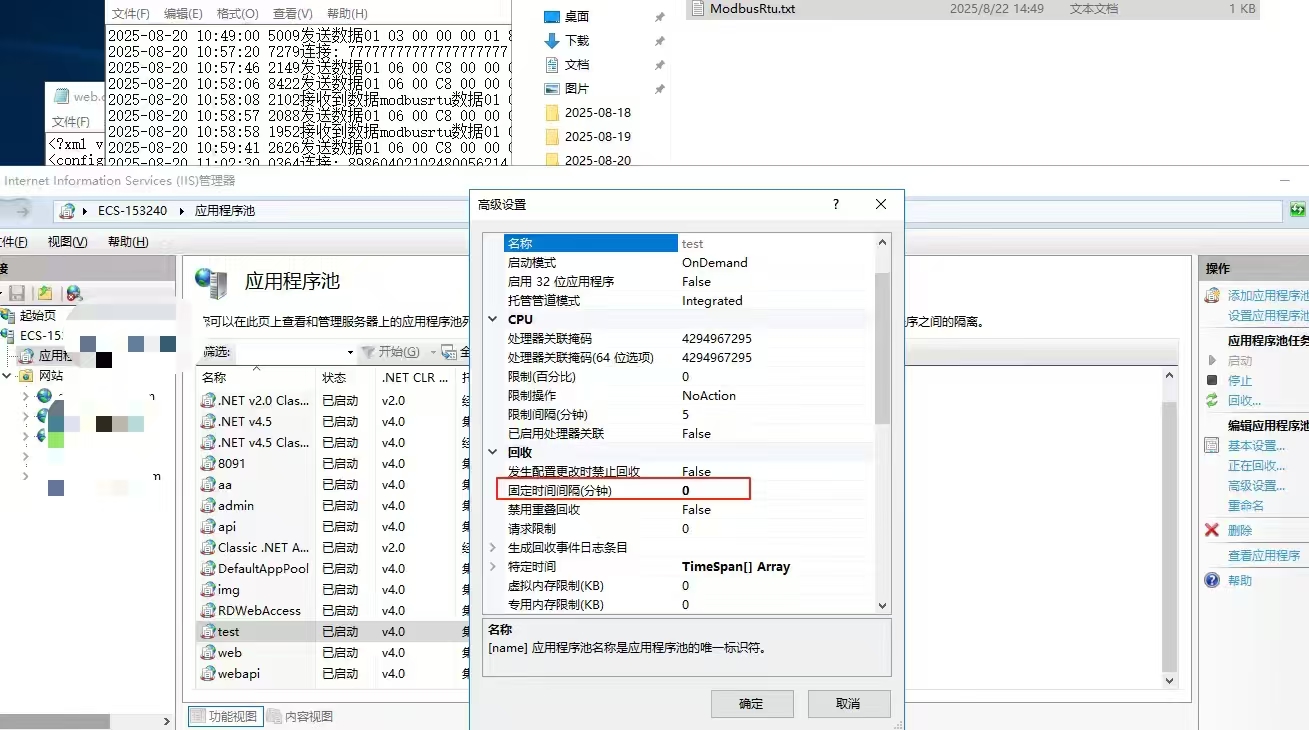
发布应用:
dotnet publish -c Release -o ./publish
部署到服务器:
将发布文件上传到服务器
配置系统服务或使用反向代理
配置HTTPS:
在Program.cs中配置Kestrel使用HTTPS
确保证书路径和密码正确
四、关键技术点与优化
4.1 连接管理优化
设备标识管理:
使用ICCID作为设备唯一标识
自动处理设备重连和旧连接清理
资源释放:
实现IDisposable接口确保资源正确释放
使用finally块确保网络连接正确关闭
4.2 通信可靠性保障
超时控制:
设置合理的接收超时时间(ReceiveTimeout)
使用Stopwatch精确控制超时
数据校验:
实现Modbus CRC校验确保数据完整性
验证响应帧格式和长度
缓冲区管理:
定期清空接收缓冲区避免数据堆积
合理设置缓冲区大小
4.3 线程安全处理
同步机制:
使用SimpleHybirdLock确保线程安全
对共享资源(_ICCIDclients)加锁访问
异常处理:
使用try-catch块捕获和处理异常
记录详细日志便于问题排查
五、总结
本文详细介绍了基于ASP.NET Core实现WebAPI与TCP终端设备通信的完整过程。通过结合Web API和TCP Socket技术,我们实现了一个既能提供RESTful接口供小程序调用,又能与4G终端设备进行实时通信的服务端系统。
该系统具有以下特点:
双向通信: 支持Web客户端与终端设备的双向数据交换
协议完整: 实现完整的Modbus RTU over TCP协议
高可靠性: 完善的异常处理和连接管理机制
易于扩展: 模块化设计便于功能扩展和设备支持
这种架构非常适合物联网应用场景,可以为各种工业设备提供远程监控和控制能力。在实际部署时,需要根据具体需求调整配置参数,并确保网络环境和安全策略正确配置。