Hadoop 3.x(HDFS)----【HDFS 的 API 操作】
代码链接:https://download.csdn.net/download/qq_52354698/86513189
1. 客户端环境准备
拷贝
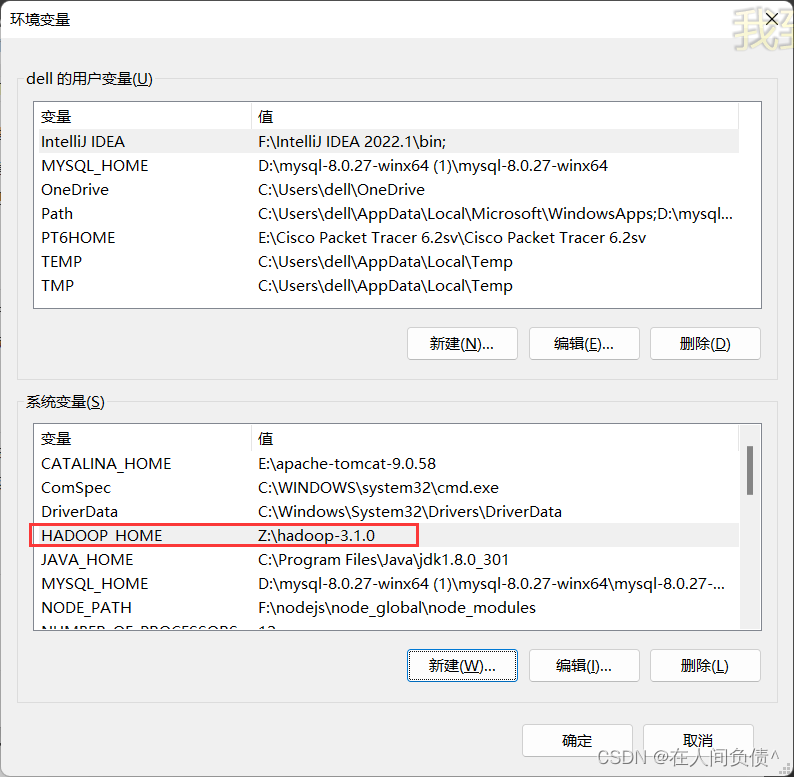
hadoop-3.1.0文件到非中文路径(如:Z:\hadoop-3.1.0)配置 HADOOP_HOME 环境变量
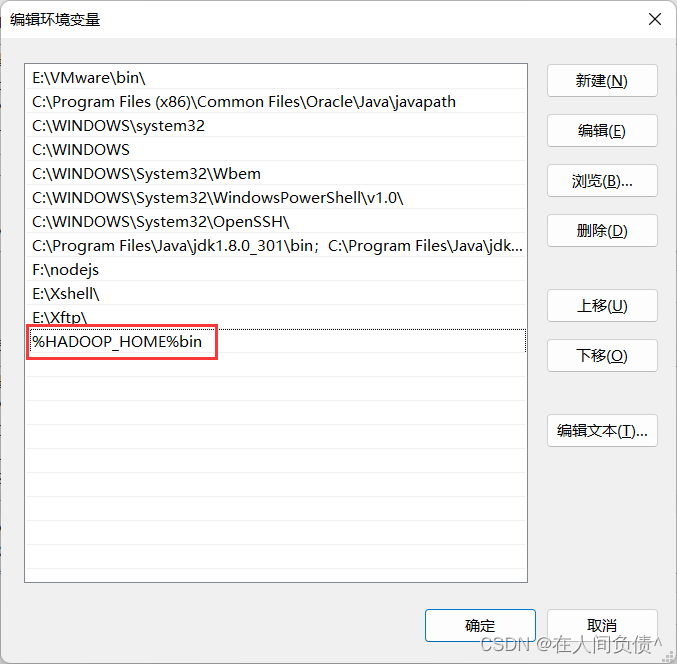
配置 Path 环境变量
注意:如果环境变量不起作用,可以重启电脑试试看
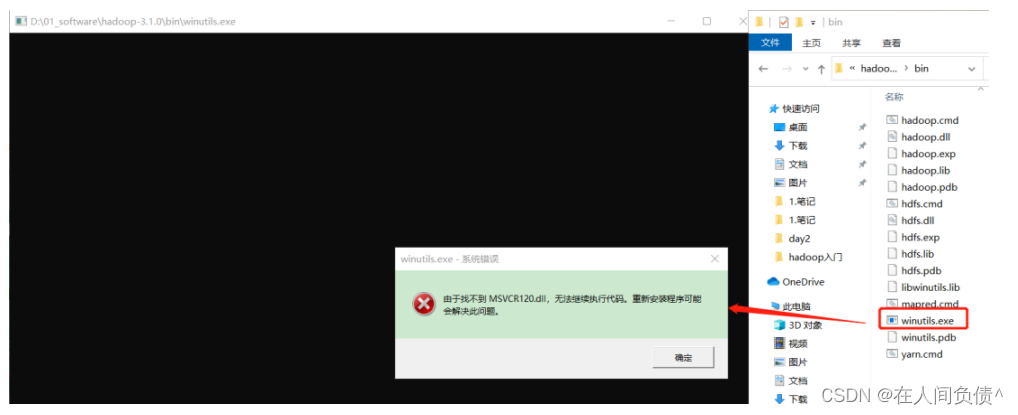
验证 Hadoop 环境变量是否正常。双击 winutils.exe,如果报如下错误。说明缺少微软运行库(正版系统往往会有这个问题,但是不是说,没有出现错误,系统就是盗版的了 … )。
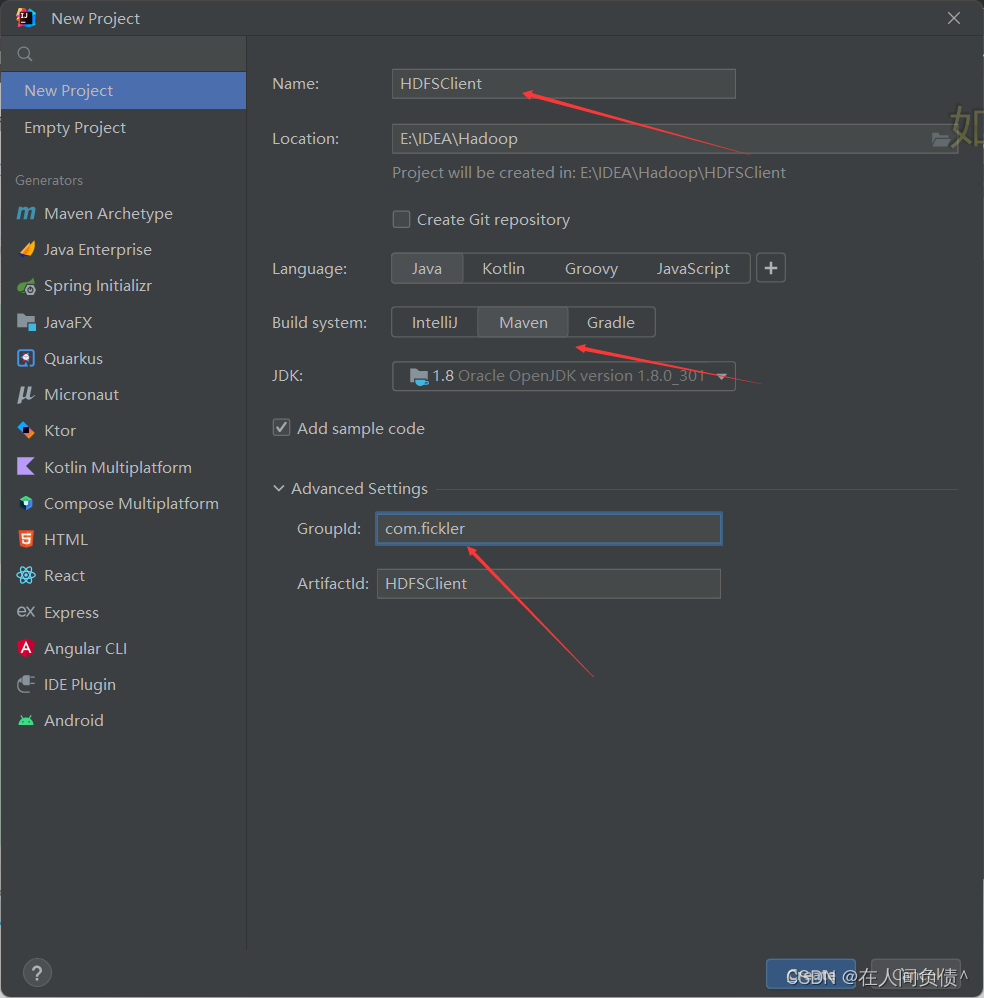
在 IDEA 中创建一个 Maven 工程 HdfsClientDemo,并导入相应的依赖坐标 + 日志添加
    <dependencies>
        <dependency>
            <groupId>org.apache.hadoop</groupId>
            <artifactId>hadoop-client</artifactId>
            <version>3.1.3</version>
        </dependency>
        <dependency>
            <groupId>junit</groupId>
            <artifactId>junit</artifactId>
            <version>4.12</version>
        </dependency>
        <dependency>
            <groupId>org.slf4j</groupId>
            <artifactId>slf4j-log4j12</artifactId>
            <version>1.7.30</version>
        </dependency>
    </dependencies>
在项目的 src/main/resource 目录下,新建一个文件,命名为 log4.properties,在文件中填入
log4j.rootLogger=INFO, stdout
log4j.appender.stdout=org.apache.log4j.ConsoleAppender
log4j.appender.stdout.layout=org.apache.log4j.PatternLayout
log4j.appender.stdout.layout.ConversionPattern=%d %p [%c] - %m%n
log4j.appender.logfile=org.apache.log4j.FileAppender
log4j.appender.logfile.File=target/spring.log
log4j.appender.logfile.layout=org.apache.log4j.PatternLayout
log4j.appender.logfile.layout.ConversionPattern=%d %p [%c] - %m%n
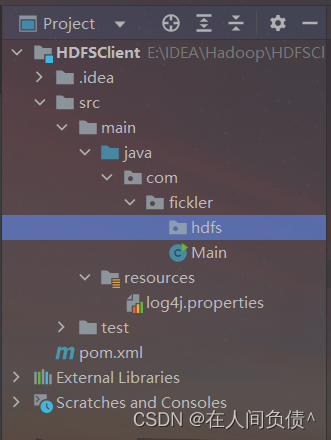
创建包名:
com.fickler.hdfs
创建 HdfsClient 类
package com.fickler.hdfs;

import org.apache.hadoop.conf.Configuration;
import org.apache.hadoop.fs.FileSystem;
import org.apache.hadoop.fs.Path;
import org.junit.Test;

import java.io.IOException;
import java.net.URI;
import java.net.URISyntaxException;

/**
 * @author dell
 * @version 1.0
 */
public class HdfsClient {

    @Test
    public void testMkdirs() throws URISyntaxException, IOException, InterruptedException {

        //连接的集群nn地址
        URI uri = new URI("hdfs://hadoop102:8020");
        //配置文件
        Configuration configuration = new Configuration();
        //用户
        String user = "fickler";
        //获得客户端对象
        FileSystem fileSystem = FileSystem.get(uri, configuration, user);
        //创建一个文件夹
        fileSystem.mkdirs(new Path("/xiyou/huaguoshan"));
        //关闭资源
        fileSystem.close();

    }

}
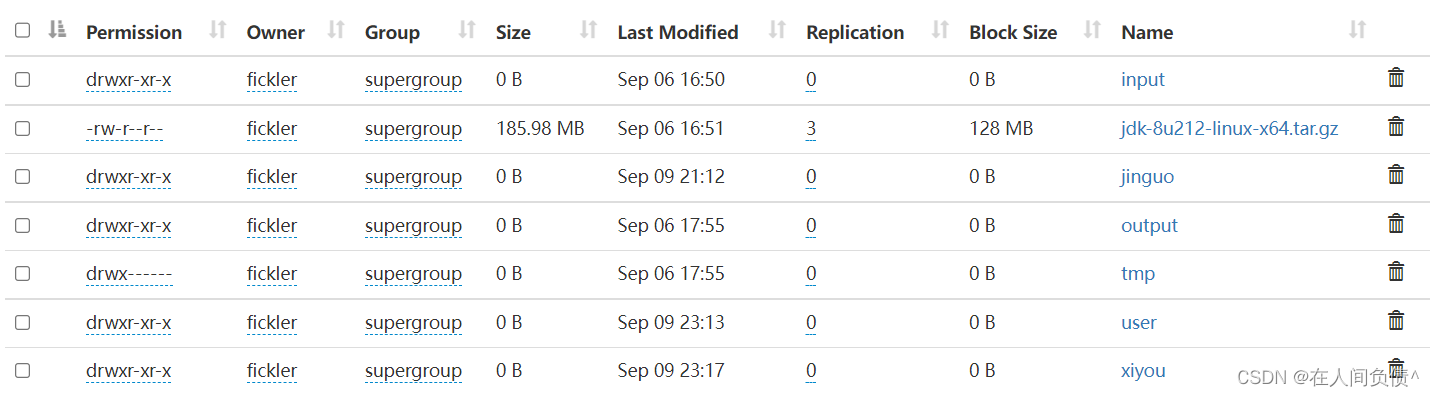
- 执行程序
客户端去操作 HDFS 时,是有一个用户身份的。默认情况下,HDFS 客户端 API 会采用 Windows 默认用户访问 HDFS,会报权限异常错误。所以在访问 HDFS 时,一定要配置用户。
2. HDFS的API案例实操
1. HDFS文件上传(测试参数优先级)
- 编写源代码
    @Test
    public void testPut() throws URISyntaxException, IOException, InterruptedException {

        //连接到集群nn
        URI uri = new URI("hdfs://hadoop102:8020");
        //用户
        String user = "fickler";
        //配置文件
        Configuration configuration = new Configuration();
        //获得客户端对象
        FileSystem fileSystem = FileSystem.get(uri, configuration, user);
        //上传文件
        fileSystem.copyFromLocalFile(true, true, new Path("d:/sunwukong.txt"), new Path("/xiyou/huaguoshan"));
        //关闭资源
        fileSystem.close();

    }

- 将 hdfs-site.xml 拷贝到项目的 resources 资源目录下
<?xml version="1.0" encoding="UTF-8"?>
<?xml-stylesheet type="text/xsl" href="configuration.xsl"?>
<configuration>
    <property>
        <name>dfs.replication</name>
        <value>1</value>
    </property>
</configuration>
- 参数优先级
参数优先级排序:1.客户端代码中设置的值 > 2.ClassPath 下的用户定义配置文件 > 3.然后是服务器的自定义配置(xxx.site.xml) > 4.服务器的默认配置(xxx-default.xml)
2. HDFS文件下载
    @Test
    public void testCopyToLocalFile() throws URISyntaxException, IOException, InterruptedException {

        URI uri = new URI("hdfs://hadoop102:8020");
        String user = "fickelr";
        Configuration configuration = new Configuration();
        FileSystem fileSystem = FileSystem.get(uri, configuration, user);
        //第一个参数:是否将原文件删除,第二个参数:要下载的文件路径,第三个参数:文件将要下载到的路径,第四个参数:是否开启文件校验
        fileSystem.copyToLocalFile(false, new Path("/xiyou/huaguoshan/sunwukong.txt"), new Path("d:/sunwukong.txt"), true);
        fileSystem.close();

    }
3. HDFS文件更名和移动
    @Test
    public void testRename() throws URISyntaxException, IOException, InterruptedException {

        URI uri = new URI("hdfs://hadoop102:8020");
        String user = "fickler";
        Configuration configuration = new Configuration();
        FileSystem fileSystem = FileSystem.get(uri, configuration, user);
        fileSystem.rename(new Path("/xiyou/huaguoshan/sunwukong.txt"), new Path("/xiyou/huaguoshan/meihouwang.txt"));
        fileSystem.close();

    }

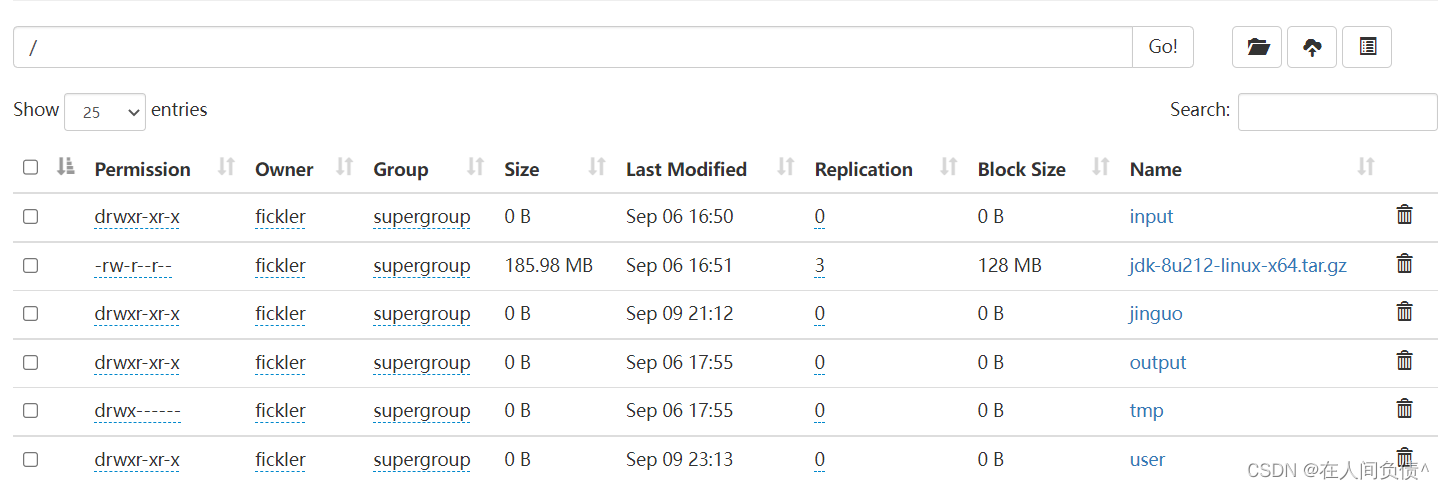
4. HDFS删除文件和目录
    @Test
    public void testDelete() throws URISyntaxException, IOException, InterruptedException {

        URI uri = new URI("hdfs://hadoop102:8020");
        String user = "fickler";
        Configuration configuration = new Configuration();
        FileSystem fileSystem = FileSystem.get(uri, configuration, user);
        //第一个参数:要删除的目录,第二个参数:是否递归删除
        fileSystem.delete(new Path("/xiyou"), true);
        fileSystem.close();

    }
5. HDFS文件详情查看
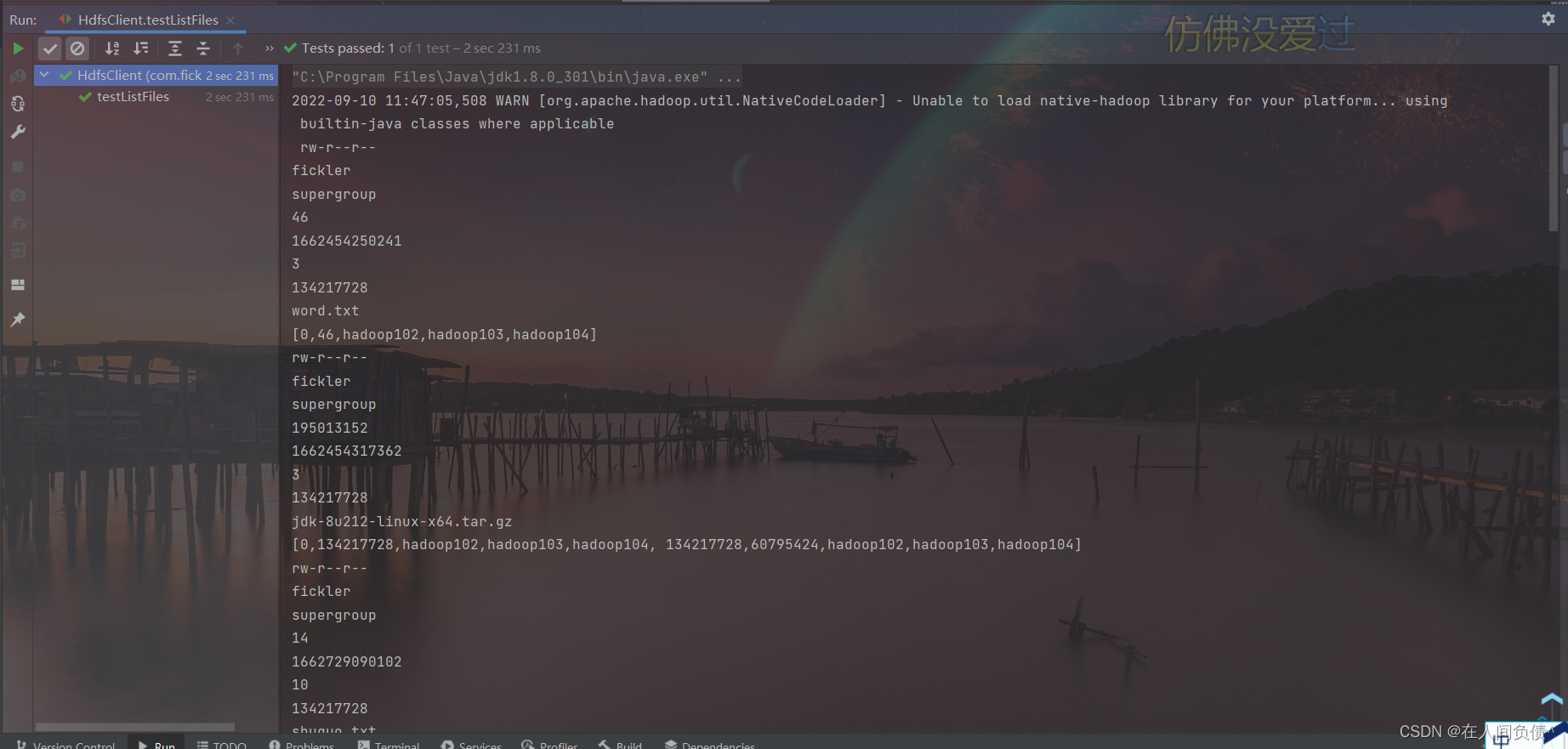
    @Test
    public void testListFiles() throws URISyntaxException, IOException, InterruptedException {

        URI uri = new URI("hdfs://hadoop102:8020");
        String user = "fickler";
        Configuration configuration = new Configuration();
        FileSystem fileSystem = FileSystem.get(uri, configuration, user);
        RemoteIterator<LocatedFileStatus> listFiles = fileSystem.listFiles(new Path("/"), true);
        while (listFiles.hasNext()) {
            LocatedFileStatus next = listFiles.next();
            System.out.println(next.getPermission());
            System.out.println(next.getOwner());
            System.out.println(next.getGroup());
            System.out.println(next.getLen());
            System.out.println(next.getModificationTime());
            System.out.println(next.getReplication());
            System.out.println(next.getBlockSize());
            System.out.println(next.getPath().getName());
            //获取块信息
            BlockLocation[] blockLocations = next.getBlockLocations();
            System.out.println(Arrays.toString(blockLocations));
        }
        fileSystem.close();

    }
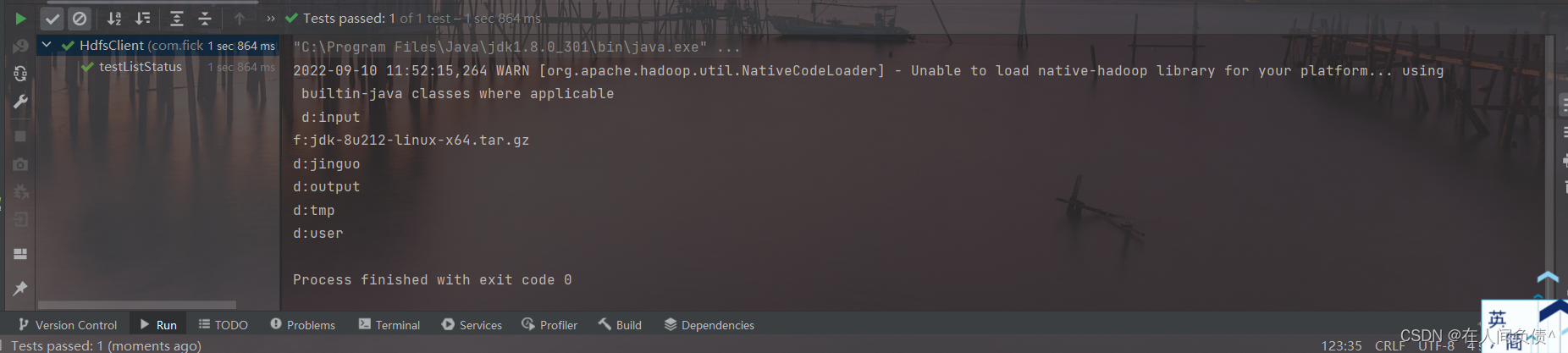
6. HDFS文件和文件夹判断
    @Test
    public void testListStatus() throws URISyntaxException, IOException, InterruptedException {

        URI uri = new URI("hdfs://hadoop102:8020");
        String user = "fickler";
        Configuration configuration = new Configuration();
        FileSystem fileSystem = FileSystem.get(uri, configuration, user);
        FileStatus[] fileStatuses = fileSystem.listStatus(new Path("/"));
        for (FileStatus fileStatus : fileStatuses) {

            if (fileStatus.isFile()) {
                System.out.println("f:" + fileStatus.getPath().getName());
            } else {
                System.out.println("d:" + fileStatus.getPath().getName());
            }

        }

        fileSystem.close();

    }
本文含有隐藏内容,请 开通VIP 后查看