三层交换机配置
场景一:三层交换机的接口属于不同VLAN
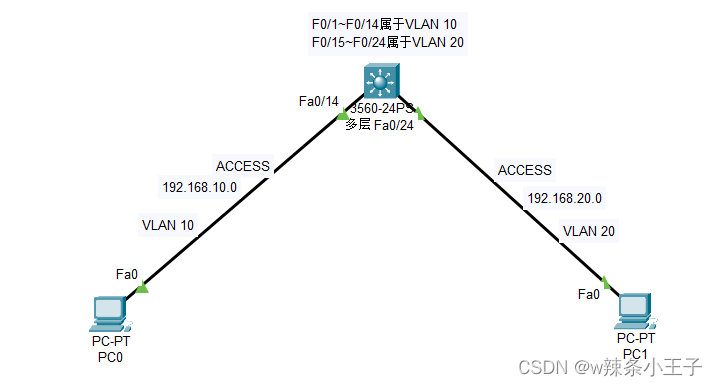
创建VLAN 10并将接口加入到VLAN10
Switch#conf t
Enter configuration commands, one per line. End with CNTL/Z.
Switch(config)#vlan 10
Switch(config-vlan)#exit
Switch(config)#int range f0/1-14
Switch(config-if-range)#sw mode acc
Switch(config-if-range)#sw acc vlan 10
Switch(config-if-range)#exit
配置虚接口IP,配置DHCP
Switch(config)#int vlan 10
Switch(config-if)#ip add 192.168.10.254 255.255.255.0
Switch(config-if)#no shutdown
Switch(config-if)#ip dhcp pool vlan10
Switch(dhcp-config)#network 192.168.10.0 255.255.255.0
Switch(dhcp-config)#default-router 192.168.10.254
Switch(dhcp-config)#dns-server 114.114.114.114
Switch(dhcp-config)#exit
Switch(config)#ip dhcp excluded-address 192.168.10.254
Switch(config)#
创建VLAN 20 并将接口加入到VLAN 20
Switch(config)#vlan 20
Switch(config-vlan)#exit
Switch(config)#int range f0/15-24
Switch(config-if-range)#sw mode acc
Switch(config-if-range)#sw acc vlan 20
Switch(config-if-range)#exit
Switch(config)#
配置虚接口IP 和DHCP
Switch(config)#int vlan 20
Switch(config-if)#
%LINK-5-CHANGED: Interface Vlan20, changed state to up
Switch(config-if)#ip add 192.168.20.254 255.255.255.0
Switch(config-if)#no shutdown
Switch(config-if)#ip dhcp pool vlan20
Switch(dhcp-config)#network 192.168.20.0 255.255.255.0
Switch(dhcp-config)#default-router 192.168.20.254
Switch(dhcp-config)#dns-server 114.114.114.114
Switch(dhcp-config)#exit
Switch(config)#ip dhcp excluded-address 192.168.20.254
Switch(config)#
开启路由功能
Switch(config)#ip routing
Switch(config)#
思科设备默认情况下,三层交换机是没有开启路由功能的。需要手动开启
场景二:三层交换机所有接口都属于Trunk模式
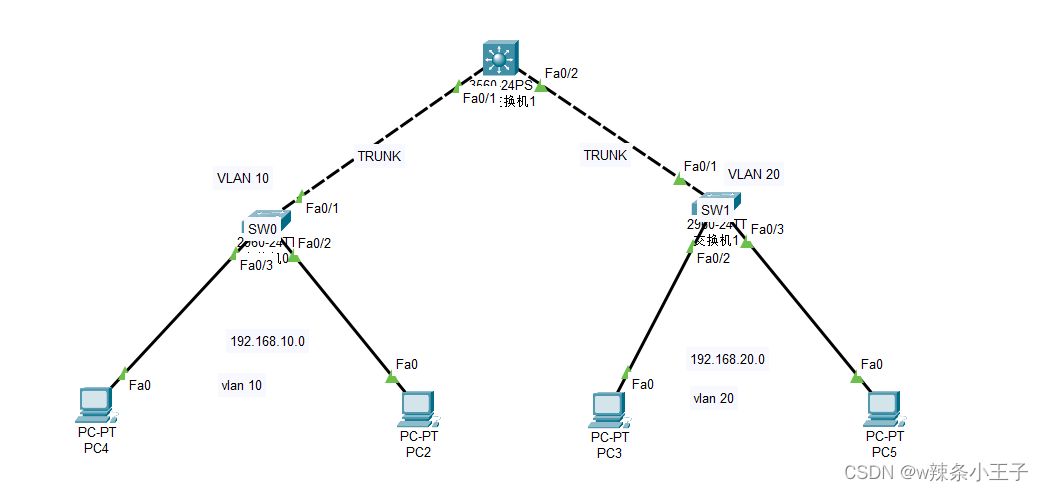
问题:交换机sw0上是否创建vlan 20
交换机sw1上是否创建vlan 10
答案:否
我的理解:
Pc4发送数据到pc5 到达sw0 打上vlan 10标签,发现是不同网段的,将数据发往三层交换机,到达三层交换机,查看目的IP,发现是发往vlan 20的数据,会将标签转换为vlan 20 重新进行二层封装,后通过对应接口转发给sw1 sw1收到数据后通过对应接口转发给pc5
SW0配置
创建VLAN 10并将接口加入到VLAN 10
Switch>en
Switch#conf t
Enter configuration commands, one per line. End with CNTL/Z.
Switch(config)#vlan 10
Switch(config-vlan)#exit
Switch(config)#int range f0/2-3
Switch(config-if-range)#sw mode acc
Switch(config-if-range)#sw acc vlan 10
Switch(config-if-range)#exit
Switch(config)#
/* 与三层交换机相连的接口配置为trunk口 */
Switch(config)#int f0/1
Switch(config-if)#sw mode trunk
Switch(config-if)#
%LINEPROTO-5-UPDOWN: Line protocol on Interface FastEthernet0/1, changed state to down
%LINEPROTO-5-UPDOWN: Line protocol on Interface FastEthernet0/1, changed state to up
Switch(config-if)#
SW1配置
创建VLAN 20并将接口加入到VLAN 20
Switch>en
Switch#conf t
Enter configuration commands, one per line. End with CNTL/Z.
Switch(config)#vlan 20
Switch(config-vlan)#exit
Switch(config)#int range f0/2-3
Switch(config-if-range)#sw mode acc
Switch(config-if-range)#sw acc vlan 20
Switch(config-if-range)#exit
/* 与三层交换机相连的接口配置为trunk口 */
Switch(config)#int f0/1
Switch(config-if)#sw mode trunk
Switch(config-if)#
%LINEPROTO-5-UPDOWN: Line protocol on Interface FastEthernet0/1, changed state to down
%LINEPROTO-5-UPDOWN: Line protocol on Interface FastEthernet0/1, changed state to up
Switch(config-if)#
三层交换机配置
创建所有VLAN(VLAN 10、VLAN 20)
将对应接口加入到VLAN,将所有接口设置为Trunk
需要将接口封装成dot1q标准帧格式才能trunk
为虚接口配置IP,mask,作为每个vlan的默认网关
为虚接口配置DHCP,使得主机自动获取TCP/IP参数
开启IP routing 路由功能
Switch>en
Switch#conf t
Enter configuration commands, one per line. End with CNTL/Z.
Switch(config)#vlan 10
Switch(config-vlan)#exit
Switch(config)#vlan 20
Switch(config-vlan)#exit
Switch(config)#
%LINEPROTO-5-UPDOWN: Line protocol on Interface FastEthernet0/2, changed state to down
%LINEPROTO-5-UPDOWN: Line protocol on Interface FastEthernet0/2, changed state to up
Switch(config)#int range f0/1-2
/* 强制封装成标准帧格式 */
Switch(config-if-range)#switchport trunk encapsulation dot1q
Switch(config-if)#sw mode trunk
Switch(config-if)#exit
Switch(config)#int vlan 10
Switch(config-if)#
%LINK-5-CHANGED: Interface Vlan10, changed state to up
%LINEPROTO-5-UPDOWN: Line protocol on Interface Vlan10, changed state to up
Switch(config-if)#ip add 192.168.10.254 255.255.255.0
Switch(config-if)#no shutdown
Switch(config-if)#ip dhcp pool vlan10
Switch(dhcp-config)#network 192.168.10.0 255.255.255.0
Switch(dhcp-config)#default-router 192.168.10.254
Switch(dhcp-config)#dns-server 114.114.114.114
Switch(dhcp-config)#exit
Switch(config)#ip dhcp excluded-address 192.168.10.254
Switch(config)#int vlan 20
Switch(config-if)#
%LINK-5-CHANGED: Interface Vlan20, changed state to up
%LINEPROTO-5-UPDOWN: Line protocol on Interface Vlan20, changed state to up
Switch(config-if)#ip add 192.168.20.254 255.255.255.0
Switch(config-if)#no shutdown
Switch(config-if)#ip dhcp pool vlan20
Switch(dhcp-config)#network 192.168.20.0 255.255.255.0
Switch(dhcp-config)#default-router 192.168.20.254
Switch(dhcp-config)#dns-server 114.114.114.114
Switch(dhcp-config)#exit
Switch(config)#ip dhcp excluded 192.168.20.254
Switch(config)#ip routing
Switch(config)#
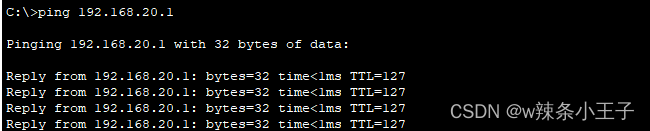
实验结果
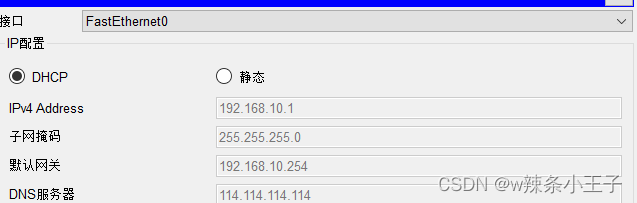
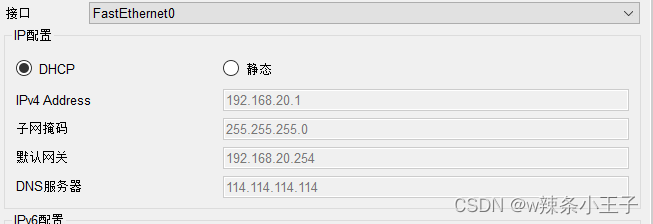

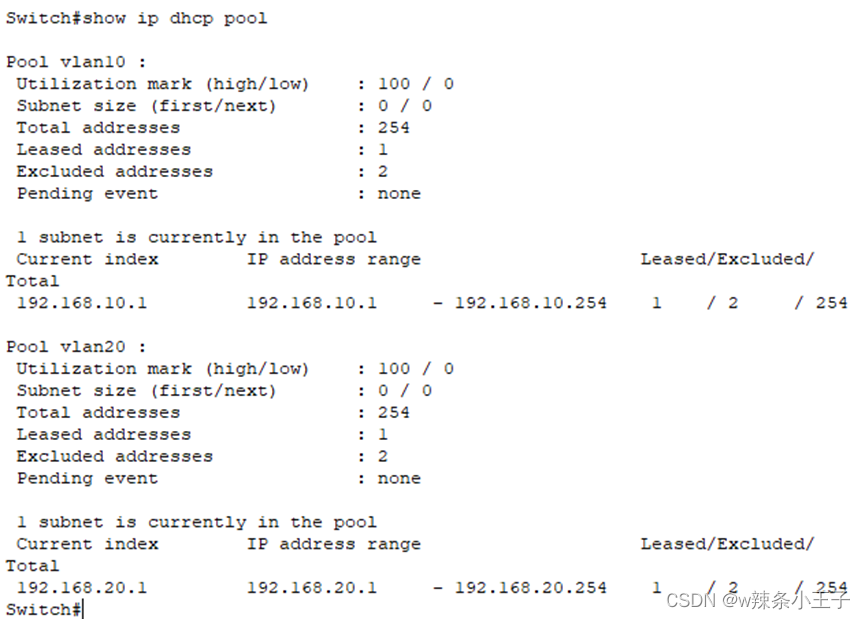
查看配置的DHCP信息
Show ip dhcp pool