如果有些朋友以前没有使用过java8 stream这种链式编程方式做开发,想学习一下。
如果有些朋友只学习了一部分用法,想学习更多。
如果有些朋友想看看有没有好的示例适用于实际工作当中。
那么恭喜你,这篇文章非常适合你。
首先,我们一起看看stream的继承关系:
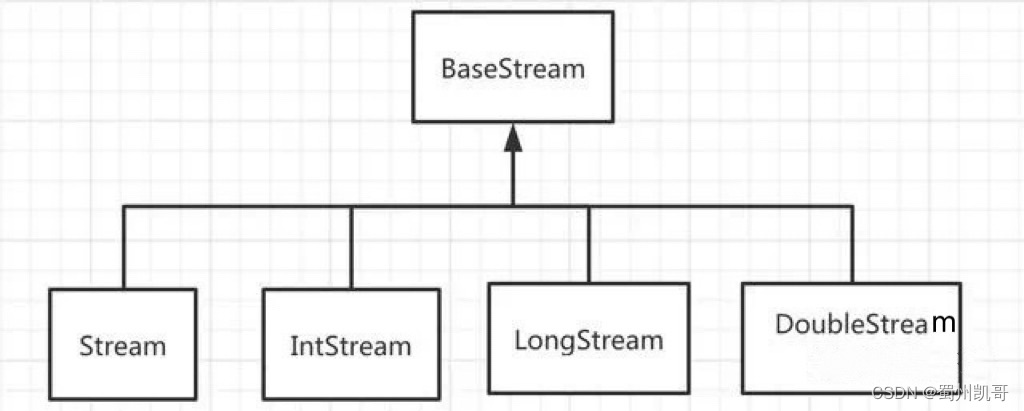
stream的继承关系
Stream、IntStream、LongStream、DoubleStream的父接口都是BaseStream。BaseStream的四个子接口方法都差不多,只是IntStream、LongStream、DoubleStream直接存储基本类型,可以避免自动装/拆箱,效率会更高一些。但是,我们实际上使用Stream更多一些。
我们再看看stream的工作流程图:
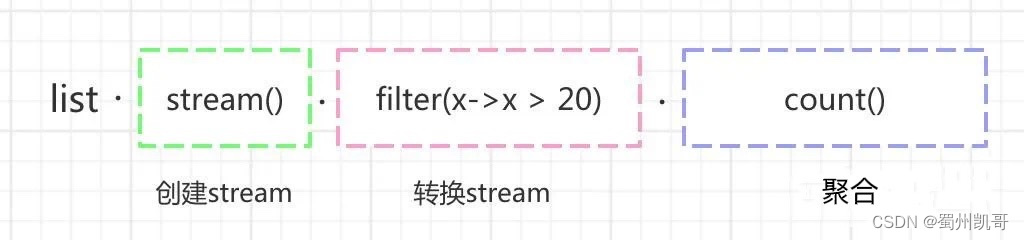
stream的工作流程图
为什么要学stream的链式编程方式
业务需求1:指定一个字符串数组,找出里面相同的元素,并且统计重复的次数。
我们以前大概是这样做的:
public class CountTest {@Testpublic void testCount1() {List<String> list = Lists.newArrayList("a", "b", "ab", "abc", "a", "ab", "a", "abcd", "bd", "abc");Map<String, Long> countMap = new HashMap<>();for (String data : list) {Long aLong = countMap.get(data);if (Objects.isNull(aLong)) {countMap.put(data, 1L);} else {countMap.put(data, ++aLong);}}countMap.forEach((key, value) -> System.out.println("key:" + key + " value:" + value));}}
执行结果:
key:a value:3key:ab value:2key:b value:1key:bd value:1key:abc value:2key:abcd value:1
我们再看看如果用java8的stream可以怎么做:
public class CountTest {@Testpublic void testCount2() {List<String> list = Lists.newArrayList("a", "b", "ab", "abc", "a", "ab", "a", "abcd", "bd", "abc");Map<String, Long> countMap = list.stream().collect(Collectors.groupingBy(Function.identity(), Collectors.counting()));countMap.forEach((key, value) -> System.out.println("key:" + key + " value:" + value));}}
执行结果:
key:a value:3key:ab value:2key:b value:1key:bd value:1key:abc value:2key:abcd value:1
我们可以看到testCount1和testCount2执行结果相同,仅仅一行代码:Map<String, Long> countMap = list.stream().collect(Collectors.groupingBy(Function.identity(), Collectors.counting())); 就可以实现上面testCount1中多行代码的逻辑。
业务需求2:从一个指定的字符串数组中,查找指定的字符串是否存在
我们以前大概是这样做的:
public class FindTest {@Testpublic void testFind1() {String findStr = "bd";List<String> list = Lists.newArrayList("a", "b", "ab", "abc", "a", "ab", "a", "abcd", "bd", "abc");boolean match = false;for (String data : list) {if (data.equals(findStr)) {match = true;break;}}//结果:match:trueSystem.out.println("match:" + match);}}
我们再看看如果用java8的stream可以怎么做:
public class MatchTest {@Testpublic void testFind2() {String findStr = "bd";List<String> list = Lists.newArrayList("a", "b", "ab", "abc", "a", "ab", "a", "abcd", "bd", "abc");boolean match = list.stream().anyMatch(x -> x.equals(findStr));//结果:match:trueSystem.out.println("match:" + match);}}
我们可以看到调用testFind1和testFind2方法执行结果也是一样的。但是,用java8 stream的语法,又只用一行代码就完成功能了,真棒。
java8 stream超详细用法指南
stream的操作符大体上分为两种:中间操作符和终止操作符
中间操作:
1.filter(T-> boolean)
过滤数据,保留 boolean 为 true 的元素,返回一个集合
public class FilterTest {@Testpublic void testFilter() {List<Integer> list = Lists.newArrayList(20, 23, 25, 28, 30, 33, 37, 40);//从指定数据集合中过滤出大于等于30的数据集合List<Integer> collect = list.stream().filter(x -> x >= 30).collect(Collectors.toList());//结果:[33, 37, 40]System.out.println(collect);}}
collect(Collectors.toList())可以把流转换为 List 类型,collect实际上是一个终止操作。
2.map(T -> R)
转换操作符,可以做数据转换,比如:把字符串转换成int、long、double,或者把一个实体转换成另外一个实体。包含:map,mapToInt、mapToLong、mapToDouble
public class MapTest {@Testpublic void testMap() {List<String> list = Lists.newArrayList("1", "2", "3", "4", "5", "6");List<Long> collect1 = list.stream().map(x -> Long.parseLong(x)).collect(Collectors.toList());//结果:[1, 2, 3, 4, 5, 6]System.out.println(collect1);//结果:111111list.stream().mapToInt(x -> x.length()).forEach(System.out::print);System.out.println("");//结果:111111list.stream().mapToLong(x -> x.length()).forEach(System.out::print);System.out.println("");//结果:1.01.01.01.01.01.0list.stream().mapToDouble(x -> x.length()).forEach(System.out::print);}}
3.flatMap(T -> Stream)
将流中的每一个元素 T 映射为一个流,再把每一个流连接成为一个流
public class FlatMapTest {@Testpublic void testFlatMap() {List<List<String>> list = new ArrayList<List<String>>(){{add(Lists.newArrayList("a","b","c"));add(Lists.newArrayList("d","e","f"));add(Lists.newArrayList("j","k","y"));}};//结果:[[a, b, c], [d, e, f], [j, k, y]]System.out.println(list);List<String> collect = list.stream().flatMap(List::stream).collect(Collectors.toList());//结果:[a, b, c, d, e, f, j, k, y]System.out.println(collect);}}
我们可以看到flatMap可以轻松把字符串的二维数据变成一位数组。
4.distinct
去重,类似于msql中的distinct的作用,底层使用了equals方法做比较。
public class DistinctTest {@Testpublic void testDistinct() {List<String> list = Lists.newArrayList("a", "b", "ab", "abc", "a", "ab", "a", "abcd", "bd", "abc");List<String> collect = list.stream().distinct().collect(Collectors.toList());//结果:[a, b, ab, abc, abcd, bd]System.out.println(collect);}}
其实,去重还有另外一种办法,可以用Collectors.toSet(),后面会讲到。
5.sorted
对元素进行排序,前提是实现Comparable接口,当然也可以自定义比较器。
public class SortTest {@Testpublic void testSort() {List<Integer> list = Lists.newArrayList(5, 3, 7, 1, 4, 6);List<Integer> collect = list.stream().sorted((a, b) -> a.compareTo(b)).collect(Collectors.toList());//结果:[1, 3, 4, 5, 6, 7]System.out.println(collect);}}
6.limit
限流操作,有点类似于mysql中的limit功能,比如:有10个元素,只取前面3个元素
public class LimitTest {@Testpublic void testLimit() {List<String> list = Lists.newArrayList("a", "b", "ab", "abc", "a", "ab", "a", "abcd", "bd", "abc");List<String> collect = list.stream().limit(3).collect(Collectors.toList());//结果:[a, b, ab]System.out.println(collect);}}
7.skip
跳过操作,比如:有个10个元素,从第5个元素开始去后面的元素
public class SkipTest {@Testpublic void testSkip() {List<String> list = Lists.newArrayList("a", "b", "ab", "abc", "a", "ab", "a", "abcd", "bd", "abc");List<String> collect = list.stream().skip(5).collect(Collectors.toList());//结果:[ab, a, abcd, bd, abc]System.out.println(collect);}}
8.peek
挑出操作,
public class PeekTest {@Testpublic void testPeek() {List<String> list = Lists.newArrayList("a", "b", "ab", "abc", "a", "ab", "a", "abcd", "bd", "abc");//结果:abababcaabaabcdbdabclist.stream().peek(x -> x.toUpperCase()).forEach(System.out::print);}}
眼尖的朋友会发现,进行x.toUpperCase()转换为大写功能,但是实际上没有生效。把peek改成map方法试试:
public class PeekTest {@Testpublic void testPeek() {List<String> list = Lists.newArrayList("a", "b", "ab", "abc", "a", "ab", "a", "abcd", "bd", "abc");//结果:ABABABCAABAABCDBDABClist.stream().map(x -> x.toUpperCase()).forEach(System.out::print);}}
我们可以看到,用map操作转换成大写功能生效了,但是用peek操作却没有生效。peek只是对Stream中的元素进行某些操作,但是操作之后的数据并不返回到Stream中,所以Stream中的元素还是原来的元素。
终止操作:
1.forEach
遍历操作,包含:forEach 和 forEachOrdered
forEach:支持并行处理
forEachOrdered:是按顺序处理的,遍历速度较慢
public class ForEachTest {@Testpublic void testForEach() {List<String> list = Lists.newArrayList("a", "b", "ab");//结果:a b ablist.stream().forEach(x-> System.out.print(x+' '));System.out.println("");//可以简化//结果:a b ablist.forEach(x-> System.out.print(x+' '));System.out.println("");//结果:a b ablist.stream().forEachOrdered(x-> System.out.print(x+' '));}}
2.collect
收集操作,将所有的元素收集起来,Collectors 提供了非常多收集器。包含:toMap、toSet、toList、joining,groupingBy,maxBy,minBy等操作。
toMap:将数据流转换为map,里面包含的元素是用key/value的形式的
toSet:将数据流转换为set,里面包含的元素不可重复
toList:将数据流转出为list,里面包含的元素是有序的
joining:拼接字符串
groupingBy:分组,可以将list转换map
couting:统计元素数量
maxBy:获取最大元素
minBy:获取最小元素
summarizingInt: 汇总int类型的元素,返回IntSummaryStatistics,再调用具体的方法对元素进行统计:getCount(统计数量),getSum(求和),getMin(获取最小值),getMax(获取最大值),getAverage(获取平均值)
summarizingLong:汇总long类型的元素,用法同summarizingInt
summarizingDouble:汇总double类型的元素,用法同summarizingInt
averagingInt:获取int类型的元素的平均值,返回一个double类型的数据
averagingLong:获取long类型的元素的平均值,用法同averagingInt
averagingDouble:获取double类型的元素的平均值,用法同averagingInt
mapping:获取映射,可以将原始元素的一部分内容作为一个新元素返回
public class CollectTest {@Data@AllArgsConstructorclass User {private String name;private Integer age;}@Testpublic void testCollect() {List<String> list0 = Lists.newArrayList("a", "b", "ab");Map<String, String> collect0 = list0.stream().collect(Collectors.toMap(String::new, Function.identity()));//结果:{ab=ab, a=a, b=b}System.out.println(collect0);List<String> list = Lists.newArrayList("a", "b", "ab", "a", "b", "ab");List<String> collect1 = list.stream().collect(Collectors.toList());//结果:[a, b, ab, a, b, ab]System.out.println(collect1);//结果:[a, ab, b]Set<String> collect2 = list.stream().collect(Collectors.toSet());System.out.println(collect2);String collect3 = list.stream().collect(Collectors.joining(","));//结果:a,b,ab,a,b,abSystem.out.println(collect3);Map<String, List<String>> collect4 = list.stream().collect(Collectors.groupingBy(Function.identity()));//结果:{ab=[ab, ab], a=[a, a], b=[b, b]}System.out.println(collect4);Long collect = list.stream().collect(Collectors.counting());//结果:6System.out.println(collect);String collect5 = list.stream().collect(Collectors.maxBy((a, b) -> a.compareTo(b))).orElse(null);//结果:bSystem.out.println(collect5);String collect6 = list.stream().collect(Collectors.minBy((a, b) -> a.compareTo(b))).orElse(null);//结果:aSystem.out.println(collect6);List<String> list2 = Lists.newArrayList("2", "3", "5");IntSummaryStatistics summaryStatistics = list2.stream().collect(Collectors.summarizingInt(x -> Integer.parseInt(x)));long sum = summaryStatistics.getSum();//结果:10System.out.println(sum);Double collect7 = list2.stream().collect(Collectors.averagingInt(x -> Integer.parseInt(x)));//结果:3.3333333333333335System.out.println(collect7);List<User> userList = new ArrayList<User>() {{add(new User("jack",23));add(new User("james",30));add(new User("curry",28));}};List<String> collect8 = userList.stream().collect(Collectors.mapping(User::getName, Collectors.toList()));//[jack, james, curry]System.out.println(collect8);}}
3.find
查找操作,包含:findFirst、findAny
findFirst:找到第一个,返回的类型为Optional
findAny:使用 stream() 时找到的是第一个元素,使用 parallelStream() 并行时找到的是其中一个元素,返回的类型为Optional
public class FindOpTest {@Testpublic void testFindOp() {List<String> list = Lists.newArrayList("a", "b", "ab", "abc", "bc", "ab");//查找第一匹配的元素String data1 = list.stream().findFirst().orElse(null);//结果: aSystem.out.println(data1);String data2 = list.stream().findAny().orElse(null);//结果: aSystem.out.println(data2);}}
4.match
匹配操作,包含:allMatch、anyMatch、noneMatch
allMatch:所有元素都满足条件,返回boolean类型
anyMatch:任意一个元素满足条件,返回boolean类型
noneMatch:所有元素都不满足条件,返回boolean类型
public class MatchTest {@Testpublic void testMatch() {List<Integer> list = Lists.newArrayList(2, 3, 5, 7);boolean allMatch = list.stream().allMatch(x -> x > 1);//结果:trueSystem.out.println(allMatch);boolean allMatch2 = list.stream().allMatch(x -> x > 2);//结果:falseSystem.out.println(allMatch2);boolean anyMatch = list.stream().anyMatch(x -> x > 2);//结果:trueSystem.out.println(anyMatch);boolean noneMatch1 = list.stream().noneMatch(x -> x > 5);//结果:falseSystem.out.println(noneMatch1);boolean noneMatch2 = list.stream().noneMatch(x -> x > 7);//结果:trueSystem.out.println(noneMatch2);}}
5.count
统计操作,效果跟调用集合的size()方法类似
public class CountOpTest {@Testpublic void testCountOp() {List<String> list = Lists.newArrayList("a", "b", "ab");long count = list.stream().count();//结果:3System.out.println(count);}}
6.min、max
min:获取最小值,返回Optional类型的数据
max:获取最大值,返回Optional类型的数据
public class MaxMinTest {@Testpublic void testMaxMin() {List<Integer> list = Lists.newArrayList(2, 3, 5, 7);Optional<Integer> max = list.stream().max((a, b) -> a.compareTo(b));//结果:7System.out.println(max.get());Optional<Integer> min = list.stream().min((a, b) -> a.compareTo(b));//结果:2System.out.println(min.get());}}
7.reduce
规约操作,将整个数据流的值规约为一个值,count、min、max底层就是使用reduce。
reduce 操作可以实现从Stream中生成一个值,其生成的值不是随意的,而是根据指定的计算模型。
public class ReduceTest {@Testpublic void testReduce() {List<Integer> list = Lists.newArrayList(2, 3, 5, 7);Integer sum1 = list.stream().reduce(0, Integer::sum);//结果:17System.out.println(sum1);Optional<Integer> reduce = list.stream().reduce((a, b) -> a + b);//结果:17System.out.println(reduce.get());Integer max = list.stream().reduce(0, Integer::max);//结果:7System.out.println(max);Integer min = list.stream().reduce(0, Integer::min);//结果:0System.out.println(min);Optional<Integer> reduce1 = list.stream().reduce((a, b) -> a > b ? b : a);//2System.out.println(reduce1.get());}}
8.toArray
数组操作,将数据流的元素转换成数组。
public class ArrayTest {@Testpublic void testArray() {List<String> list = Lists.newArrayList("a", "b", "ab");String[] strings = list.stream().toArray(String[]::new);//结果:a b abfor (int i = 0; i < strings.length; i++) {System.out.print(strings[i]+" ");}}}
stream和parallelStream的区别
stream:是单管道,称其为流,其主要用于集合的逻辑处理。
parallelStream:是多管道,提供了流的并行处理,它是Stream的另一重要特性,其底层使用Fork/Join框架实现
public class StreamTest {@Testpublic void testStream() {List<Integer> list = Lists.newArrayList(1,2, 3,4, 5,6, 7);//结果:1234567list.stream().forEach(System.out::print);}}
public class ParallelStreamTest {@Testpublic void testParallelStream() {List<Integer> list = Lists.newArrayList(1,2, 3,4, 5,6, 7);//结果:5726134list.parallelStream().forEach(System.out::print);}}
我们可以看到直接使用parallelStream的forEach遍历数据,是没有顺序的。
如果要让parallelStream遍历时有顺序怎么办呢?
public class ParallelStreamTest {@Testpublic void testParallelStream() {List<Integer> list = Lists.newArrayList(1,2, 3,4, 5,6, 7);//结果:1234567list.parallelStream().forEachOrdered(System.out::print);}}
parallelStream的工作原理:
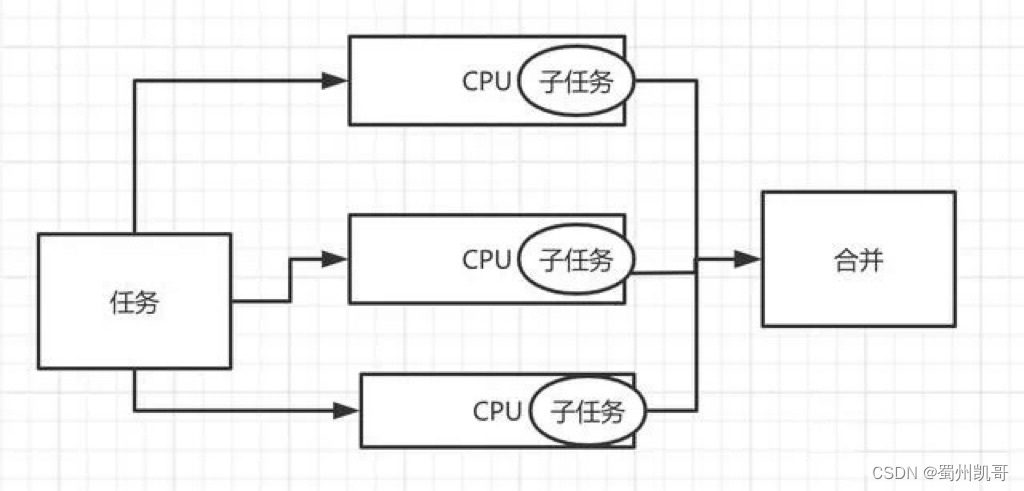
实际工作中的案例
1.从两个集合中找相同的元素。一般用于批量数据导入的场景,先查询出数据,再批量新增或修改。
public class WorkTest {@Testpublic void testWork1() {List<String> list1 = Lists.newArrayList("a", "b", "ab");List<String> list2 = Lists.newArrayList("a", "c", "ab");List<String> collect = list1.stream().filter(x -> list2.stream().anyMatch(e -> e.equals(x))).collect(Collectors.toList());//结果:[a, ab]System.out.println(collect);}}
2.有两个集合a和b,过滤出集合a中有,但是集合b中没有的元素。这种情况可以使用在假如指定一个id集合,根据id集合从数据库中查询出数据集合,再根据id集合过滤出数据集合中不存在的id,这些id就是需要新增的。
@Testpublic void testWork2() {List<String> list1 = Lists.newArrayList("a", "b", "ab");List<String> list2 = Lists.newArrayList("a", "c", "ab");List<String> collect = list1.stream().filter(x -> list2.stream().noneMatch(e -> e.equals(x))).collect(Collectors.toList());//结果:[b]System.out.println(collect);}
3.根据条件过滤数据,并且去重做数据转换
@AllArgsConstructor@Dataclass User {private String name;private Integer age;}@Testpublic void testWork3() {List<User> userList = new ArrayList<User>() {{add(new User("jack",23));add(new User("james",30));add(new User("curry",28));add(new User("tom",27));add(new User("sue",29));}};List<String> collect = userList.stream().filter(x -> x.getAge() > 27).sorted((a, b) -> a.getAge().compareTo(b.getAge())).limit(2).map(User::getName).collect(Collectors.toList());//结果:[curry, sue]System.out.println(collect);}
4.统计指定集合中,姓名相同的人中年龄最小的年龄
@Testpublic void testWork4() {List<User> userList = new ArrayList<User>() {{add(new User("tom", 23));add(new User("james", 30));add(new User("james", 28));add(new User("tom", 27));add(new User("sue", 29));}};userList.stream().collect(Collectors.groupingBy(User::getName)).forEach((name, list) -> {User user = list.stream().sorted((a, b) -> a.getAge().compareTo(b.getAge())).findFirst().orElse(null);//结果:name:sue,age:29// name:tom,age:23// name:james,age:28System.out.println("name:" + name + ",age:" + user.getAge());});}大家喜欢这篇文章的话,请关注一下。