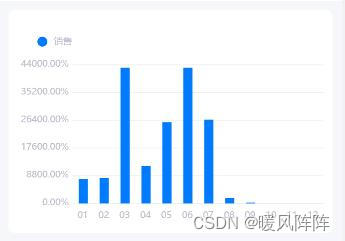
一、(1)插件市场,导入使用秋云插件
//使用组件
<!-- 列表页 -->
<template>
	<view>
		<!--1 start -->
		<view class="sales-view">
			<view class="title"></view>
			<view>
				<!--uCharts组件事件及方法: @getIndex -->
				<!-- https://www.ucharts.cn/v2/#/guide/index -->
				<!-- (3),使用 customType="column" 树状图,line折线,scatter散点图-->
				<tree-charts
					customType="column"
					:showTitle="true"
					:chartData="chartDataObj"
					@getIndex="getTreeIndexTap">
				</tree-charts>
			</view>
		</view>
		<!--1 end -->
	</view>
</template>

<script>
//(1),引入组件
import treeCharts from '@/pages/sales/components/tree-charts.vue';
export default {
	//(2),挂载
	components: {
		treeCharts,
	},
	data(){
		return{
			//
			chartDataObj:{
				categories:['01','02','03','04','05','06','07','08','09','10','11','12'],
				series:[{
					color: "#007aff",
					legendShape: "circle",
					name: "销售",
					data:["7769.84","8051.73","43077.18","11853.73","25637.62","43024.84","26610.34","1794.47","158.32","0.00" ,"0.00" ,"0.00"]
				}]
			},

		}
	},
	onLoad() {},
	methods:{
		getTreeIndexTap(row){
			console.log('----',row)
		}
	},
}
</script>

<style lang="scss" scoped>
	page{
		background-color: #f6f7fb;
	}
	.sales-view{
		margin: 20rpx;
		border-radius: 16rpx;
		background-color: white;
		padding: 20rpx;
		.title{
			font-size: 26rpx;
		}
	}
</style>
一、(2)封装组件
// 文件名:/pages/sales/components/tree-charts.vue
<!-- 封装树状图组件-->
<template>
	<view class="charts-box">
		<qiun-data-charts :type="customType" :chartData="chartData" :tooltipShow="false" :animation="false" :opts="opts" />
	</view>
</template>

<script>
	// 可参考官网案例
	// https://www.ucharts.cn/v2/#/demo/index
export default {
	//接收父组件传的内容
	props: {
		//图类型
		customType:{
			type:String,
			default:'line'
		},
		//图显示内容
		chartData: {
			type: Object
		},
		profitMin:{
			type:[Number,String],
			default:0
		}
	},
	data() {
		return {
			opts: {
				// type: this.customType,
				canvasId: 'lineChartId',
				canvas2d: false,
				background: '#FFFFFF',
				animation: true,
				timing: 'easeOut',
				duration: 1000,
				dataLabel: false, //是否显示顶部提示
				fontSize: 10, //字体大小
				fontColor: '#BEC1CD', //字体颜色
				padding: [0, 0, 0, 0],
				xAxis: {
					axisLineColor: '#F0F0F0' //X轴颜色
				},
				yAxis: {
					gridColor: '#F0F0F0',
					data: [
						{
							type: 'value',
							unit: '%',
							min: this.profitMin,
							tofix: 2,
							axisLineColor: '#F0F0F0', //Y轴颜色
							textAlign: 'right',
							axisLine: false //数据标线不显示
						}
					]
				},
				legend: {
					show: true, //是否显示提示
					position: 'top',
					float: 'left',
					padding: 20,
					lineHeight: 11,
					margin: 0
				},
				extra: {
					line: {
						type: 'curve' //曲线  curve曲线,straight直线
					},
					column: {
						type: 'stack',
						width: 10 //柱子宽度
					},
					tooltip: {
						showBox: true
					}
				}
			}
		};
	},
	mounted() {}
};
</script>

<style lang="scss" scoped>
.charts-box {
	height: 450rpx;
}
</style>
本文含有隐藏内容,请 开通VIP 后查看