RectTransform转屏幕坐标
分两种情况
Canvas渲染模式为Overlay时,使用此方式

public Rect GetScreenCoordinatesOfCorners(RectTransform rt)
{
    var worldCorners = new Vector3[4];
    rt.GetWorldCorners(worldCorners);
    var result = new Rect(
                    worldCorners[0].x,
                    worldCorners[0].y,
                    worldCorners[2].x - worldCorners[0].x,
                    worldCorners[2].y - worldCorners[0].y);
    return result;
}
/// <summary>
/// RectTransform转屏幕坐标
/// </summary>
/// <param name="rt"></param>
/// <returns></returns>
public Vector2 RectTransformToScreenPoint(RectTransform rt)
{
    Rect screenRect = GetScreenCoordinatesOfCorners(rt);

    return new Vector2(screenRect.center.x, screenRect.center.y);
}Canvas渲染模式为Camera时,使用此方式
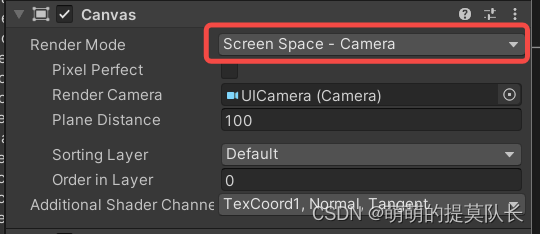
/// <summary>
/// RectTransform转屏幕坐标
/// </summary>
/// <param name="rt"></param>
/// <param name="uiCamera"></param>
/// <returns></returns>
public Vector2 GetScreenPoint(RectTransform rt,Camera uiCamera)
{
    return uiCamera.WorldToScreenPoint(rt.position);
}
屏幕坐标转RectTransfom局部坐标
针对锚点变化暂未测试
/// <summary>
/// 屏幕坐标转局部坐标
/// </summary>
/// <param name="screenPoint"></param>
/// <param name="parent"></param>
/// <param name="UICamera"></param>
/// <returns></returns>
public Vector2 ScreenPointToRectTransform(Vector2 screenPoint,  RectTransform parent,Camera UICamera)
{
    Vector2 LocalPoint = Vector2.zero;
    RectTransformUtility.ScreenPointToLocalPointInRectangle(RT, screenPoint, UICamera, out LocalPoint);
    return LocalPoint;
}