目录
前言
在数字化转型的浪潮下,企业业务系统的复杂度日益增长,微服务架构以其高度的模块化、可伸缩性和独立性,逐渐成为构建现代复杂应用的首选。然而,随着服务的拆分和细化,分布式事务问题也愈发凸显,成为制约微服务架构发展的一个重要瓶颈。
Seata(Simple Extensible Autonomous Transaction Architecture)是一个开源的分布式事务解决方案,致力于在微服务架构下提供高性能和简单易用的分布式事务服务。Seata通过全局事务ID将多个分支事务进行关联,并使用TC(Transaction Coordinator)进行全局事务的控制和协调,确保在分布式环境下的数据一致性和完整性。
将Seata集成到微服务架构中,可以带来诸多优势。首先,它解决了微服务间的数据一致性问题,保证了在分布式环境下事务的原子性、一致性、隔离性和持久性。其次,Seata提供了灵活的事务模式,支持多种事务类型,如AT模式(基于补偿的分布式事务模式)、TCC模式(基于Try-Confirm-Cancel的分布式事务模式)和Saga模式(长事务模式),可以根据不同的业务场景选择合适的模式。此外,Seata还提供了友好的集成方式,可以轻松地与主流的微服务框架和数据库进行集成,降低了开发和维护的复杂度。
然而,微服务集成Seata也面临着一些挑战。首先,需要深入理解Seata的工作原理和事务模型,以便正确地使用它来解决分布式事务问题。其次,在集成过程中可能需要对现有的业务代码进行改造和适配,以符合Seata的要求。最后,还需要对Seata的性能和稳定性进行充分的测试和验证,以确保其在实际生产环境中的可靠性。
步骤
引入相关maven依赖
<!-- Seata -->
<dependency>
  <groupId>com.alibaba.cloud</groupId>
  <artifactId>spring-cloud-starter-alibaba-seata</artifactId>
</dependency>
添加相关配置
Client端配置注册中心
seata:
  registry:
    type: nacos
    nacos:
      application: seata-server
      server-addr: 127.0.0.1:8848
      group: "DEFAULT_GROUP"
      namespace: "dev"
      username: "nacos"
      password: "nacos"
      context-path: ""
  tx-service-group: default_tx_group
  service:
    vgroup-mapping:
      default_tx_group: default
Server端配置注册中心
seata:
  config:
    type: nacos
    nacos:
      application: seata-server
      server-addr: 127.0.0.1:8848
      group: 'DEFAULT_GROUP'
      namespace: 'dev'
      username: 'nacos'
      password: 'nacos'
Seata-Server相关配置
#  Copyright 1999-2019 Seata.io Group.
#
#  Licensed under the Apache License, Version 2.0 (the "License");
#  you may not use this file except in compliance with the License.
#  You may obtain a copy of the License at
#
#  http://www.apache.org/licenses/LICENSE-2.0
#
#  Unless required by applicable law or agreed to in writing, software
#  distributed under the License is distributed on an "AS IS" BASIS,
#  WITHOUT WARRANTIES OR CONDITIONS OF ANY KIND, either express or implied.
#  See the License for the specific language governing permissions and
#  limitations under the License.

server:
  port: 17091

spring:
  application:
    name: seata-server

logging:
  config: classpath:logback-spring.xml
  file:
    path: ${user.home}/logs/seata
  extend:
    logstash-appender:
      destination: 127.0.0.1:4560
    kafka-appender:
      bootstrap-servers: 127.0.0.1:9092
      topic: logback_to_logstash

console:
  user:
    username: seata
    password: seata

seata:
  config:
    # support: nacos, consul, apollo, zk, etcd3
    type: nacos
    nacos:
      server-addr: 127.0.0.1:8848
      namespace: dev
      group: DEFAULT_GROUP
      username: nacos
      password: nacos
      context-path:
      ##if use MSE Nacos with auth, mutex with username/password attribute
      #access-key:
      #secret-key:
      data-id: seataServer.properties
  registry:
    # support: nacos, eureka, redis, zk, consul, etcd3, sofa
    type: nacos
    nacos:
      application: seata-server
      server-addr: 10.0.8.10:8848
      group: DEFAULT_GROUP
      namespace: dev
      username: nacos
      password: nacos
      cluster: default
      context-path:
      ##if use MSE Nacos with auth, mutex with username/password attribute
      #access-key:
      #secret-key:
  store:
    # support: file 、 db 、 redis
    mode: file
#  server:
#    service-port: 8091 #If not configured, the default is '${server.port} + 1000'
  security:
    secretKey: SeataSecretKey0c382ef121d778043159209298fd40bf3850a017
    tokenValidityInMilliseconds: 1800000
    ignore:
      urls: /,/**/*.css,/**/*.js,/**/*.html,/**/*.map,/**/*.svg,/**/*.png,/**/*.ico,/console-fe/public/**,/api/v1/auth/login
启动seata-server
docker run --name seata-server-demo -p 8091:8091 -p 7091:7091 -e SEATA_IP=127.0.0.1 -e SEATA_PORT=8091 -v /opt/project/seata-demo/config/resources:/seata-server/resources -v /opt/project/seata-demo/sessionStore:/seata-server/sessionStore -d seataio/seata-server:1.6.1
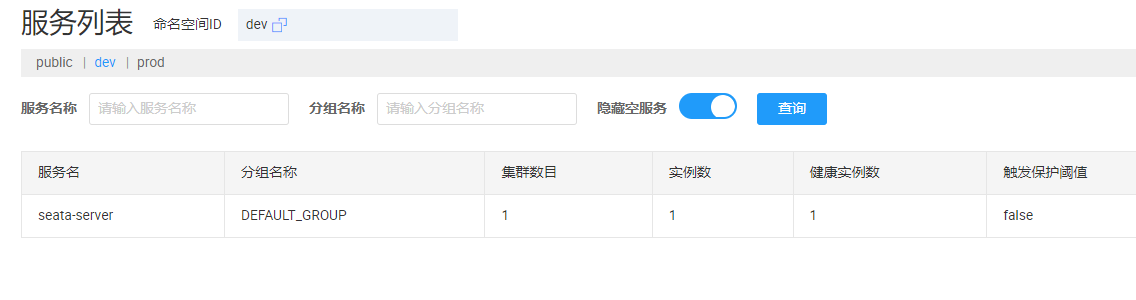
启动完成后Server端的服务出现在 Nacos 控制台中的注册中心列表中
使用方法
Seata AT 模式
AT 模式是 Seata 创新的一种非侵入式的分布式事务解决方案,Seata 在内部做了对数据库操作的代理层,我们使用 Seata AT 模式时,实际上用的是 Seata 自带的数据源代理 DataSourceProxy,Seata 在这层代理中加入了很多逻辑,比如插入回滚 undo_log 日志,检查全局锁等。
整体机制
两阶段提交协议的演变:
- 一阶段:业务数据和回滚日志记录在同一个本地事务中提交,释放本地锁和连接资源。
- 二阶段:
- 提交异步化,非常快速地完成。
- 回滚通过一阶段的回滚日志进行反向补偿。
步骤
初始化表结构
create table undo_log
(
  branch_id     bigint       not null comment 'branch transaction id',
  xid           varchar(128) not null comment 'global transaction id',
  context       varchar(128) not null comment 'undo_log context,such as serialization',
  rollback_info longblob     not null comment 'rollback info',
  log_status    int          not null comment '0:normal status,1:defense status',
  log_created   datetime(6)  not null comment 'create datetime',
  log_modified  datetime(6)  not null comment 'modify datetime',
  constraint ux_undo_log
  unique (xid, branch_id)
)
    comment 'AT transaction mode undo table' row_format = DYNAMIC;

create index ix_log_created
    on undo_log (log_created);
标记注解@GlobalTransactional
在需要事务的接口上标记seata提供的事务注解@GlobalTransactional,这样事务就生效了。
总结
完成上述步骤我们就完成了seata的集成。