要这样才能发出来所以

1.测试校园网53端口能不能通
连上校园网,不要认证,先用PING命令看看能不能ping通域名,解析出IP地址,
入下图就表示可以用53端口绕过验证,也可以测试其他端口,这里以53端口为例
ping www.baidu.com
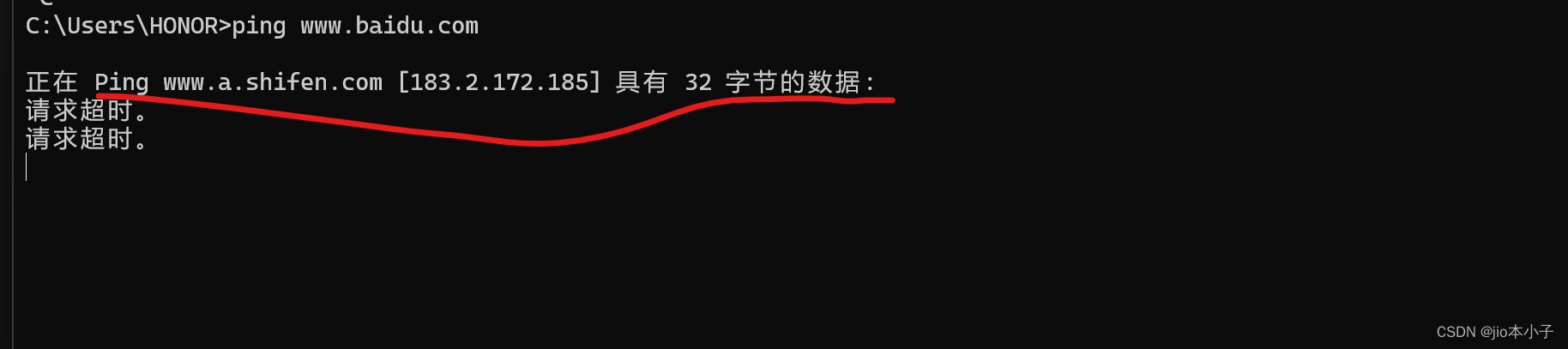
2.开始搭建
https://www.123pan.com/s/Z6tFjv-iViPv.html
下载这个脚本
以下为搭建日志,注意几个点
1.协议选择UDP,端口选择自定义53,其他默认就行
	[root@localhost ~]# bash UDP53.sh
Welcome to the Open虚拟局域网 installer!
The git repository is available at: https://github.com/angristan/虚拟局域网-install

I need to ask you a few questions before starting the setup.
You can leave the default options and just press enter if you are ok with them.

I need to know the IPv4 address of the network interface you want Open虚拟局域网 listening to.
Unless your server is behind NAT, it should be your public IPv4 address.
IP address: 10.2.2.123

Checking for IPv6 connectivity...

Your host does not appear to have IPv6 connectivity.

Do you want to enable IPv6 support (NAT)? [y/n]: n

What port do you want Open虚拟局域网 to listen to?#这里选2
   1) Default: 1194
   2) Custom
   3) Random [49152-65535]
Port choice [1-3]: 2
Custom port [1-65535]: 53

What protocol do you want Open虚拟局域网 to use?
UDP is faster. Unless it is not available, you shouldn't use TCP.
   1) UDP
   2) TCP
Protocol [1-2]: 1

What DNS resolvers do you want to use with the 虚拟局域网?
   1) Current system resolvers (from /etc/resolv.conf)
   2) Self-hosted DNS Resolver (Unbound)
   3) Cloudflare (Anycast: worldwide)
   4) Quad9 (Anycast: worldwide)
   5) Quad9 uncensored (Anycast: worldwide)
   6) FDN (France)
   7) DNS.WATCH (Germany)
   8) OpenDNS (Anycast: worldwide)
   9) Google (Anycast: worldwide)
   10) Yandex Basic (Russia)
   11) AdGuard DNS (Anycast: worldwide)
   12) NextDNS (Anycast: worldwide)
   13) Custom
DNS [1-12]: 11

Do you want to use compression? It is not recommended since the VORACLE attack makes use of it.
Enable compression? [y/n]: n

Do you want to customize encryption settings?
Unless you know what you're doing, you should stick with the default parameters provided by the script.
Note that whatever you choose, all the choices presented in the script are safe. (Unlike Open虚拟局域网's defaults)
See https://github.com/angristan/open虚拟局域网-install#security-and-encryption to learn more.

Customize encryption settings? [y/n]: n

Okay, that was all I needed. We are ready to setup your Open虚拟局域网 server now.
You will be able to generate a client at the end of the installation.
Press any key to continue...
Loaded plugins: fastestmirror
Loading mirror speeds from cached hostfile
 * base: mirrors.aliyun.com
 * centos-sclo-rh: mirror-hk.koddos.net
 * extras: mirrors.aliyun.com
 * updates: mirrors.aliyun.com
Package epel-release-7-14.noarch already installed and latest version
Nothing to do
Loaded plugins: fastestmirror
Loading mirror speeds from cached hostfile
 * base: mirrors.aliyun.com
 * centos-sclo-rh: mirror-hk.koddos.net
 * extras: mirrors.aliyun.com
 * updates: mirrors.aliyun.com
Package iptables-1.4.21-35.el7.x86_64 already installed and latest version
Package wget-1.14-18.el7_6.1.x86_64 already installed and latest version
Package 2:tar-1.26-35.el7.x86_64 already installed and latest version
Package policycoreutils-python-2.5-34.el7.x86_64 already installed and latest version
Resolving Dependencies
--> Running transaction check
---> Package ca-certificates.noarch 0:2022.2.54-74.el7_9 will be updated
---> Package ca-certificates.noarch 0:2023.2.60_v7.0.306-72.el7_9 will be an update
---> Package curl.x86_64 0:7.29.0-59.el7_9.1 will be updated
---> Package curl.x86_64 0:7.29.0-59.el7_9.2 will be an update
--> Processing Dependency: libcurl = 7.29.0-59.el7_9.2 for package: curl-7.29.0-59.el7_9.2.x86_64
---> Package openssl.x86_64 1:1.0.2k-25.el7_9 will be updated
---> Package openssl.x86_64 1:1.0.2k-26.el7_9 will be an update
--> Processing Dependency: openssl-libs(x86-64) = 1:1.0.2k-26.el7_9 for package: 1:openssl-1.0.2k-26.el7_9.x86_64
---> Package open虚拟局域网.x86_64 0:2.4.12-1.el7 will be installed
--> Processing Dependency: libpkcs11-helper.so.1()(64bit) for package: open虚拟局域网-2.4.12-1.el7.x86_64
--> Running transaction check
---> Package libcurl.x86_64 0:7.29.0-59.el7_9.1 will be updated
--> Processing Dependency: libcurl = 7.29.0-59.el7_9.1 for package: libcurl-devel-7.29.0-59.el7_9.1.x86_64
---> Package libcurl.x86_64 0:7.29.0-59.el7_9.2 will be an update
---> Package openssl-libs.x86_64 1:1.0.2k-25.el7_9 will be updated
--> Processing Dependency: openssl-libs(x86-64) = 1:1.0.2k-25.el7_9 for package: 1:openssl-devel-1.0.2k-25.el7_9.x86_64
---> Package openssl-libs.x86_64 1:1.0.2k-26.el7_9 will be an update
---> Package pkcs11-helper.x86_64 0:1.11-3.el7 will be installed
--> Running transaction check
---> Package libcurl-devel.x86_64 0:7.29.0-59.el7_9.1 will be updated
---> Package libcurl-devel.x86_64 0:7.29.0-59.el7_9.2 will be an update
epel/x86_64/filelists_db                                                                    |  14 MB  00:00:09
updates/7/x86_64/filelists_db                                                               |  14 MB  00:00:09
---> Package openssl-devel.x86_64 1:1.0.2k-25.el7_9 will be updated
---> Package openssl-devel.x86_64 1:1.0.2k-26.el7_9 will be an update
--> Finished Dependency Resolution

Dependencies Resolved

===================================================================================================================
 Package                     Arch               Version                                  Repository           Size
===================================================================================================================
Installing:
 open虚拟局域网                     x86_64             2.4.12-1.el7                             epel                529 k
Updating:
 ca-certificates             noarch             2023.2.60_v7.0.306-72.el7_9              updates             923 k
 curl                        x86_64             7.29.0-59.el7_9.2                        updates             271 k
 openssl                     x86_64             1:1.0.2k-26.el7_9                        updates             494 k
Installing for dependencies:
 pkcs11-helper               x86_64             1.11-3.el7                               epel                 56 k
Updating for dependencies:
 libcurl                     x86_64             7.29.0-59.el7_9.2                        updates             223 k
 libcurl-devel               x86_64             7.29.0-59.el7_9.2                        updates             303 k
 openssl-devel               x86_64             1:1.0.2k-26.el7_9                        updates             1.5 M
 openssl-libs                x86_64             1:1.0.2k-26.el7_9                        updates             1.2 M

Transaction Summary
===================================================================================================================
Install  1 Package  (+1 Dependent package)
Upgrade  3 Packages (+4 Dependent packages)

Total download size: 5.4 M
Downloading packages:
Delta RPMs disabled because /usr/bin/applydeltarpm not installed.
(1/9): curl-7.29.0-59.el7_9.2.x86_64.rpm                                                    | 271 kB  00:00:00
(2/9): libcurl-7.29.0-59.el7_9.2.x86_64.rpm                                                 | 223 kB  00:00:00
(3/9): ca-certificates-2023.2.60_v7.0.306-72.el7_9.noarch.rpm                               | 923 kB  00:00:01
(4/9): libcurl-devel-7.29.0-59.el7_9.2.x86_64.rpm                                           | 303 kB  00:00:00
(5/9): openssl-1.0.2k-26.el7_9.x86_64.rpm                                                   | 494 kB  00:00:00
(6/9): openssl-devel-1.0.2k-26.el7_9.x86_64.rpm                                             | 1.5 MB  00:00:02
(7/9): openssl-libs-1.0.2k-26.el7_9.x86_64.rpm                                              | 1.2 MB  00:00:02
(8/9): open虚拟局域网-2.4.12-1.el7.x86_64.rpm                                                      | 529 kB  00:00:01
(9/9): pkcs11-helper-1.11-3.el7.x86_64.rpm                                                  |  56 kB  00:00:01
-------------------------------------------------------------------------------------------------------------------
Total                                                                              1.6 MB/s | 5.4 MB  00:00:03
Running transaction check
Running transaction test
Transaction test succeeded
Running transaction
  Updating   : libcurl-7.29.0-59.el7_9.2.x86_64                                                               1/16
  Updating   : ca-certificates-2023.2.60_v7.0.306-72.el7_9.noarch                                             2/16
  Updating   : 1:openssl-libs-1.0.2k-26.el7_9.x86_64                                                          3/16
  Installing : pkcs11-helper-1.11-3.el7.x86_64                                                                4/16
  Installing : open虚拟局域网-2.4.12-1.el7.x86_64                                                                    5/16
  Updating   : 1:openssl-devel-1.0.2k-26.el7_9.x86_64                                                         6/16
  Updating   : 1:openssl-1.0.2k-26.el7_9.x86_64                                                               7/16
  Updating   : libcurl-devel-7.29.0-59.el7_9.2.x86_64                                                         8/16
  Updating   : curl-7.29.0-59.el7_9.2.x86_64                                                                  9/16
  Cleanup    : libcurl-devel-7.29.0-59.el7_9.1.x86_64                                                        10/16
  Cleanup    : 1:openssl-devel-1.0.2k-25.el7_9.x86_64                                                        11/16
  Cleanup    : 1:openssl-1.0.2k-25.el7_9.x86_64                                                              12/16
  Cleanup    : 1:openssl-libs-1.0.2k-25.el7_9.x86_64                                                         13/16
  Cleanup    : curl-7.29.0-59.el7_9.1.x86_64                                                                 14/16
  Cleanup    : ca-certificates-2022.2.54-74.el7_9.noarch                                                     15/16
  Cleanup    : libcurl-7.29.0-59.el7_9.1.x86_64                                                              16/16
  Verifying  : 1:openssl-devel-1.0.2k-26.el7_9.x86_64                                                         1/16
  Verifying  : 1:openssl-libs-1.0.2k-26.el7_9.x86_64                                                          2/16
  Verifying  : ca-certificates-2023.2.60_v7.0.306-72.el7_9.noarch                                             3/16
  Verifying  : libcurl-devel-7.29.0-59.el7_9.2.x86_64                                                         4/16
  Verifying  : open虚拟局域网-2.4.12-1.el7.x86_64                                                                    5/16
  Verifying  : libcurl-7.29.0-59.el7_9.2.x86_64                                                               6/16
  Verifying  : pkcs11-helper-1.11-3.el7.x86_64                                                                7/16
  Verifying  : curl-7.29.0-59.el7_9.2.x86_64                                                                  8/16
  Verifying  : 1:openssl-1.0.2k-26.el7_9.x86_64                                                               9/16
  Verifying  : curl-7.29.0-59.el7_9.1.x86_64                                                                 10/16
  Verifying  : ca-certificates-2022.2.54-74.el7_9.noarch                                                     11/16
  Verifying  : 1:openssl-libs-1.0.2k-25.el7_9.x86_64                                                         12/16
  Verifying  : 1:openssl-1.0.2k-25.el7_9.x86_64                                                              13/16
  Verifying  : libcurl-devel-7.29.0-59.el7_9.1.x86_64                                                        14/16
  Verifying  : 1:openssl-devel-1.0.2k-25.el7_9.x86_64                                                        15/16
  Verifying  : libcurl-7.29.0-59.el7_9.1.x86_64                                                              16/16

Installed:
  open虚拟局域网.x86_64 0:2.4.12-1.el7

Dependency Installed:
  pkcs11-helper.x86_64 0:1.11-3.el7

Updated:
  ca-certificates.noarch 0:2023.2.60_v7.0.306-72.el7_9               curl.x86_64 0:7.29.0-59.el7_9.2
  openssl.x86_64 1:1.0.2k-26.el7_9

Dependency Updated:
  libcurl.x86_64 0:7.29.0-59.el7_9.2                      libcurl-devel.x86_64 0:7.29.0-59.el7_9.2
  openssl-devel.x86_64 1:1.0.2k-26.el7_9                  openssl-libs.x86_64 1:1.0.2k-26.el7_9

Complete!
--2024-05-17 17:20:10--  https://github.com/Open虚拟局域网/easy-rsa/releases/download/v3.1.2/EasyRSA-3.1.2.tgz
Resolving github.com (github.com)... 20.205.243.166
Connecting to github.com (github.com)|20.205.243.166|:443... connected.
HTTP request sent, awaiting response... 302 Found
Location: https://objects.githubusercontent.com/github-production-release-asset-2e65be/4519663/c2688102-7cd5-4fcc-b272-083d48dc4b4d?X-Amz-Algorithm=AWS4-HMAC-SHA256&X-Amz-Credential=releaseassetproduction%2F20240517%2Fus-east-1%2Fs3%2Faws4_request&X-Amz-Date=20240517T092011Z&X-Amz-Expires=300&X-Amz-Signature=2c089a20dd92ad3ef7ec2d45d2d051caa4dfdd7bc0bf8d997ab0d44fbb8374d0&X-Amz-SignedHeaders=host&actor_id=0&key_id=0&repo_id=4519663&response-content-disposition=attachment%3B%20filename%3DEasyRSA-3.1.2.tgz&response-content-type=application%2Foctet-stream [following]
--2024-05-17 17:20:11--  https://objects.githubusercontent.com/github-production-release-asset-2e65be/4519663/c2688102-7cd5-4fcc-b272-083d48dc4b4d?X-Amz-Algorithm=AWS4-HMAC-SHA256&X-Amz-Credential=releaseassetproduction%2F20240517%2Fus-east-1%2Fs3%2Faws4_request&X-Amz-Date=20240517T092011Z&X-Amz-Expires=300&X-Amz-Signature=2c089a20dd92ad3ef7ec2d45d2d051caa4dfdd7bc0bf8d997ab0d44fbb8374d0&X-Amz-SignedHeaders=host&actor_id=0&key_id=0&repo_id=4519663&response-content-disposition=attachment%3B%20filename%3DEasyRSA-3.1.2.tgz&response-content-type=application%2Foctet-stream
Resolving objects.githubusercontent.com (objects.githubusercontent.com)... 185.199.108.133, 185.199.110.133, 185.199.111.133, ...
Connecting to objects.githubusercontent.com (objects.githubusercontent.com)|185.199.108.133|:443... connected.
HTTP request sent, awaiting response... 200 OK
Length: 68984 (67K) [application/octet-stream]
Saving to: ‘/root/easy-rsa.tgz’

100%[=========================================================================>] 68,984       317KB/s   in 0.2s

2024-05-17 17:20:12 (317 KB/s) - ‘/root/easy-rsa.tgz’ saved [68984/68984]


Notice
------
'init-pki' complete; you may now create a CA or requests.

Your newly created PKI dir is:
* /etc/open虚拟局域网/easy-rsa/pki

* Using Easy-RSA configuration: /etc/open虚拟局域网/easy-rsa/vars

* The preferred location for 'vars' is within the PKI folder.
  To silence this message move your 'vars' file to your PKI
  or declare your 'vars' file with option: --vars=<FILE>

* Using x509-types directory: /etc/open虚拟局域网/easy-rsa/x509-types


* Using SSL: openssl OpenSSL 1.0.2k-fips  26 Jan 2017

* Using Easy-RSA configuration: /etc/open虚拟局域网/easy-rsa/vars

* The preferred location for 'vars' is within the PKI folder.
  To silence this message move your 'vars' file to your PKI
  or declare your 'vars' file with option: --vars=<FILE>

Notice
------
CA creation complete and you may now import and sign cert requests.
Your new CA certificate file for publishing is at:
/etc/open虚拟局域网/easy-rsa/pki/ca.crt

* Using SSL: openssl OpenSSL 1.0.2k-fips  26 Jan 2017

* Using Easy-RSA configuration: /etc/open虚拟局域网/easy-rsa/vars

* The preferred location for 'vars' is within the PKI folder.
  To silence this message move your 'vars' file to your PKI
  or declare your 'vars' file with option: --vars=<FILE>
Generating a 256 bit EC private key
writing new private key to '/etc/open虚拟局域网/easy-rsa/pki/957bde8c/temp.6602ebf2'
-----

Notice
------
Keypair and certificate request completed. Your files are:
req: /etc/open虚拟局域网/easy-rsa/pki/reqs/server_Labsrq28vHwCh6c5.req
key: /etc/open虚拟局域网/easy-rsa/pki/private/server_Labsrq28vHwCh6c5.key
Using configuration from /etc/open虚拟局域网/easy-rsa/pki/957bde8c/temp.ab412457
Check that the request matches the signature
Signature ok
The Subject's Distinguished Name is as follows
commonName            :ASN.1 12:'server_Labsrq28vHwCh6c5'
Certificate is to be certified until Aug 20 09:20:14 2026 GMT (825 days)

Write out database with 1 new entries
Data Base Updated

Notice
------
Certificate created at:
* /etc/open虚拟局域网/easy-rsa/pki/issued/server_Labsrq28vHwCh6c5.crt

Notice
------
Inline file created:
* /etc/open虚拟局域网/easy-rsa/pki/inline/server_Labsrq28vHwCh6c5.inline

* Using SSL: openssl OpenSSL 1.0.2k-fips  26 Jan 2017

* Using Easy-RSA configuration: /etc/open虚拟局域网/easy-rsa/vars

* The preferred location for 'vars' is within the PKI folder.
  To silence this message move your 'vars' file to your PKI
  or declare your 'vars' file with option: --vars=<FILE>
Using configuration from /etc/open虚拟局域网/easy-rsa/pki/ce486d60/temp.7a54765e

Notice
------
An updated CRL has been created.
CRL file: /etc/open虚拟局域网/easy-rsa/pki/crl.pem

* Applying /usr/lib/sysctl.d/00-system.conf ...
* Applying /usr/lib/sysctl.d/10-default-yama-scope.conf ...
kernel.yama.ptrace_scope = 0
* Applying /usr/lib/sysctl.d/50-default.conf ...
kernel.sysrq = 16
kernel.core_uses_pid = 1
kernel.kptr_restrict = 1
net.ipv4.conf.default.rp_filter = 1
net.ipv4.conf.all.rp_filter = 1
net.ipv4.conf.default.accept_source_route = 0
net.ipv4.conf.all.accept_source_route = 0
net.ipv4.conf.default.promote_secondaries = 1
net.ipv4.conf.all.promote_secondaries = 1
fs.protected_hardlinks = 1
fs.protected_symlinks = 1
* Applying /etc/sysctl.d/99-open虚拟局域网.conf ...
net.ipv4.ip_forward = 1
* Applying /etc/sysctl.d/99-sysctl.conf ...
vm.overcommit_memory = 1
net.core.somaxconn = 1024
* Applying /etc/sysctl.conf ...
vm.overcommit_memory = 1
net.core.somaxconn = 1024
Created symlink from /etc/systemd/system/multi-user.target.wants/open虚拟局域网-server@server.service to /etc/systemd/system/open虚拟局域网-server@.service.
Created symlink from /etc/systemd/system/multi-user.target.wants/iptables-open虚拟局域网.service to /etc/systemd/system/iptables-open虚拟局域网.service.

Tell me a name for the client.
The name must consist of alphanumeric character. It may also include an underscore or a dash.
Client name: lk

Do you want to protect the configuration file with a password?
(e.g. encrypt the private key with a password)
   1) Add a passwordless client
   2) Use a password for the client
Select an option [1-2]: 1

* Using SSL: openssl OpenSSL 1.0.2k-fips  26 Jan 2017

* Using Easy-RSA configuration: /etc/open虚拟局域网/easy-rsa/vars

* The preferred location for 'vars' is within the PKI folder.
  To silence this message move your 'vars' file to your PKI
  or declare your 'vars' file with option: --vars=<FILE>
Generating a 256 bit EC private key
writing new private key to '/etc/open虚拟局域网/easy-rsa/pki/7980a0c8/temp.457bf72e'
-----

Notice
------
Keypair and certificate request completed. Your files are:
req: /etc/open虚拟局域网/easy-rsa/pki/reqs/lk.req
key: /etc/open虚拟局域网/easy-rsa/pki/private/lk.key
Using configuration from /etc/open虚拟局域网/easy-rsa/pki/7980a0c8/temp.4ffa72bd
Check that the request matches the signature
Signature ok
The Subject's Distinguished Name is as follows
commonName            :ASN.1 12:'lk'
Certificate is to be certified until Aug 20 09:21:20 2026 GMT (825 days)

Write out database with 1 new entries
Data Base Updated

Notice
------
Certificate created at:
* /etc/open虚拟局域网/easy-rsa/pki/issued/lk.crt

Notice
------
Inline file created:
* /etc/open虚拟局域网/easy-rsa/pki/inline/lk.inline
Client lk added.

The configuration file has been written to /root/lk.o虚拟局域网.
Download the .o虚拟局域网 file and import it in your Open虚拟局域网 client.
[root@localhost ~]# ls
anaconda-ks.cfg  igbinary.sh  lk.o虚拟局域网  open虚拟局域网-install.sh  package.xml
安装完成后会在root目录生成你刚刚命名的文件,传到客户端就可以,支持win,安卓,ios,都有大家自行下载。