基本介绍
- 什么是分布式事务
指一次大的操作由不同的小操作组成的,这些小的操作分布在不同的服务器上,分布式事务需要保证这些小操作要么全部成功,要么全部失败。从本质上来说,分布式事务就是为了保证不同数据库的数据一致性。
- 为什么要使用分布式事务
在微服务独立数据源的思想,每一个微服务都有一个或者多个数据源,虽然单机单库事务已经非常成熟,但是由于网路延迟和不可靠的客观因素,分布式事务到现在也还没有成熟的方案,对于中大型网站,特别是涉及到交易的网站,一旦将服务拆分微服务,分布式事务一定是绕不开的一个组件,通常解决分布式事务问题。
- seata 分布式事务
Seata是阿里开源的一款开源的分布式事务解决方案,致力于提供高性能和简单易用的分布式事务服务。
Seata目标打造一站式的分布事务的解决方案,最终会提供四种事务模式:
AT 模式:参见(《Seata AT 模式》 (opens new window))文档
TCC 模式:参见(《Seata TCC 模式》 (opens new window))文档
Saga 模式:参见(《SEATA Saga 模式》 (opens new window))文档
XA 模式:正在开发中… 目前使用的流行度情况是:AT > TCC > Saga。因此,我们在学习Seata的时候,可以花更多精力在AT模式上,最好搞懂背后的实现原理,毕竟分布式事务涉及到数据的正确性,出问题需要快速排查定位并解决。
docker-compose安装部署seata-server(nacos-2.1.1做注册、配置中心)
1、启动一个seata的临时容器,提取配置文件备用
用-rm启动一个seata的临时容器,方便提取配置文件,stop的时候容器也会被删除。
docker run --rm --name seata-server -d -p 8091:8091 seataio/seata-server:1.5.2
提取配置文件到宿主机
#在宿主机对应路径下创建conf文件夹,放置导出的配置文件
docker cp [容器id]:/seata-server/resources/* /home/data/soft/seata/conf
#复制完即可stop停止容器,自动删除掉
2、修改application.yml文件
server:
  port: 7091
spring:
  application:
    name: seata-server
logging:
  #config: classpath:logback-spring.xml
  file:
    path: ${user.home}/logs/seata

console:
  user:
    username: seata
    password: seata

seata:
  config:
    # support: nacos, consul, apollo, zk, etcd3
    type: nacos
    nacos:
      server-addr: 192.168.1.137:8848
      namespace:
      group: SEATA_GROUP
      username: nacos
      password: nacos
      data-id: seataServer.yml
  registry:
    # support: nacos, eureka, redis, zk, consul, etcd3, sofa
    type: nacos
    nacos:
      application: seata-server
      server-addr: 192.168.1.137:8848
      group: SEATA_GROUP
      namespace:
      cluster: default
      username: nacos
      password: nacos
 # server:
 #    service-port: 8091 #If not configured, the default is '${server.port} + 1000'
  security:
    secretKey: SeataSecretKey0c382ef121d778043159209298fd40bf3850a017
    tokenValidityInMilliseconds: 1800000
    ignore:
      urls: /,/**/*.css,/**/*.js,/**/*.html,/**/*.map,/**/*.svg,/**/*.png,/**/*.ico,/console-fe/public/**,/api/v1/auth/login
3、集成Nacos配置中心
nacos上创建seataServer.yml配置文件
service:
  vgroupMapping:
    ruoyi-system-group: default
store:
  db:
    datasource: druid
    dbType: mysql
    driverClassName: com.mysql.jdbc.Driver
    url: jdbc:mysql://192.168.1.165:4406/ry-seata?useUnicode=true
    user: root
    password: root
    globalTable: global_table
    lockTable: lock_table
    branchTable: branch_table
    maxConn: 30
    maxWait: 5000
    minConn: 5
    queryLimit: 100
  mode: db
由于seata使用mysql作为db高可用数据库,故需要在mysql创建一个ry-seata库,并导入数据库脚本。
-- -------------------------------- The script used when storeMode is 'db' --------------------------------
-- the table to store GlobalSession data
CREATE TABLE IF NOT EXISTS `global_table`
(
    `xid`                       VARCHAR(128) NOT NULL,
    `transaction_id`            BIGINT,
    `status`                    TINYINT      NOT NULL,
    `application_id`            VARCHAR(32),
    `transaction_service_group` VARCHAR(32),
    `transaction_name`          VARCHAR(128),
    `timeout`                   INT,
    `begin_time`                BIGINT,
    `application_data`          VARCHAR(2000),
    `gmt_create`                DATETIME,
    `gmt_modified`              DATETIME,
    PRIMARY KEY (`xid`),
    KEY `idx_gmt_modified_status` (`gmt_modified`, `status`),
    KEY `idx_transaction_id` (`transaction_id`)
) ENGINE = InnoDB
  DEFAULT CHARSET = utf8mb4;

-- the table to store BranchSession data
CREATE TABLE IF NOT EXISTS `branch_table`
(
    `branch_id`         BIGINT       NOT NULL,
    `xid`               VARCHAR(128) NOT NULL,
    `transaction_id`    BIGINT,
    `resource_group_id` VARCHAR(32),
    `resource_id`       VARCHAR(256),
    `branch_type`       VARCHAR(8),
    `status`            TINYINT,
    `client_id`         VARCHAR(64),
    `application_data`  VARCHAR(2000),
    `gmt_create`        DATETIME(6),
    `gmt_modified`      DATETIME(6),
    PRIMARY KEY (`branch_id`),
    KEY `idx_xid` (`xid`)
) ENGINE = InnoDB
  DEFAULT CHARSET = utf8mb4;

-- the table to store lock data
CREATE TABLE IF NOT EXISTS `lock_table`
(
    `row_key`        VARCHAR(128) NOT NULL,
    `xid`            VARCHAR(96),
    `transaction_id` BIGINT,
    `branch_id`      BIGINT       NOT NULL,
    `resource_id`    VARCHAR(256),
    `table_name`     VARCHAR(32),
    `pk`             VARCHAR(36),
    `gmt_create`     DATETIME,
    `gmt_modified`   DATETIME,
    PRIMARY KEY (`row_key`),
    KEY `idx_branch_id` (`branch_id`)
) ENGINE = InnoDB
  DEFAULT CHARSET = utf8mb4;

-- for AT mode you must to init this sql for you business database. the seata server not need it.
CREATE TABLE IF NOT EXISTS `undo_log`
(
    `branch_id`     BIGINT(20)   NOT NULL COMMENT 'branch transaction id',
    `xid`           VARCHAR(100) NOT NULL COMMENT 'global transaction id',
    `context`       VARCHAR(128) NOT NULL COMMENT 'undo_log context,such as serialization',
    `rollback_info` LONGBLOB     NOT NULL COMMENT 'rollback info',
    `log_status`    INT(11)      NOT NULL COMMENT '0:normal status,1:defense status',
    `log_created`   DATETIME(6)  NOT NULL COMMENT 'create datetime',
    `log_modified`  DATETIME(6)  NOT NULL COMMENT 'modify datetime',
    UNIQUE KEY `ux_undo_log` (`xid`, `branch_id`)
) ENGINE = InnoDB
  AUTO_INCREMENT = 1
  DEFAULT CHARSET = utf8mb4 COMMENT ='AT transaction mode undo table';
4、执行docker-compose配置文件
version: "3"
services:
  seata-server:
    image: seataio/seata-server:1.5.2
    ports:
      - "7091:7091"
      - "8091:8091"
    environment:
      - STORE_MODE=db
      # 以SEATA_IP作为host注册seata server
      - SEATA_IP=192.168.1.224
      - SEATA_PORT=8091
    volumes:
      - "/usr/share/zoneinfo/Asia/Shanghai:/etc/localtime"        #设置系统时区
      - "/usr/share/zoneinfo/Asia/Shanghai:/etc/timezone"  #设置时区
      # 假设我们通过docker cp命令把资源文件拷贝到相对路径`/home/data/soft/seata/conf`中
      # 如有问题,请阅读上面的[注意事项]以及[使用自定义配置文件]
      - "/home/data/soft/seata/conf:/seata-server/resources"
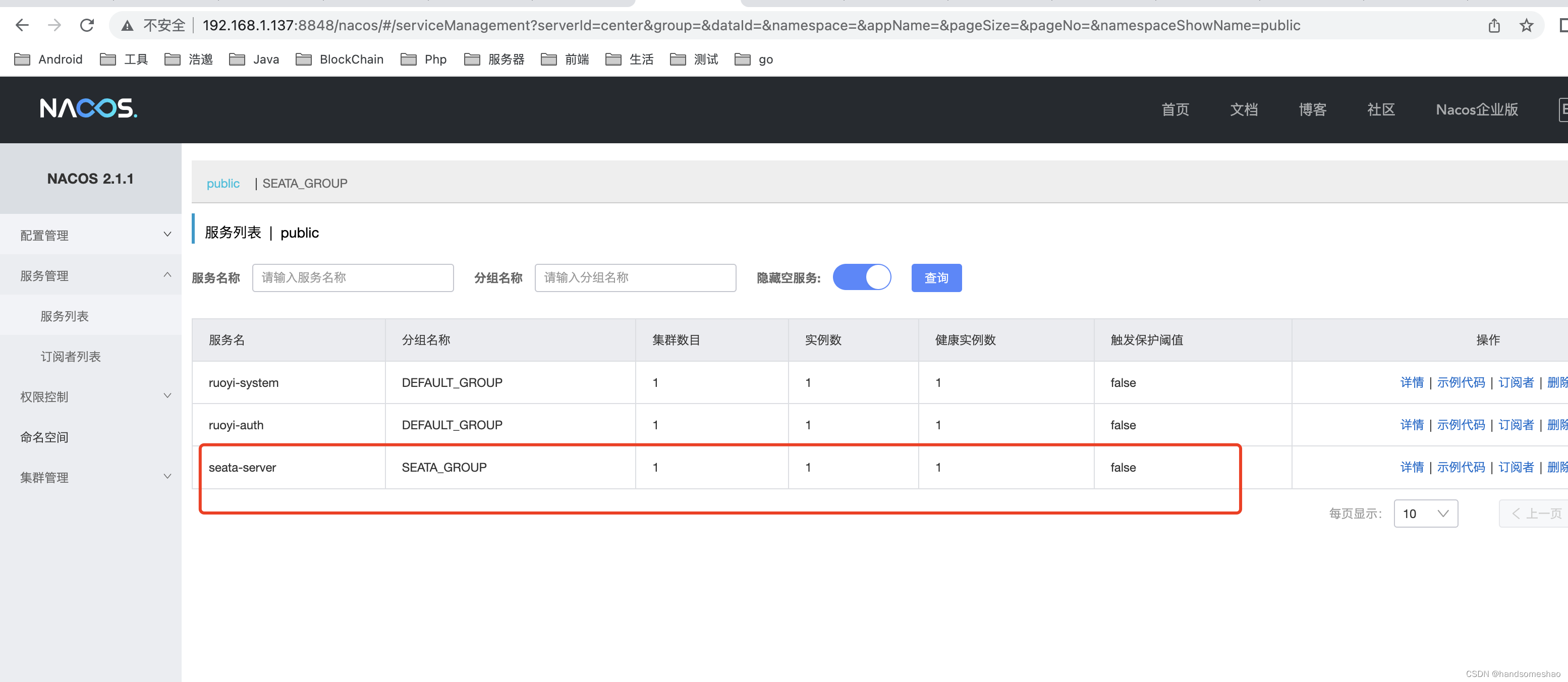
成功后会注册上nacos
如何使用
注:演示代码是基于 RuoYi-Cloud 版本扩展,完整代码可查看 RuoYi-Cloud-Seata
1、创建相关测试数据库和表。
# 订单数据库信息 seata_order
DROP DATABASE IF EXISTS seata_order;
CREATE DATABASE seata_order;

DROP TABLE IF EXISTS seata_order.p_order;
CREATE TABLE seata_order.p_order
(
    id               INT(11) NOT NULL AUTO_INCREMENT,
    user_id          INT(11) DEFAULT NULL,
    product_id       INT(11) DEFAULT NULL,
    amount           INT(11) DEFAULT NULL,
    total_price      DOUBLE       DEFAULT NULL,
    status           VARCHAR(100) DEFAULT NULL,
    add_time         DATETIME     DEFAULT CURRENT_TIMESTAMP,
    last_update_time DATETIME     DEFAULT CURRENT_TIMESTAMP ON UPDATE CURRENT_TIMESTAMP,
    PRIMARY KEY (id)
) ENGINE = InnoDB
  AUTO_INCREMENT = 1
  DEFAULT CHARSET = utf8mb4;

DROP TABLE IF EXISTS seata_order.undo_log;
CREATE TABLE seata_order.undo_log
(
    id            BIGINT(20) NOT NULL AUTO_INCREMENT,
    branch_id     BIGINT(20) NOT NULL,
    xid           VARCHAR(100) NOT NULL,
    context       VARCHAR(128) NOT NULL,
    rollback_info LONGBLOB     NOT NULL,
    log_status    INT(11) NOT NULL,
    log_created   DATETIME     NOT NULL,
    log_modified  DATETIME     NOT NULL,
    PRIMARY KEY (id),
    UNIQUE KEY ux_undo_log (xid, branch_id)
) ENGINE = InnoDB
  AUTO_INCREMENT = 1
  DEFAULT CHARSET = utf8mb4;

# 产品数据库信息 seata_product
DROP DATABASE IF EXISTS seata_product;
CREATE DATABASE seata_product;

DROP TABLE IF EXISTS seata_product.product;
CREATE TABLE seata_product.product
(
    id               INT(11) NOT NULL AUTO_INCREMENT,
    price            DOUBLE   DEFAULT NULL,
    stock            INT(11) DEFAULT NULL,
    last_update_time DATETIME DEFAULT CURRENT_TIMESTAMP ON UPDATE CURRENT_TIMESTAMP,
    PRIMARY KEY (id)
) ENGINE = InnoDB
  AUTO_INCREMENT = 1
  DEFAULT CHARSET = utf8mb4;

DROP TABLE IF EXISTS seata_product.undo_log;
CREATE TABLE seata_product.undo_log
(
    id            BIGINT(20) NOT NULL AUTO_INCREMENT,
    branch_id     BIGINT(20) NOT NULL,
    xid           VARCHAR(100) NOT NULL,
    context       VARCHAR(128) NOT NULL,
    rollback_info LONGBLOB     NOT NULL,
    log_status    INT(11) NOT NULL,
    log_created   DATETIME     NOT NULL,
    log_modified  DATETIME     NOT NULL,
    PRIMARY KEY (id),
    UNIQUE KEY ux_undo_log (xid, branch_id)
) ENGINE = InnoDB
  AUTO_INCREMENT = 1
  DEFAULT CHARSET = utf8mb4;

INSERT INTO seata_product.product (id, price, stock)
VALUES (1, 10, 20);


# 账户数据库信息 seata_account
DROP DATABASE IF EXISTS seata_account;
CREATE DATABASE seata_account;

DROP TABLE IF EXISTS seata_account.account;
CREATE TABLE seata_account.account
(
    id               INT(11) NOT NULL AUTO_INCREMENT,
    balance          DOUBLE   DEFAULT NULL,
    last_update_time DATETIME DEFAULT CURRENT_TIMESTAMP ON UPDATE CURRENT_TIMESTAMP,
    PRIMARY KEY (id)
) ENGINE = InnoDB
  AUTO_INCREMENT = 1
  DEFAULT CHARSET = utf8mb4;

DROP TABLE IF EXISTS seata_account.undo_log;
CREATE TABLE seata_account.undo_log
(
    id            BIGINT(20) NOT NULL AUTO_INCREMENT,
    branch_id     BIGINT(20) NOT NULL,
    xid           VARCHAR(100) NOT NULL,
    context       VARCHAR(128) NOT NULL,
    rollback_info LONGBLOB     NOT NULL,
    log_status    INT(11) NOT NULL,
    log_created   DATETIME     NOT NULL,
    log_modified  DATETIME     NOT NULL,
    PRIMARY KEY (id),
    UNIQUE KEY ux_undo_log (xid, branch_id)
) ENGINE = InnoDB
  AUTO_INCREMENT = 1
  DEFAULT CHARSET = utf8mb4;
INSERT INTO seata_account.account (id, balance)
VALUES (1, 50);
其中,每个库中的undo_log表,是Seata AT模式必须创建的表,主要用于分支事务的回滚。
另外,考虑到测试方便,我们插入了一条id = 1的account记录,和一条id = 1的product记录。
2、引入ruoyi-common-datasource依赖(包含seata配置)
<!-- ruoyi common datasource -->
<dependency>
	<groupId>com.ruoyi</groupId>
	<artifactId>ruoyi-common-datasource</artifactId>
</dependency>
3、服务配置文件
# spring配置
spring:
  redis:
    host: localhost
    port: 6379
    password:
  datasource:
    druid:
      stat-view-servlet:
        enabled: true
        loginUsername: admin
        loginPassword: 123456
    dynamic:
      druid:
        initial-size: 5
        min-idle: 5
        maxActive: 20
        maxWait: 60000
        timeBetweenEvictionRunsMillis: 60000
        minEvictableIdleTimeMillis: 300000
        validationQuery: SELECT 1 FROM DUAL
        testWhileIdle: true
        testOnBorrow: false
        testOnReturn: false
        poolPreparedStatements: true
        maxPoolPreparedStatementPerConnectionSize: 20
        filters: stat,wall,slf4j
        connectionProperties: druid.stat.mergeSql\=true;druid.stat.slowSqlMillis\=5000
      datasource:
          # 主库数据源
          master:
            driver-class-name: com.mysql.cj.jdbc.Driver
            url: jdbc:mysql://localhost:3306/ry-cloud?useUnicode=true&characterEncoding=utf8&zeroDateTimeBehavior=convertToNull&useSSL=true&serverTimezone=GMT%2B8
            username: root
            password: password
          # seata_order数据源
          order:
            username: root
            password: password
            url: jdbc:mysql://localhost:3306/seata_order?useUnicode=true&characterEncoding=utf8&zeroDateTimeBehavior=convertToNull&useSSL=true&serverTimezone=GMT%2B8
            driver-class-name: com.mysql.cj.jdbc.Driver
          # seata_account数据源
          account:
            username: root
            password: password
            url: jdbc:mysql://localhost:3306/seata_account?useUnicode=true&characterEncoding=utf8&zeroDateTimeBehavior=convertToNull&useSSL=true&serverTimezone=GMT%2B8
            driver-class-name: com.mysql.cj.jdbc.Driver
          # seata_product数据源
          product:
            username: root
            password: password
            url: jdbc:mysql://localhost:3306/seata_product?useUnicode=true&characterEncoding=utf8&zeroDateTimeBehavior=convertToNull&useSSL=true&serverTimezone=GMT%2B8
            driver-class-name: com.mysql.cj.jdbc.Driver
      seata: true    #开启seata代理,开启后默认每个数据源都代理,如果某个不需要代理可单独关闭

# seata配置
seata:
  enabled: true
  # Seata 应用编号,默认为 ${spring.application.name}
  application-id: ${spring.application.name}
  # Seata 事务组编号,用于 TC 集群名
  tx-service-group: ${spring.application.name}-group
  # 关闭自动代理
  enable-auto-data-source-proxy: false
  # 服务配置项
  service:
    # 虚拟组和分组的映射
    vgroup-mapping:
      ruoyi-system-group: default
    # 分组和 Seata 服务的映射
  config:
    type: nacos
    nacos:
      serverAddr: 192.168.1.137:8848
      group: SEATA_GROUP
      namespace:
  registry:
    type: nacos
    nacos:
      application: seata-server
      server-addr: 192.168.1.137:8848
      namespace:

# mybatis配置
mybatis:
    # 搜索指定包别名
    typeAliasesPackage: com.ruoyi.system
    # 配置mapper的扫描,找到所有的mapper.xml映射文件
    mapperLocations: classpath:mapper/**/*.xml

# swagger配置
swagger:
  title: 系统模块接口文档
  license: Powered By ruoyi
  licenseUrl: https://ruoyi.vip
示例代码
Domain
Account.java
package com.ruoyi.system.domain;

import java.util.Date;

public class Account
{
    private Long id;

    /**
     * 余额
     */
    private Double balance;

    private Date lastUpdateTime;

    public Long getId()
    {
        return id;
    }

    public void setId(Long id)
    {
        this.id = id;
    }

    public Double getBalance()
    {
        return balance;
    }

    public void setBalance(Double balance)
    {
        this.balance = balance;
    }

    public Date getLastUpdateTime()
    {
        return lastUpdateTime;
    }

    public void setLastUpdateTime(Date lastUpdateTime)
    {
        this.lastUpdateTime = lastUpdateTime;
    }
}
Order.java
package com.ruoyi.system.domain;

public class Order
{
    private Integer id;

    /**
     * 用户ID
     */
    private Long userId;

    /**
     * 商品ID
     */
    private Long productId;

    /**
     * 订单状态
     */
    private int status;

    /**
     * 数量
     */
    private Integer amount;

    /**
     * 总金额
     */
    private Double totalPrice;

    public Order()
    {
    }

    public Order(Long userId, Long productId, int status, Integer amount)
    {
        this.userId = userId;
        this.productId = productId;
        this.status = status;
        this.amount = amount;
    }

    public Integer getId()
    {
        return id;
    }

    public void setId(Integer id)
    {
        this.id = id;
    }

    public Long getUserId()
    {
        return userId;
    }

    public void setUserId(Long userId)
    {
        this.userId = userId;
    }

    public Long getProductId()
    {
        return productId;
    }

    public void setProductId(Long productId)
    {
        this.productId = productId;
    }

    public int getStatus()
    {
        return status;
    }

    public void setStatus(int status)
    {
        this.status = status;
    }

    public Integer getAmount()
    {
        return amount;
    }

    public void setAmount(Integer amount)
    {
        this.amount = amount;
    }

    public Double getTotalPrice()
    {
        return totalPrice;
    }

    public void setTotalPrice(Double totalPrice)
    {
        this.totalPrice = totalPrice;
    }
}
Product.java
package com.ruoyi.system.domain;

import java.util.Date;

public class Product
{

    private Integer id;
    /**
     * 价格
     */
    private Double price;
    /**
     * 库存
     */
    private Integer stock;

    private Date lastUpdateTime;

    public Integer getId()
    {
        return id;
    }

    public void setId(Integer id)
    {
        this.id = id;
    }

    public Double getPrice()
    {
        return price;
    }

    public void setPrice(Double price)
    {
        this.price = price;
    }

    public Integer getStock()
    {
        return stock;
    }

    public void setStock(Integer stock)
    {
        this.stock = stock;
    }

    public Date getLastUpdateTime()
    {
        return lastUpdateTime;
    }

    public void setLastUpdateTime(Date lastUpdateTime)
    {
        this.lastUpdateTime = lastUpdateTime;
    }
}
Dto
PlaceOrderRequest.java
package com.ruoyi.system.domain.dto;

public class PlaceOrderRequest
{
    private Long userId;

    private Long productId;

    private Integer amount;

    public PlaceOrderRequest()
    {
    }

    public PlaceOrderRequest(Long userId, Long productId, Integer amount)
    {
        this.userId = userId;
        this.productId = productId;
        this.amount = amount;
    }

    public Long getUserId()
    {
        return userId;
    }

    public void setUserId(Long userId)
    {
        this.userId = userId;
    }

    public Long getProductId()
    {
        return productId;
    }

    public void setProductId(Long productId)
    {
        this.productId = productId;
    }

    public Integer getAmount()
    {
        return amount;
    }

    public void setAmount(Integer amount)
    {
        this.amount = amount;
    }
}
ReduceBalanceRequest.java
package com.ruoyi.system.domain.dto;

public class ReduceBalanceRequest
{
    private Long userId;

    private Integer price;

    public Long getUserId()
    {
        return userId;
    }

    public void setUserId(Long userId)
    {
        this.userId = userId;
    }

    public Integer getPrice()
    {
        return price;
    }

    public void setPrice(Integer price)
    {
        this.price = price;
    }
}
ReduceStockRequest.java
package com.ruoyi.system.domain.dto;

public class ReduceStockRequest
{
    private Long productId;

    private Integer amount;

    public Long getProductId()
    {
        return productId;
    }

    public void setProductId(Long productId)
    {
        this.productId = productId;
    }

    public Integer getAmount()
    {
        return amount;
    }

    public void setAmount(Integer amount)
    {
        this.amount = amount;
    }
}
Mapper
AccountMapper.java
package com.ruoyi.system.mapper;

import com.ruoyi.system.domain.Account;

public interface AccountMapper
{
    public Account selectById(Long userId);

    public void updateById(Account account);
}
OrderMapper.java
package com.ruoyi.system.mapper;

import com.ruoyi.system.domain.Order;

public interface OrderMapper
{
    public void insert(Order order);

    public void updateById(Order order);
}
ProductMapper.java
package com.ruoyi.system.mapper;

import com.ruoyi.system.domain.Product;

public interface ProductMapper
{
    public Product selectById(Long productId);

    public void updateById(Product product);
}
Service
AccountService.java
package com.ruoyi.system.service;

public interface AccountService
{
    /**
     * 账户扣减
     * @param userId 用户 ID
     * @param price 扣减金额
     */
    void reduceBalance(Long userId, Double price);
}
OrderService.java
package com.ruoyi.system.service;

import com.ruoyi.system.domain.dto.PlaceOrderRequest;

public interface OrderService
{
    /**
     * 下单
     *
     * @param placeOrderRequest 订单请求参数
     */
    void placeOrder(PlaceOrderRequest placeOrderRequest);
}
ProductService.java
package com.ruoyi.system.service;

public interface ProductService
{
    /**
     * 扣减库存
     *
     * @param productId 商品 ID
     * @param amount 扣减数量
     * @return 商品总价
     */
    Double reduceStock(Long productId, Integer amount);
}
ServiceImpl
AccountService.java
package com.ruoyi.system.service.impl;

import javax.annotation.Resource;
import org.slf4j.Logger;
import org.slf4j.LoggerFactory;
import org.springframework.stereotype.Service;
import org.springframework.transaction.annotation.Propagation;
import org.springframework.transaction.annotation.Transactional;
import com.baomidou.dynamic.datasource.annotation.DS;
import com.ruoyi.system.domain.Account;
import com.ruoyi.system.mapper.AccountMapper;
import com.ruoyi.system.service.AccountService;
import io.seata.core.context.RootContext;

@Service
public class AccountServiceImpl implements AccountService
{
    private static final Logger log = LoggerFactory.getLogger(AccountServiceImpl.class);

    @Resource
    private AccountMapper accountMapper;

    /**
     * 事务传播特性设置为 REQUIRES_NEW 开启新的事务 重要!!!!一定要使用REQUIRES_NEW
     */
    @DS("account")
    @Override
    @Transactional(propagation = Propagation.REQUIRES_NEW)
    public void reduceBalance(Long userId, Double price)
    {
        log.info("=============ACCOUNT START=================");
        log.info("当前 XID: {}", RootContext.getXID());

        Account account = accountMapper.selectById(userId);
        Double balance = account.getBalance();
        log.info("下单用户{}余额为 {},商品总价为{}", userId, balance, price);

        if (balance < price)
        {
            log.warn("用户 {} 余额不足,当前余额:{}", userId, balance);
            throw new RuntimeException("余额不足");
        }
        log.info("开始扣减用户 {} 余额", userId);
        double currentBalance = account.getBalance() - price;
        account.setBalance(currentBalance);
        accountMapper.updateById(account);
        log.info("扣减用户 {} 余额成功,扣减后用户账户余额为{}", userId, currentBalance);
        log.info("=============ACCOUNT END=================");
    }

}
OrderService.java
package com.ruoyi.system.service.impl;

import javax.annotation.Resource;
import org.slf4j.Logger;
import org.slf4j.LoggerFactory;
import org.springframework.beans.factory.annotation.Autowired;
import org.springframework.stereotype.Service;
import org.springframework.transaction.annotation.Transactional;
import com.baomidou.dynamic.datasource.annotation.DS;
import com.ruoyi.system.domain.Order;
import com.ruoyi.system.domain.dto.PlaceOrderRequest;
import com.ruoyi.system.mapper.OrderMapper;
import com.ruoyi.system.service.AccountService;
import com.ruoyi.system.service.OrderService;
import com.ruoyi.system.service.ProductService;
import io.seata.core.context.RootContext;
import io.seata.spring.annotation.GlobalTransactional;

@Service
public class OrderServiceImpl implements OrderService
{
    private static final Logger log = LoggerFactory.getLogger(OrderServiceImpl.class);

    @Resource
    private OrderMapper orderMapper;

    @Autowired
    private AccountService accountService;

    @Autowired
    private ProductService productService;

    @DS("order") // 每一层都需要使用多数据源注解切换所选择的数据库
    @Override
    @Transactional
    @GlobalTransactional // 重点 第一个开启事务的需要添加seata全局事务注解
    public void placeOrder(PlaceOrderRequest request)
    {
        log.info("=============ORDER START=================");
        Long userId = request.getUserId();
        Long productId = request.getProductId();
        Integer amount = request.getAmount();
        log.info("收到下单请求,用户:{}, 商品:{},数量:{}", userId, productId, amount);

        log.info("当前 XID: {}", RootContext.getXID());

        Order order = new Order(userId, productId, 0, amount);

        orderMapper.insert(order);
        log.info("订单一阶段生成,等待扣库存付款中");
        // 扣减库存并计算总价
        Double totalPrice = productService.reduceStock(productId, amount);
        // 扣减余额
        accountService.reduceBalance(userId, totalPrice);

        order.setStatus(1);
        order.setTotalPrice(totalPrice);
        orderMapper.updateById(order);
        log.info("订单已成功下单");
        log.info("=============ORDER END=================");
    }

}
ProductService.java
package com.ruoyi.system.service.impl;

import javax.annotation.Resource;
import org.slf4j.Logger;
import org.slf4j.LoggerFactory;
import org.springframework.stereotype.Service;
import org.springframework.transaction.annotation.Propagation;
import org.springframework.transaction.annotation.Transactional;
import com.baomidou.dynamic.datasource.annotation.DS;
import com.ruoyi.system.domain.Product;
import com.ruoyi.system.mapper.ProductMapper;
import com.ruoyi.system.service.ProductService;
import io.seata.core.context.RootContext;

@Service
public class ProductServiceImpl implements ProductService
{
    private static final Logger log = LoggerFactory.getLogger(ProductServiceImpl.class);

    @Resource
    private ProductMapper productMapper;

    /**
     * 事务传播特性设置为 REQUIRES_NEW 开启新的事务 重要!!!!一定要使用REQUIRES_NEW
     */
    @DS("product")
    @Transactional(propagation = Propagation.REQUIRES_NEW)
    @Override
    public Double reduceStock(Long productId, Integer amount)
    {
        log.info("=============PRODUCT START=================");
        log.info("当前 XID: {}", RootContext.getXID());

        // 检查库存
        Product product = productMapper.selectById(productId);
        Integer stock = product.getStock();
        log.info("商品编号为 {} 的库存为{},订单商品数量为{}", productId, stock, amount);

        if (stock < amount)
        {
            log.warn("商品编号为{} 库存不足,当前库存:{}", productId, stock);
            throw new RuntimeException("库存不足");
        }
        log.info("开始扣减商品编号为 {} 库存,单价商品价格为{}", productId, product.getPrice());
        // 扣减库存
        int currentStock = stock - amount;
        product.setStock(currentStock);
        productMapper.updateById(product);
        double totalPrice = product.getPrice() * amount;
        log.info("扣减商品编号为 {} 库存成功,扣减后库存为{}, {} 件商品总价为 {} ", productId, currentStock, amount, totalPrice);
        log.info("=============PRODUCT END=================");
        return totalPrice;
    }

}
Controller
OrderController.java
package com.ruoyi.system.controller;

import org.springframework.beans.factory.annotation.Autowired;
import org.springframework.validation.annotation.Validated;
import org.springframework.web.bind.annotation.PostMapping;
import org.springframework.web.bind.annotation.RequestBody;
import org.springframework.web.bind.annotation.RequestMapping;
import org.springframework.web.bind.annotation.RestController;
import com.ruoyi.system.domain.dto.PlaceOrderRequest;
import com.ruoyi.system.service.OrderService;
import io.swagger.annotations.ApiOperation;

@RestController
@RequestMapping("/order")
public class OrderController
{
    @Autowired
    private OrderService orderService;

    @PostMapping("/placeOrder")
    public String placeOrder(@Validated @RequestBody PlaceOrderRequest request)
    {
        orderService.placeOrder(request);
        return "下单成功";
    }

    @PostMapping("/test1")
    @ApiOperation("测试商品库存不足-异常回滚")
    public String test1()
    {
        // 商品单价10元,库存20个,用户余额50元,模拟一次性购买22个。 期望异常回滚
        orderService.placeOrder(new PlaceOrderRequest(1L, 1L, 22));
        return "下单成功";
    }

    @PostMapping("/test2")
    @ApiOperation("测试用户账户余额不足-异常回滚")
    public String test2()
    {
        // 商品单价10元,库存20个,用户余额50元,模拟一次性购买6个。 期望异常回滚
        orderService.placeOrder(new PlaceOrderRequest(1L, 1L, 6));
        return "下单成功";
    }
}
Mapper.xml
AccountMapper.xml
<?xml version="1.0" encoding="UTF-8" ?>
<!DOCTYPE mapper
PUBLIC "-//mybatis.org//DTD Mapper 3.0//EN"
"http://mybatis.org/dtd/mybatis-3-mapper.dtd">
<mapper namespace="com.ruoyi.system.mapper.AccountMapper">

    <resultMap type="Account" id="AccountResult">
    	<id     property="id"              column="id"                />
        <result property="balance"         column="balance"           />
        <result property="lastUpdateTime"  column="last_update_time"  />
    </resultMap>

    <select id="selectById" parameterType="Account" resultMap="AccountResult">
        select id, balance, last_update_time
		from account where id = #{userId}
    </select>

    <update id="updateById" parameterType="Account">
        update account set balance = #{balance}, last_update_time = sysdate() where id = #{id}
    </update>

</mapper>
OrderMapper.xml
<?xml version="1.0" encoding="UTF-8" ?>
<!DOCTYPE mapper
PUBLIC "-//mybatis.org//DTD Mapper 3.0//EN"
"http://mybatis.org/dtd/mybatis-3-mapper.dtd">
<mapper namespace="com.ruoyi.system.mapper.OrderMapper">

    <resultMap type="Order" id="OrderResult">
    	<id     property="id"              column="id"                />
        <result property="userId"          column="user_id"           />
        <result property="productId"       column="product_id"        />
        <result property="amount"          column="amount"            />
        <result property="totalPrice"      column="total_price"       />
        <result property="status"          column="status"            />
        <result property="addTime"         column="add_time"          />
        <result property="lastUpdateTime"  column="last_update_time"  />
    </resultMap>

    <insert id="insert" parameterType="Order" useGeneratedKeys="true" keyProperty="id">
        insert into p_order (
			<if test="userId != null and userId != '' ">user_id,</if>
			<if test="productId != null and productId != '' ">product_id,</if>
			<if test="amount != null and amount != '' ">amount,</if>
			<if test="totalPrice != null and totalPrice != '' ">total_price,</if>
			<if test="status != null and status != ''">status,</if>
 			add_time
        )values(
			<if test="userId != null and userId != ''">#{userId},</if>
			<if test="productId != null and productId != ''">#{productId},</if>
			<if test="amount != null and amount != ''">#{amount},</if>
			<if test="totalPrice != null and totalPrice != ''">#{totalPrice},</if>
			<if test="status != null and status != ''">#{status},</if>
 			sysdate()
		)
    </insert>

    <update id="updateById" parameterType="Order">
        update p_order
        <set>
            <if test="userId != null and userId != ''">user_id = #{userId},</if>
            <if test="productId != null and productId != ''">product_id = #{productId},</if>
            <if test="amount != null and amount != ''">amount = #{amount},</if>
            <if test="totalPrice != null and totalPrice != ''">total_price = #{totalPrice},</if>
            <if test="status != null and status != ''">status = #{status},</if>
 			last_update_time = sysdate()
        </set>
        where id = #{id}
    </update>

</mapper>
ProductMapper.xml
<?xml version="1.0" encoding="UTF-8" ?>
<!DOCTYPE mapper
PUBLIC "-//mybatis.org//DTD Mapper 3.0//EN"
"http://mybatis.org/dtd/mybatis-3-mapper.dtd">
<mapper namespace="com.ruoyi.system.mapper.ProductMapper">

    <resultMap type="Product" id="ProductResult">
    	<id     property="id"              column="id"                />
        <result property="price"           column="price"             />
        <result property="stock"           column="stock"             />
        <result property="lastUpdateTime"  column="last_update_time"  />
    </resultMap>

    <select id="selectById" parameterType="Product" resultMap="ProductResult">
        select id, price, stock, last_update_time
		from product where id = #{productId}
    </select>

    <update id="updateById" parameterType="Product">
        update product set price = #{price}, stock = #{stock}, last_update_time = sysdate() where id = #{id}
    </update>
</mapper>
测试验证
使用Postman工具测试接口,注意观察运行日志,至此分布式事务集成案例全流程完毕。
正常下单
模拟正常下单,买一个商品 http://localhost:9201/order/placeOrder
Content-Type/application/json
{
    "userId": 1,
    "productId": 1,
    "amount": 1
}
库存不足
模拟库存不足,事务回滚 http://localhost:9201/order/placeOrder
Content-Type/application/json
{
    "userId": 1,
    "productId": 1,
    "amount": 22
}
用户余额不足
模拟用户余额不足,事务回滚 http://localhost:9201/order/placeOrder
Content-Type/application/json
{
    "userId": 1,
    "productId": 1,
    "amount": 6
}
测试Feign服务调用
测试使用ruoyi-file添加Feign调用测试文件入库,验证分布式数据库调用执行结果,也适用于新的应用。
1、添加测试数据库seata_file
# 文件数据库信息 seata_file
DROP DATABASE IF EXISTS seata_file;
CREATE DATABASE seata_file;

DROP TABLE IF EXISTS seata_file.sys_file_info;
CREATE TABLE seata_file.sys_file_info
(
    file_id           BIGINT(11)       NOT NULL AUTO_INCREMENT       COMMENT '文件编号',
    file_name         VARCHAR(50)      DEFAULT ''                    COMMENT '文件名称',
    file_path         VARCHAR(255)     DEFAULT ''                    COMMENT '文件路径',
    PRIMARY KEY (file_id)
) ENGINE = INNODB
  AUTO_INCREMENT = 1
  DEFAULT CHARSET = utf8mb4;

DROP TABLE IF EXISTS seata_file.undo_log;
CREATE TABLE seata_file.undo_log
(
    id            BIGINT(20) NOT NULL AUTO_INCREMENT,
    branch_id     BIGINT(20) NOT NULL,
    xid           VARCHAR(100) NOT NULL,
    context       VARCHAR(128) NOT NULL,
    rollback_info LONGBLOB     NOT NULL,
    log_status    INT(11) NOT NULL,
    log_created   DATETIME     NOT NULL,
    log_modified  DATETIME     NOT NULL,
    PRIMARY KEY (id),
    UNIQUE KEY ux_undo_log (xid, branch_id)
) ENGINE = INNODB
  AUTO_INCREMENT = 1
  DEFAULT CHARSET = utf8mb4;
2、添加示例代码ruoyi-modules-file
ruoyi-modules-file应用添加示例代码
SysFileController.java
package com.ruoyi.file.controller;

import org.slf4j.Logger;
import org.slf4j.LoggerFactory;
import org.springframework.beans.factory.annotation.Autowired;
import org.springframework.web.bind.annotation.PostMapping;
import org.springframework.web.bind.annotation.RequestBody;
import org.springframework.web.bind.annotation.RestController;
import org.springframework.web.multipart.MultipartFile;
import com.ruoyi.common.core.domain.R;
import com.ruoyi.common.core.utils.file.FileUtils;
import com.ruoyi.common.core.web.domain.AjaxResult;
import com.ruoyi.file.service.ISysFileInfoService;
import com.ruoyi.file.service.ISysFileService;
import com.ruoyi.system.api.domain.SysFile;
import com.ruoyi.system.api.domain.SysFileInfo;

/**
 * 文件请求处理
 *
 * @author ruoyi
 */
@RestController
public class SysFileController
{
    private static final Logger log = LoggerFactory.getLogger(SysFileController.class);

    @Autowired
    private ISysFileService sysFileService;

    @Autowired
    private ISysFileInfoService sysFileInfoService;

    /**
     * 文件上传请求
     */
    @PostMapping("upload")
    public R<SysFile> upload(MultipartFile file)
    {
        try
        {
            // 上传并返回访问地址
            String url = sysFileService.uploadFile(file);
            SysFile sysFile = new SysFile();
            sysFile.setName(FileUtils.getName(url));
            sysFile.setUrl(url);
            return R.ok(sysFile);
        }
        catch (Exception e)
        {
            log.error("上传文件失败", e);
            return R.fail(e.getMessage());
        }
    }

    @PostMapping("/insertFile")
    public AjaxResult insertFile(@RequestBody SysFileInfo sysFileInfo)
    {
        sysFileInfoService.insertFile(sysFileInfo);
        return AjaxResult.success();
    }
}
ISysFileInfoService.java
package com.ruoyi.file.service;

import com.ruoyi.system.api.domain.SysFileInfo;

public interface ISysFileInfoService
{
    void insertFile(SysFileInfo fileInfo);
}
SysFileInfoServiceImpl.java
package com.ruoyi.file.service;

import javax.annotation.Resource;
import org.slf4j.Logger;
import org.slf4j.LoggerFactory;
import org.springframework.stereotype.Service;
import org.springframework.transaction.annotation.Propagation;
import org.springframework.transaction.annotation.Transactional;
import com.baomidou.dynamic.datasource.annotation.DS;
import com.ruoyi.file.mapper.SysFileInfoMapper;
import com.ruoyi.system.api.domain.SysFileInfo;
import io.seata.core.context.RootContext;

@Service
public class SysFileInfoServiceImpl implements ISysFileInfoService
{
    private static final Logger log = LoggerFactory.getLogger(SysFileInfoServiceImpl.class);

    @Resource
    private SysFileInfoMapper sysFileInfoMapper;

    /**
     * 事务传播特性设置为 REQUIRES_NEW 开启新的事务 重要!!!!一定要使用REQUIRES_NEW
     */
    @DS("file")
    @Override
    @Transactional(propagation = Propagation.REQUIRES_NEW)
    public void insertFile(SysFileInfo fileInfo)
    {
        log.info("=============FILE START=================");
        log.info("当前 XID: {}", RootContext.getXID());

        sysFileInfoMapper.insert(fileInfo);
        log.info("=============FILE END=================");
    }

}
SysFileInfoMapper.java
package com.ruoyi.file.mapper;

import com.ruoyi.system.api.domain.SysFileInfo;

public interface SysFileInfoMapper
{
    public void insert(SysFileInfo fileInfo);
}
SysFileInfoMapper.xml
<?xml version="1.0" encoding="UTF-8" ?>
<!DOCTYPE mapper
PUBLIC "-//mybatis.org//DTD Mapper 3.0//EN"
"http://mybatis.org/dtd/mybatis-3-mapper.dtd">
<mapper namespace="com.ruoyi.file.mapper.SysFileInfoMapper">

    <resultMap type="SysFileInfo" id="SysFileInfoResult">
    	<id     property="fileId"         column="file_id"          />
        <result property="fileName"       column="file_name"        />
        <result property="filePath"       column="file_path"        />
    </resultMap>

    <insert id="insert" parameterType="SysFileInfo">
        insert into sys_file_info (file_name, file_path) values (#{fileName}, #{filePath})
    </insert>

</mapper>
pom.xml
<!-- Mysql Connector -->
<dependency>
	<groupId>mysql</groupId>
	<artifactId>mysql-connector-java</artifactId>
</dependency>

<!-- RuoYi Common DataSource -->
<dependency>
	<groupId>com.ruoyi</groupId>
	<artifactId>ruoyi-common-datasource</artifactId>
</dependency>
RuoYFileApplication.java
// 添加扫描mapper包路径
@MapperScan("com.ruoyi.**.mapper")
3、修改配置文件ruoyi-file-dev.yml
# 本地文件上传
file:
    domain: http://127.0.0.1:9300
    path: D:/ruoyi/uploadPath
    prefix: /statics

# FastDFS配置
fdfs:
  domain: http://8.129.231.12
  soTimeout: 3000
  connectTimeout: 2000
  trackerList: 8.129.231.12:22122

# Minio配置
minio:
  url: http://8.129.231.12:9000
  accessKey: minioadmin
  secretKey: minioadmin
  bucketName: test

# spring配置
spring:
  datasource:
    druid:
      stat-view-servlet:
        enabled: true
        loginUsername: admin
        loginPassword: 123456
    dynamic:
      druid:
        initial-size: 5
        min-idle: 5
        maxActive: 20
        maxWait: 60000
        timeBetweenEvictionRunsMillis: 60000
        minEvictableIdleTimeMillis: 300000
        validationQuery: SELECT 1 FROM DUAL
        testWhileIdle: true
        testOnBorrow: false
        testOnReturn: false
        poolPreparedStatements: true
        maxPoolPreparedStatementPerConnectionSize: 20
        filters: stat,wall,slf4j
        connectionProperties: druid.stat.mergeSql\=true;druid.stat.slowSqlMillis\=5000
      datasource:
          # 主库数据源
          master:
            driver-class-name: com.mysql.cj.jdbc.Driver
            url: jdbc:mysql://localhost:3306/ry-cloud?useUnicode=true&characterEncoding=utf8&zeroDateTimeBehavior=convertToNull&useSSL=true&serverTimezone=GMT%2B8
            username: root
            password: password
          # seata_file数据源
          file:
            username: root
            password: password
            url: jdbc:mysql://localhost:3306/seata_file?useUnicode=true&characterEncoding=utf8&zeroDateTimeBehavior=convertToNull&useSSL=true&serverTimezone=GMT%2B8
            driver-class-name: com.mysql.cj.jdbc.Driver
      seata: true

# seata配置
seata:
  # 默认关闭,如需启用spring.datasource.dynami.seata需要同时开启
  enabled: true
  # Seata 应用编号,默认为 ${spring.application.name}
  application-id: ${spring.application.name}
  # Seata 事务组编号,用于 TC 集群名
  tx-service-group: ${spring.application.name}-group
  # 关闭自动代理
  enable-auto-data-source-proxy: false
  # 服务配置项
  service:
    # 虚拟组和分组的映射
    vgroup-mapping:
      ruoyi-file-group: default
  config:
    type: nacos
    nacos:
      serverAddr: 127.0.0.1:8848
      group: SEATA_GROUP
      namespace:
  registry:
    type: nacos
    nacos:
      application: seata-server
      server-addr: 127.0.0.1:8848
      namespace:

# mybatis配置
mybatis:
    # 搜索指定包别名
    typeAliasesPackage: com.ruoyi
    # 配置mapper的扫描,找到所有的mapper.xml映射文件
    mapperLocations: classpath:mapper/**/*.xml

# swagger配置
swagger:
  title: 文件模块接口文档
  license: Powered By ruoyi
  licenseUrl: https://ruoyi.vip
4、Feign添加保存文件接口
RemoteFileService.java
package com.ruoyi.system.api;

import org.springframework.cloud.openfeign.FeignClient;
import org.springframework.http.MediaType;
import org.springframework.web.bind.annotation.PostMapping;
import org.springframework.web.bind.annotation.RequestBody;
import org.springframework.web.bind.annotation.RequestPart;
import org.springframework.web.multipart.MultipartFile;
import com.ruoyi.common.core.constant.ServiceNameConstants;
import com.ruoyi.common.core.domain.R;
import com.ruoyi.system.api.domain.SysFile;
import com.ruoyi.system.api.domain.SysFileInfo;
import com.ruoyi.system.api.factory.RemoteFileFallbackFactory;

/**
 * 文件服务
 *
 * @author ruoyi
 */
@FeignClient(contextId = "remoteFileService", value = ServiceNameConstants.FILE_SERVICE, fallbackFactory = RemoteFileFallbackFactory.class)
public interface RemoteFileService
{
    /**
     * 上传文件
     *
     * @param file 文件信息
     * @return 结果
     */
    @PostMapping(value = "/upload", consumes = MediaType.MULTIPART_FORM_DATA_VALUE)
    public R<SysFile> upload(@RequestPart(value = "file") MultipartFile file);

    /**
     * 保存系统文件
     *
     * @param sysFileInfo 系统文件
     * @return 结果
     */
    @PostMapping("/insertFile")
    R<Boolean> saveFile(@RequestBody SysFileInfo sysFileInfo);
}
RemoteFileFallbackFactory.java
package com.ruoyi.system.api.factory;

import org.slf4j.Logger;
import org.slf4j.LoggerFactory;
import org.springframework.stereotype.Component;
import org.springframework.web.multipart.MultipartFile;
import com.ruoyi.common.core.domain.R;
import com.ruoyi.system.api.RemoteFileService;
import com.ruoyi.system.api.domain.SysFile;
import com.ruoyi.system.api.domain.SysFileInfo;
import feign.hystrix.FallbackFactory;

/**
 * 文件服务降级处理
 *
 * @author ruoyi
 */
@Component
public class RemoteFileFallbackFactory implements FallbackFactory<RemoteFileService>
{
    private static final Logger log = LoggerFactory.getLogger(RemoteFileFallbackFactory.class);

    @Override
    public RemoteFileService create(Throwable throwable)
    {
        log.error("文件服务调用失败:{}", throwable.getMessage());
        return new RemoteFileService()
        {
            @Override
            public R<SysFile> upload(MultipartFile file)
            {
                return R.fail("上传文件失败:" + throwable.getMessage());
            }

            @Override
            public R<Boolean> saveFile(SysFileInfo sysFileInfo)
            {
                return R.fail("文件入库失败:" + throwable.getMessage());
            }
        };
    }
}
SysFileInfo.java
package com.ruoyi.system.api.domain;

public class SysFileInfo
{
    /**
     * 文件编号
     */
    private Long fileId;

    /**
     * 文件名称
     */
    private String fileName;

    /**
     * 文件路径
     */
    private String filePath;

    public Long getFileId()
    {
        return fileId;
    }

    public void setFileId(Long fileId)
    {
        this.fileId = fileId;
    }

    public String getFileName()
    {
        return fileName;
    }

    public void setFileName(String fileName)
    {
        this.fileName = fileName;
    }

    public String getFilePath()
    {
        return filePath;
    }

    public void setFilePath(String filePath)
    {
        this.filePath = filePath;
    }
}
5、订单接口中添加Feign文件接口
OrderServiceImpl.java
package com.ruoyi.system.service.impl;

import javax.annotation.Resource;
import org.slf4j.Logger;
import org.slf4j.LoggerFactory;
import org.springframework.beans.factory.annotation.Autowired;
import org.springframework.stereotype.Service;
import org.springframework.transaction.annotation.Transactional;
import com.baomidou.dynamic.datasource.annotation.DS;
import com.ruoyi.system.api.RemoteFileService;
import com.ruoyi.system.api.domain.SysFileInfo;
import com.ruoyi.system.domain.Order;
import com.ruoyi.system.domain.dto.PlaceOrderRequest;
import com.ruoyi.system.mapper.OrderMapper;
import com.ruoyi.system.service.AccountService;
import com.ruoyi.system.service.OrderService;
import com.ruoyi.system.service.ProductService;
import io.seata.core.context.RootContext;
import io.seata.spring.annotation.GlobalTransactional;

@Service
public class OrderServiceImpl implements OrderService
{
    private static final Logger log = LoggerFactory.getLogger(OrderServiceImpl.class);

    @Resource
    private OrderMapper orderMapper;

    @Autowired
    private AccountService accountService;

    @Autowired
    private ProductService productService;

    @Autowired
    private RemoteFileService remoteFileService;

    @DS("order") // 每一层都需要使用多数据源注解切换所选择的数据库
    @Override
    @Transactional
    @GlobalTransactional // 重点 第一个开启事务的需要添加seata全局事务注解
    public void placeOrder(PlaceOrderRequest request)
    {
        log.info("=============ORDER START=================");
        Long userId = request.getUserId();
        Long productId = request.getProductId();
        Integer amount = request.getAmount();
        log.info("收到下单请求,用户:{}, 商品:{},数量:{}", userId, productId, amount);

        log.info("当前 XID: {}", RootContext.getXID());

        Order order = new Order(userId, productId, 0, amount);

        orderMapper.insert(order);
        log.info("订单一阶段生成,等待扣库存付款中");

        // 测试fegin调用
        SysFileInfo sysFileInfo = new SysFileInfo();
        sysFileInfo.setFileName("name" + order.getId());
        sysFileInfo.setFilePath("/home/ruoyi/name" + order.getId() + ".png");
        remoteFileService.saveFile(sysFileInfo);

        // 扣减库存并计算总价
        Double totalPrice = productService.reduceStock(productId, amount);
        // 扣减余额
        accountService.reduceBalance(userId, totalPrice);

        order.setStatus(1);
        order.setTotalPrice(totalPrice);
        orderMapper.updateById(order);
        log.info("订单已成功下单");
        log.info("=============ORDER END=================");
    }
}
6、添加 seata 应用配置文件
nacos 下添加 service.vgroupMapping.ruoyi-system-group 和 service.vgroupMapping.ruoyi-file-group 配置文件
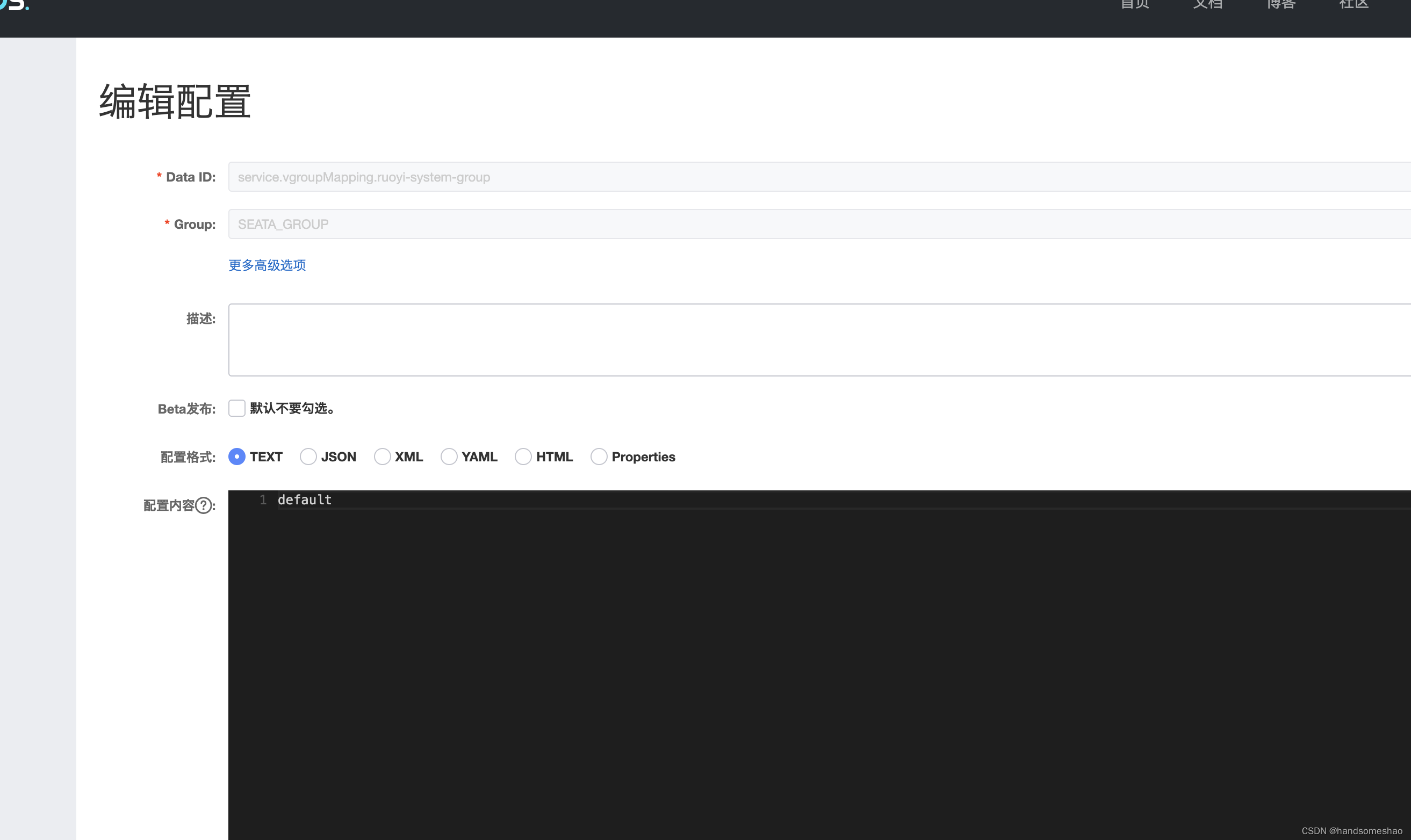
不然会报错(注意):
can not get cluster name in registry config ‘service.vgroupMapping.xx‘, please make sure registry
参考文献
can not get cluster name in registry config ‘service.vgroupMapping.xx‘, please make sure registry