文章目录
1 约束
对数据表中的数据进行限制的一种设置。
约束的统一写法
create table 表名(
 字段1 数据类型(长度) 约束,
 字段2 数据类型(长度) 约束,
  ....
);
-- 对某个列进行约束
1.1 主键约束
最重要的约束,一般每个表都要至少一个主键.一般主键都是id列
在建表时设置主键
create table emp(
	id int primary key,
	name varchar(20),
	hiredate date,
	sal double(10,2)
);
-- 主键的作用
-- 1 不能重复
-- 2 不能为空
insert into emp (id,name) values(1,'未知')
-- 主键为空报错
Field 'id' doesn't have a default value

insert into emp (id,name) values(1,'张三丰')
-- 主键重复报错
Duplicate entry '1' for key 'PRIMARY'
Navicat加主键
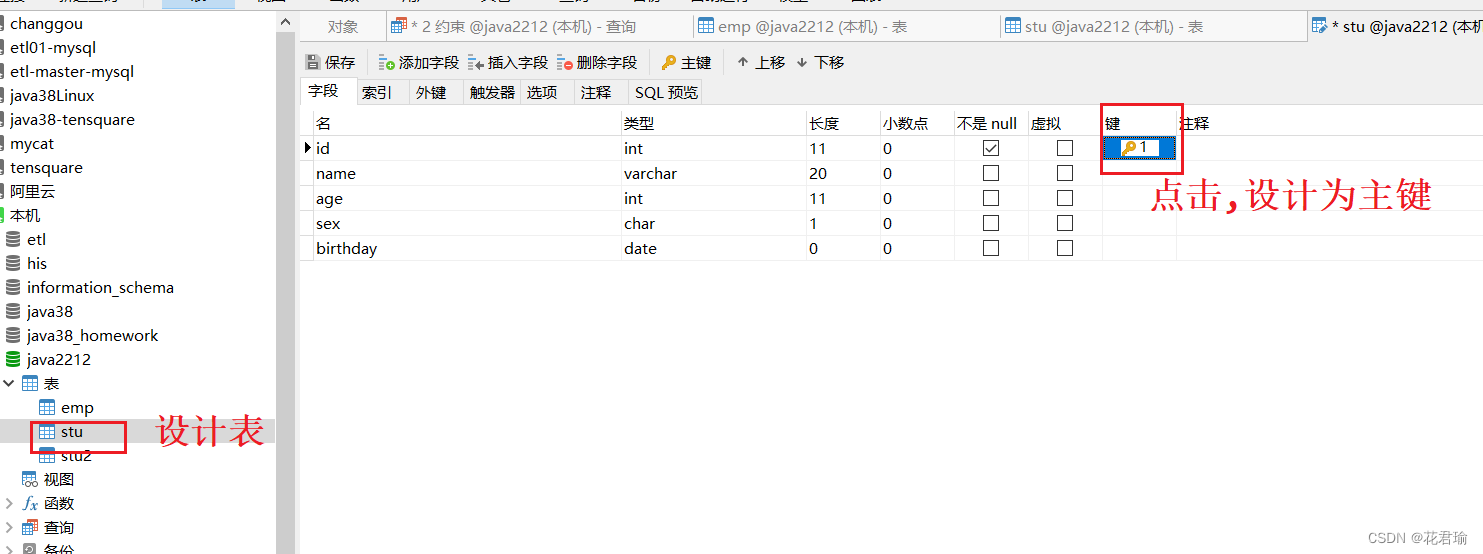
表可以设计联合主键,即多个列组合成一个主键
create table emp2(
	id int,
	name varchar(20),
	hiredate date,
	sal double(10,2),
    primary key(id,name)   -- 设计id和name为联合主键
);
-- 可以
insert into emp2 (id,name) values(1,'张三丰')
-- 只是id重复,可以
insert into emp2 (id,name) values(1,'张四丰')
-- 只是name重复,可以
insert into emp2 (id,name) values(2,'张三丰')
-- id和name都重复,不行
insert into emp2 (id,name) values(1,'张三丰')
1.2 自增约束
自增约束一般配合主键一起使用的,即主键自增。
语法: 在主键约束后加auto_increment
create table emp3(
	id int primary key auto_increment, -- 主键自增
	name varchar(20),
	hiredate date,
	sal double(10,2)
);
/*
1 当没值时,直接自增,从1开始
2 依次递增1
3 虽然设置递增,也可以自己再随意设置主键值,但是后续自增会按照当前值继续递增
4 执行delete删除数据,不会影响递增顺序
*/
Navicat设计自增
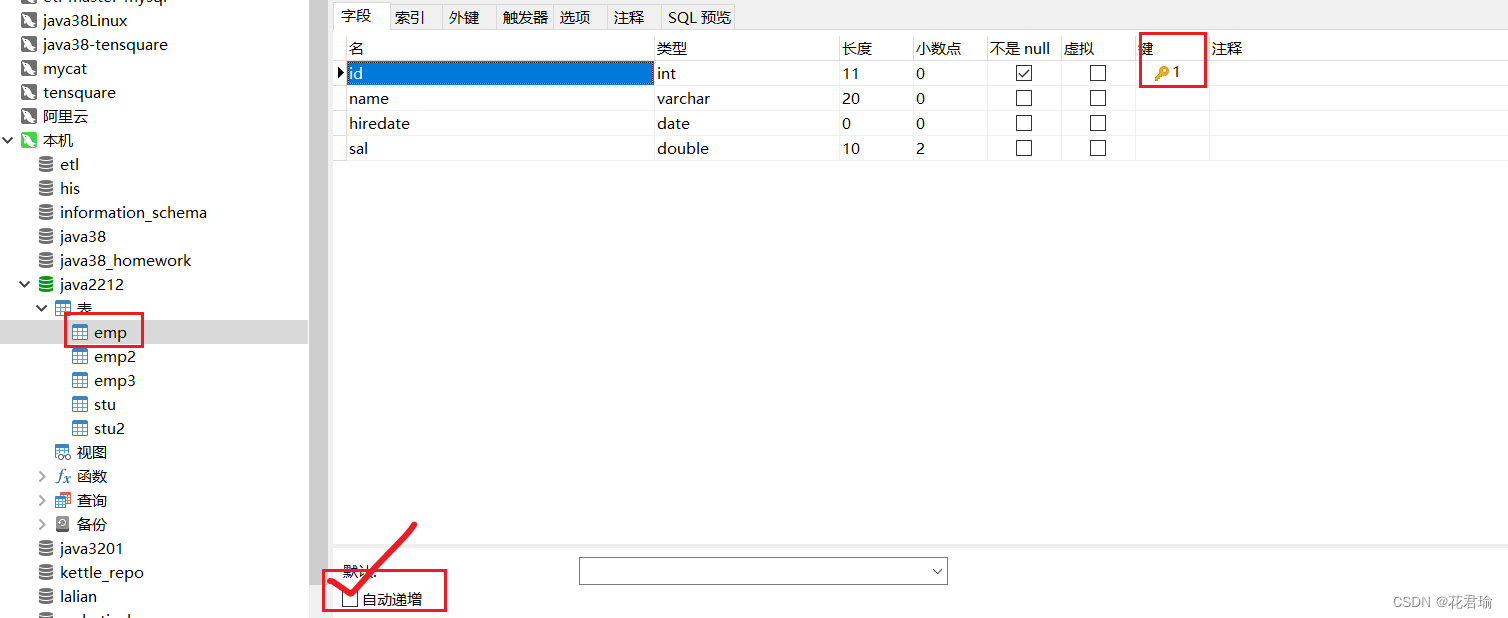
1.3 非空约束
限制该列的值不能为空.
create table emp4(
	id int primary key auto_increment, -- 主键自增
	name varchar(20) not null, -- 不为空
	hiredate date,
	sal double(10,2)
);
-- 限制name列插入值时,不能为空
1.4 默认值
当给该列设置值时,没有值时就会使用默认值填充
create table emp5(
	id int primary key auto_increment, -- 主键自增
	name varchar(20) not null, -- 不为空
	hiredate date,
	sal double(10,2) default 3000.0  -- 默认值
);
-- 没有值时就会使用默认值填充,有值是不用默认值
1.5 唯一约束
唯一约束,限制该列的值不能重复,但是可以为空
create table emp6(
	id int primary key auto_increment, -- 主键自增
	name varchar(20) unique, -- 唯一
	hiredate date,
	sal double(10,2) default 3000.0  -- 默认值
);
-- 该值不能重复
-- 但是可以给null,且允许多个null
insert into emp6 (name) values('安琪拉');
insert into emp6 (name) values(null);
1.6 外键约束
外键约束又叫引用约束,外键约束是是要在表和表之间的约束。
1.6.1 数据准备
-- 学生表
CREATE TABLE `stu3` (
  `sid` int(11) primary key,
  `sname` varchar(20) DEFAULT NULL,
  `tid` int(11) DEFAULT NULL -- 关联老师id
) ENGINE=InnoDB DEFAULT CHARSET=utf8;
-- 老师表
CREATE TABLE `teacher` (
  `tid` int(11) primary key,
  `tname` varchar(20) DEFAULT NULL
) ENGINE=InnoDB DEFAULT CHARSET=utf8;
注意,外键列必须是主键
1.6.2 添加外键
可以在建表是加外键
-- 学生表
CREATE TABLE `stu3` (
  `sid` int(11) DEFAULT NULL,
  `sname` varchar(20) DEFAULT NULL,
  `tid` int(11) DEFAULT NULL, -- 关联老师id
   constraint fk_stu_tea foreign key(tid) references teacher(tid)
) ENGINE=InnoDB DEFAULT CHARSET=utf8;
可以使用alter命令修改表,添加外键
alter table stu3 add constraint fk_stu_tea foreign key(tid) references teacher(tid);使用Navicat设置外键

1.6.3 作用
加了外键后,教师表teacher是被引用的表,学生表stu就是引用表,即teacher表是父表,stu是child子表
加上外键后,用法就有限制,子表不能乱插入和修改数据。即不能插入或更新被引用表中没有的数据
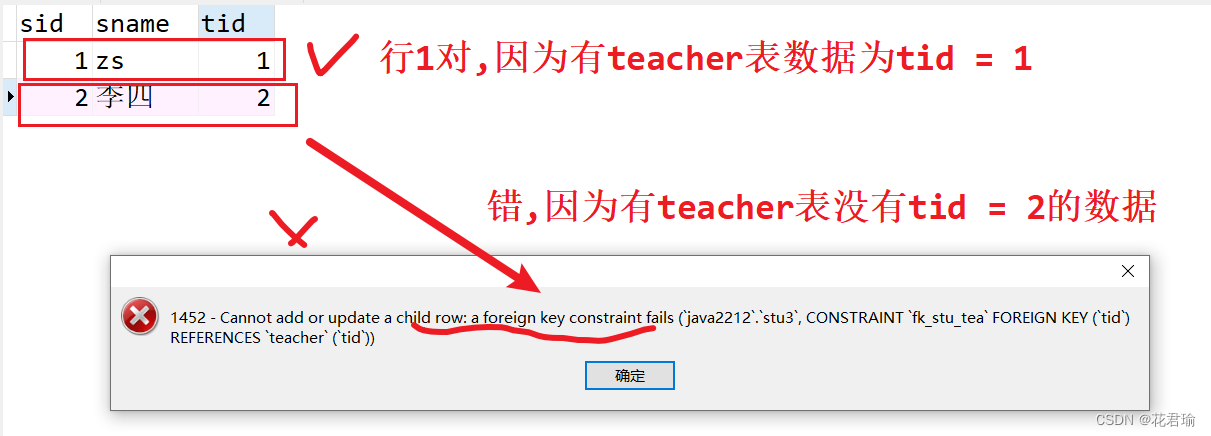
加上外键后,父表也有限制
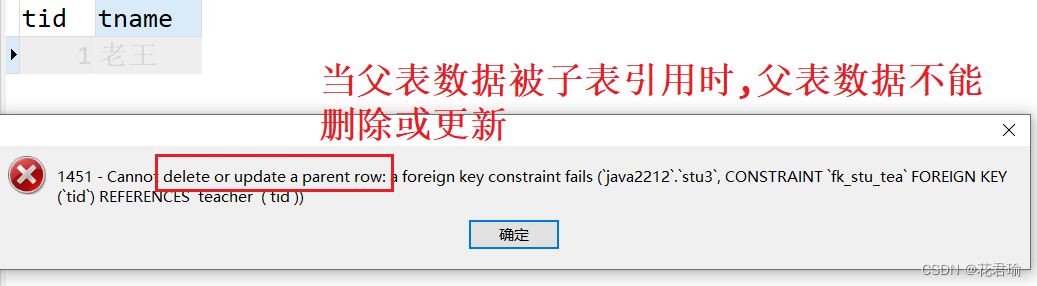
删除时/更新时:
- RESTRICT:如果想要删除父表的记录时,而在子表中有关联该父表的记录,则不允许删除父表中的记录;
- NO ACTION:同 RESTRICT,也是首先先检查外键;
- CASCADE:父表delete、update的时候,子表会delete、update掉关联记录;
- SET NULL:父表delete、update的时候,子表会将关联记录的外键字段所在列设为null,所以注意在设计子表时外键不能设为not null;
2 面试题: delete 和 truncate的区别
delete和truncate用来删除表中的数据
| delete | truncate | |
|---|---|---|
| 语言 | DML | DDL |
| 范围 | 指定删除哪几行数据 | 只能删除全表数据 |
| 性能 | 删除数据会产生碎片 | 不会产生碎片,清空大表时效率高 |
| 关于自增 | 删除数据时,不影响自增顺序 | 自增会从1开始 |
| 原理 | DELETE语句则是逐条的删除数据表中保存的记录 | 先执行删除(DROP)数据表的操作,然后再根据有效的表结构文件(.frm)重新创建数据表 |
3 DQL(重点)
查询就是从数据库查询出结果,查询数据不会对原数据表数有任何影响。
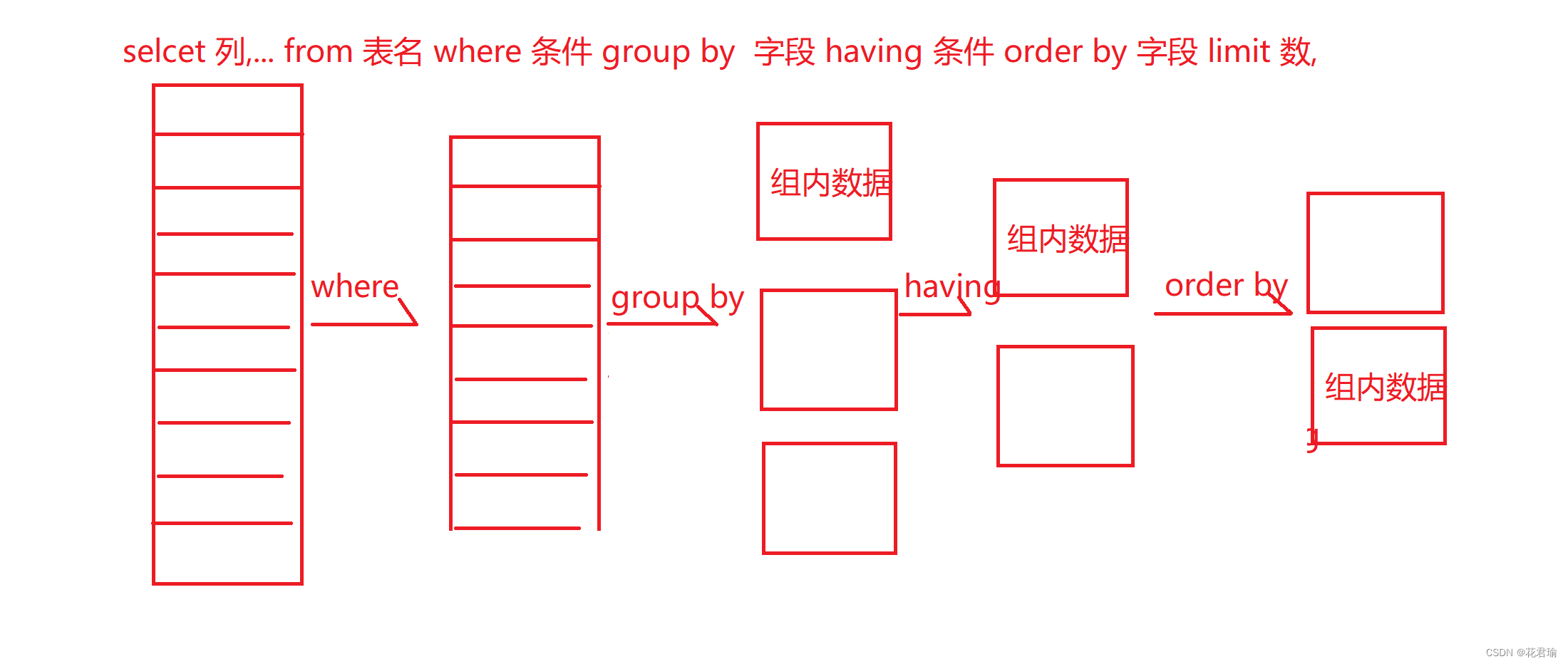
查询完整语法
  SELECT selection_list      /*要查询的列名称*/
  FROM table_list         /*要查询的表名称*/
  WHERE condition       /*行条件*/
  GROUP BY grouping_columns  /*对结果分组*/
  HAVING condition      /*分组后的行条件*/
  ORDER BY sorting_columns /*对结果排序*/
  LIMIT offset_start, row_count  /*结果限定*/
3.1 基本查询
-- select 字段1,字段2,.. from 表名
-- 查询所有列
select sid,sname,age,sex,score,cid,groupLeaderId
from stu;
-- 查询的结果是一张虚拟表
-- 查询所有列,一般在测试时,可以使用*代表所有
select * from stu;
-- 查询指定 列
-- 只查询学号,姓名,性别
select sid,sname,sex from stu;
3.2 条件查询
条件查询,就将查询结果过滤一部分,只保留满足条件的数据
select 字段1,字段2,… from 表名 where 条件
条件:
- =、!=(不等)、<>(不等)、<、<=、>、>=;
- BETWEEN…AND;
- IN(set);
- IS NULL(判断是否为空:);IS NOT NULL(判断是否不会空)
- AND;
- OR;
- NOT;
-- 查询学号为1001的学生信息
select * from stu where sid = 1001;
-- 查询学生成绩大于60的学生id 姓名,成绩
select sid,sname,score from stu where score > 60;
-- 查询学生性别为女,并且年龄小于50的记录
select * from stu where sex = '女' and age < 50;
-- 查询学生学号为1001,或者姓名为李四的记录
select * from stu where sid = 1001 or sname = '李四';
-- 查询学号为1001,1002,1004的记录
select * from stu where sid in (1001,1002,1003);
select * from stu where sid = 1001 or sid = 1002 or sid = 1003;
-- 查询学号不是1001,1002,1003的记录
select * from stu where sid not in (1001,1002,1003);
select * from stu where sid != 1001 and sid != 1002 and sid != 1003;

-- 查询学生年龄在20到40之间的学生记录
-- between..and是闭区间,即包含两端数据
select * from stu where age between 20 and 40;
select * from stu where age >= 20 and age <=40;

-- 查询性别非男的学生记录
select * from stu where sex != '男';
select * from stu where sex <> '男';
-- 查询学生性别为空的数据
-- null不能用等号判断
select * from stu where sex = null; -- 不对!!
select * from stu where sex is null;
select * from stu where sex is not  null; --注意是is not!!不是not is!!!
3.3 模糊查询
模糊查询也属于条件查询,使用的关键词是like
语法:
where 字段 like %关键词%;
where 字段 like _关键词;
模糊查询
%: 匹配任意个数的任意字符
_: 匹配一个任意字符
-- 查询姓名以“张”开头的学生记录
select * from stu where sname like '张%'
select * from stu where sname like '张_'
-- 查询姓名中包含“三”的学生记录
select * from stu where sname like '%三%'
3.4 聚合函数
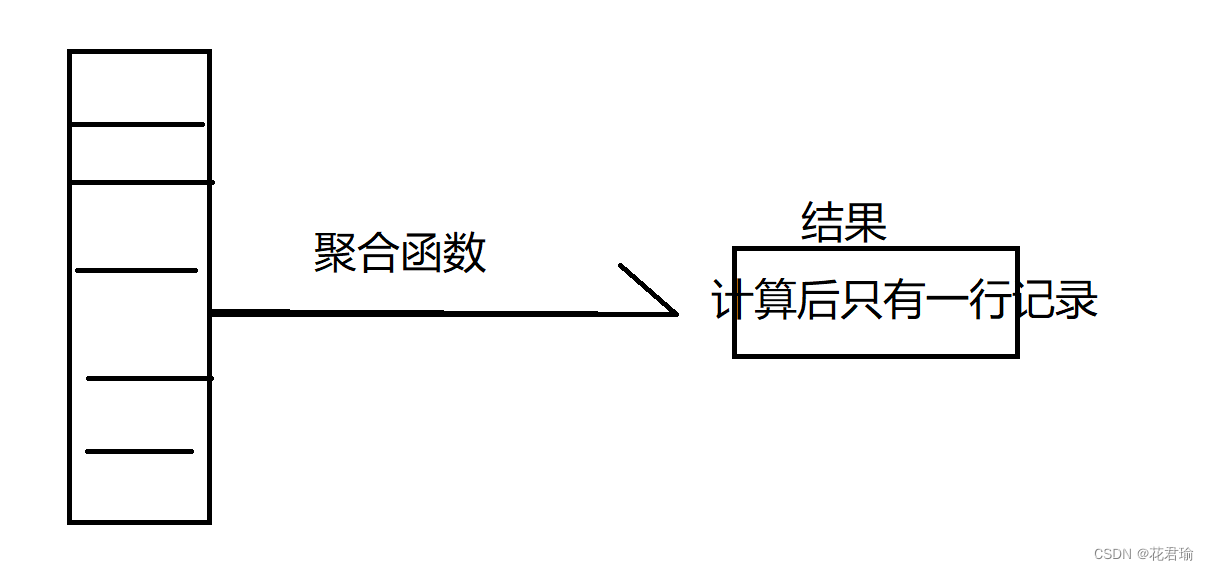
对查询的结果进行计算的一种函数,聚合函数是将多行数据计算返回一个结果的函数。
即有聚合函数的sql,查询返回的结果只有一条记录。
- COUNT(字段):统计指定列不为NULL的记录行数;
- MAX(字段):计算指定列的最大值,如果指定列是字符串类型,那么使用字符串排序运算;
- MIN(字段):计算指定列的最小值,如果指定列是字符串类型,那么使用字符串排序运算;
- SUM(字段):计算指定列的数值和,如果指定列类型不是数值类型,那么计算结果为0;
- AVG(字段):计算指定列的平均值,如果指定列类型不是数值类型,那么计算结果为0;
-- 查询stu表中记录数:
select count(sid) from stu;
select count(*) from stu;
select count(sname) from stu;
-- 查询stu表中有成绩的人数:(不为null的人数)
select count(score) from stu;
-- 查询stu表中成绩大于60的人数:
select count(sid) from stu where score > 60;
-- 查询所有学生成绩和:
select sum(score) from stu;
select sum(sname) from stu;
-- 统计所有学生平均成绩
-- avg不统计null数据
select avg(score) from stu;
-- 后续会学习ifnull函数,再来理解
select avg(ifnull(score,0)) from stu;

-- 统计所有人的平均成绩,包括null
-- !!!!可以在select后的字段上做运算!!!!
select sum(score)/count(sid) from stu;
update stu set score = score +100 where sid = 1001
-- 查询最高成绩和最低成绩:
select max(score),min(score) from stu;
可以给列取别名
select max(score) as ‘最高分’,min(score) ‘最低分’ from stu;
其中,as可以省略
3.5 去重
对查询返回的结果去重
-- 去除该列重复的值,但是一般都会配合count函数一起使用
	select distinct age from stu;
-- 查询年龄不重复的共有多少人
	select count(distinct age) from stu;
3.6 分组查询
语法:
group by 字段;
根据该字段分组,字段相同的分一组
一般用法: 分组后一般都会进行聚合操作
特点:
- 凡是分组查询,分为几组,结果只有几行
- 聚合函数是对每组内的数据进行聚合
- 出现在groupby后的字段,才可以出现在select后;凡是和聚合函数出现在一起的字段,必须出现在group by后。
注意:where和having
- where是分组前过滤,having分组后过滤
- where后不能使用聚合函数,having后是可以使用聚合函数
-- 查询男生多少人,女生多少人
select sid,sex from stu group by sex;
-- 查询每个班级的班级编号和每个班级的成绩和:
select cid,sum(score) from stu group by cid;
-- 查询每个班级的班级编号以及每个班级的人数:
select cid,count(sid) from stu group by cid;
-- 查询成绩总和大于200的班级编号以及成绩和:
select cid,sum(score) from stu
group by cid having sum(score) > 200;
3.7 排序
语法:
order by 字段 [asc|desc];
-- 查询所有学生记录,按年龄升序排序
select * from stu order by age asc;
select * from stu order by age; -- 默认即升序
-- 查询所有学生记录,按年龄降序排序
select * from stu order by age desc;
-- 查询所有学生记录,按年龄升序排序,如果年龄相同时,按编号降序排序
select * from stu order by age asc,sid desc;
-- 查询成绩大于60的学生id,姓名,成绩,并根据成绩降序
select sid,sname,score from stu  where score > 60 order by score desc;
3.8 限制
-- 语法
select * from stu limit n;
select * from stu limit (x,y);
-- 选取第x行以后的y条数据
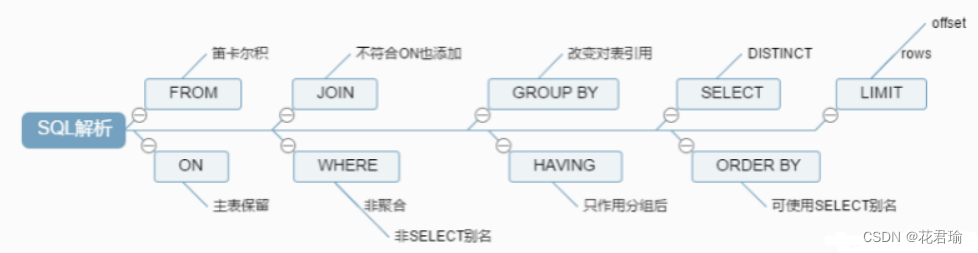
4 顺序
4.1 书写顺序
select cid,sum(score) from stu
where score > 10
group by cid
having sum(score) > 100
order by sum(score) desc
limit 4;
4.2 执行顺序
1 from查询全表
2 where 过滤一部分数据
3 分组+过滤(group by + having)
4 select
5 order
6 limit