sudo apt install vino
好像Jetpack 5.0中已经自带了。。
配置VNC server:
gsettings set org.gnome.Vino prompt-enabled false
gsettings set org.gnome.Vino require-encryption false
编辑org.gnome,增加一个“enabled key”的参数:
cd /usr/share/glib-2.0/schemas
sudo cp org.gnome.Vino.gschema.xml org.gnome.Vino.gschema.xml.old
sudo vi org.gnome.Vino.gschema.xml
<key name='enabled' type='b'>
      <summary>Enable remote access to the desktop</summary>
      <description>
              If true, allows remote access to the desktip via the RFB
              protocol. Users on remote machines may then connect to the
              desktop using a VNC viewer.
      </description>
      <default>false</default>
    </key>
编译:
sudo glib-compile-schemas /usr/share/glib-2.0/schemas
手工启动vnc-server:
/usr/lib/vino/vino-server
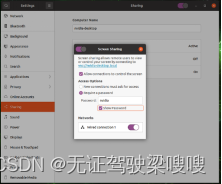
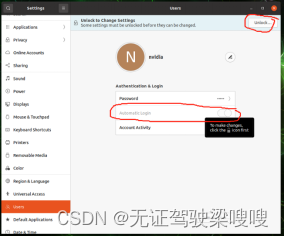
Step 0: 在设置中打开屏幕共享,并且打开自动登录
Settings → Sharing → Screen Sharing → set ‘Active’
Step 1: 安装xserver-xorg-video-dummy
$ sudo apt update
$ sudo apt install xserver-xorg-video-dummy
Step 2: 创建虚拟显示器
$ cd /etc/X11$ sudo vim xorg.conf.dummy
Step3: 在xorg.conf.dummy中添加如下配置(下面1920x1080的配置)
jetsonorin系列虚拟显示配置文件资源-CSDN文库文件
Section "Device"
   Identifier "DummyDevice"
   Driver "dummy"
   VideoRam 256000
EndSection
   Section "Screen"
   Identifier "DummyScreen"
   Device "DummyDevice"
Monitor "DummyMonitor"
   DefaultDepth 24
    SubSection "Display"
        Depth 24
        Modes "1920x1080_60.0"
    EndSubSection
EndSection
Section "Monitor"
    Identifier "DummyMonitor"
    HorizSync 30-70
    VertRefresh 50-75
    ModeLine "1920x1080" 148.50 1920 2448 2492 2640 1080 1084 1089 1125 +Hsync +Vsync
EndSection
Step 4: 替换 /etc/X11/xorg.conf
$ cp xorg.conf xorg.conf.backup
$ cp xorg.conf.dummy xorg.conf
Step 5: 重启
$ sudo reboot
1、如果想恢复hdmi的硬件显示,需要恢复配置然后reboot
cp xorg.conf.backup xorg.conf
2、如果window平台连不上提示 server did not offer supported security type
gsettings set org.gnome.Vino prompt-enabled false
gsettings set org.gnome.Vino require-encryption false