前言:👩💻 计算机行业的同仁们,大家好!作为专注于Java领域多年的开发者,我非常理解实践案例的重要性。以下是一些我认为有助于提升你们技能的资源:
👩💻 SpringBoot的精选案例推介!🔥
👩💻 想要把握小程序开发的精髓?这里有你需要的优选案例!🚀
点开文末链接,即可获取这些精品案例的源码。分享知识,共同进步!👇👇
📚 掌握这些案例,让你的编程之路更加顺畅。立即查看详情和获取源码!
希望这些资料能帮助你们在技术旅程中更进一步!🌟

项目名
ssm602社区医疗保健监控系统+vue【以测试】
技术栈
SpringBoot+Vue+小程序+MySQL+Maven
一、-环境介绍
1.1 运行环境
开发语言:Java
数据库:MySQL
系统架构:B/S
后端:SpringBoot(MyBatis)
前端:Vue
工具:IDEA,JDK1.8,Maven
二、ssm602社区医疗保健监控系统+vue【以测试】-系统介绍
2.1 项目介绍
如今社会上各行各业,都喜欢用自己行业的专属软件工作,互联网发展到这个时候,人们已经发现离不开了互联网。新技术的产生,往往能解决一些老技术的弊端问题。因为传统社区医疗保健信息管理难度大,容错率低,管理人员处理数据费工费时,所以专门为解决这个难题开发了一个社区医疗保健监控系统,可以解决许多问题。
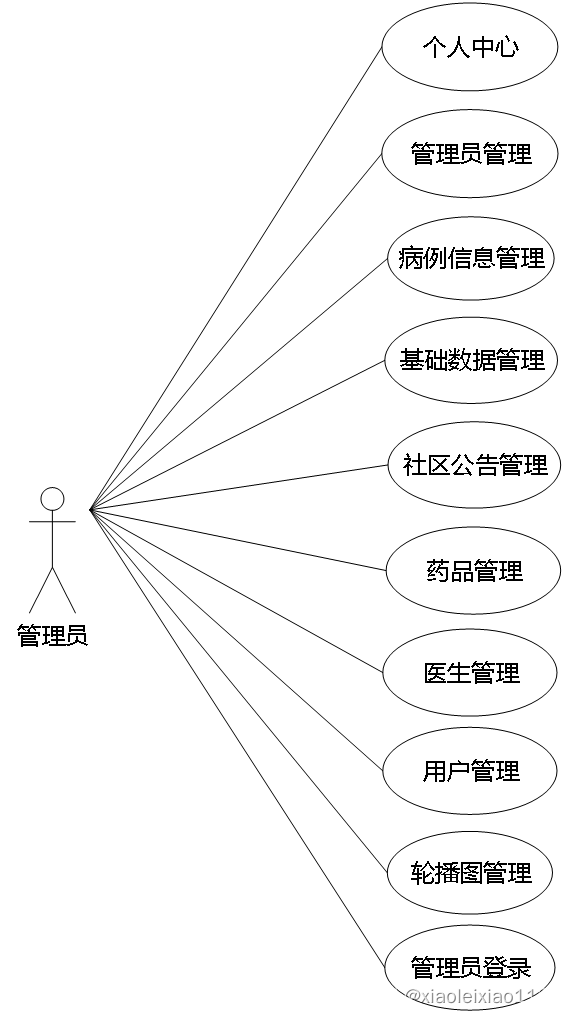
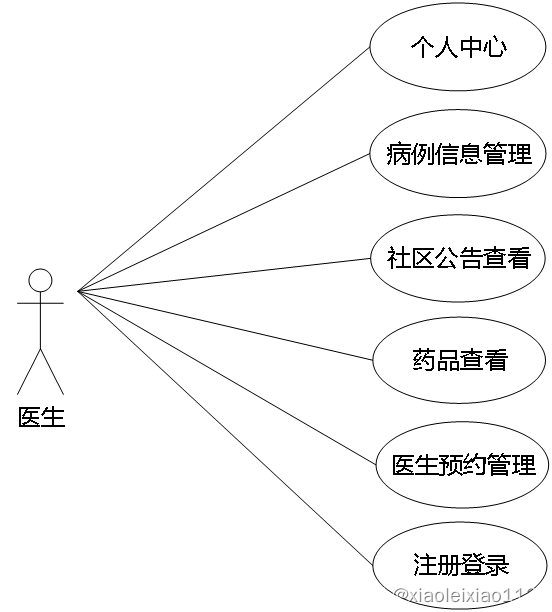
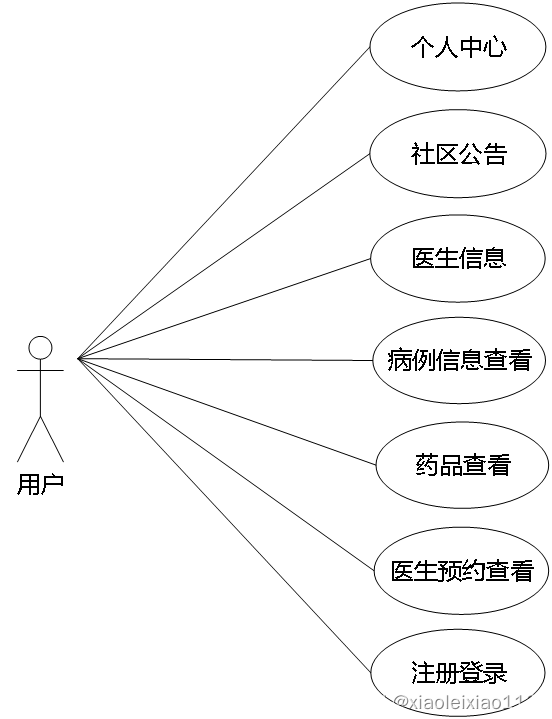
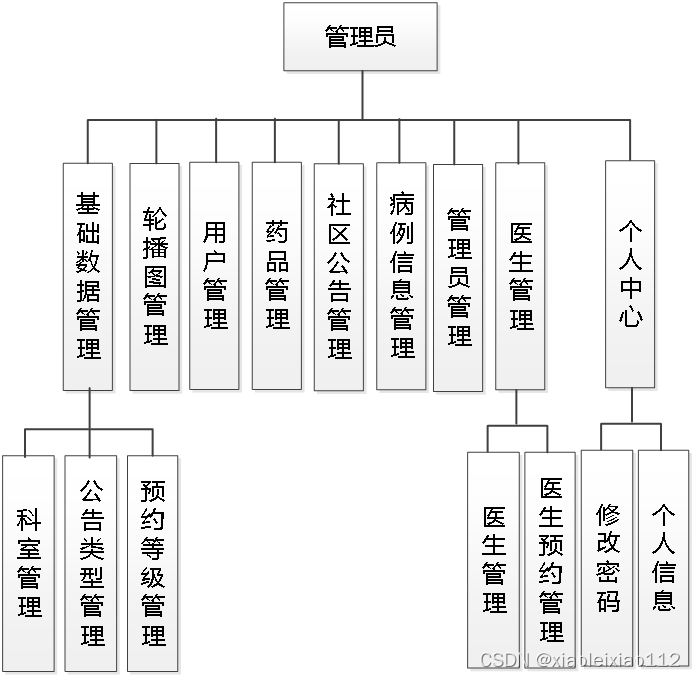
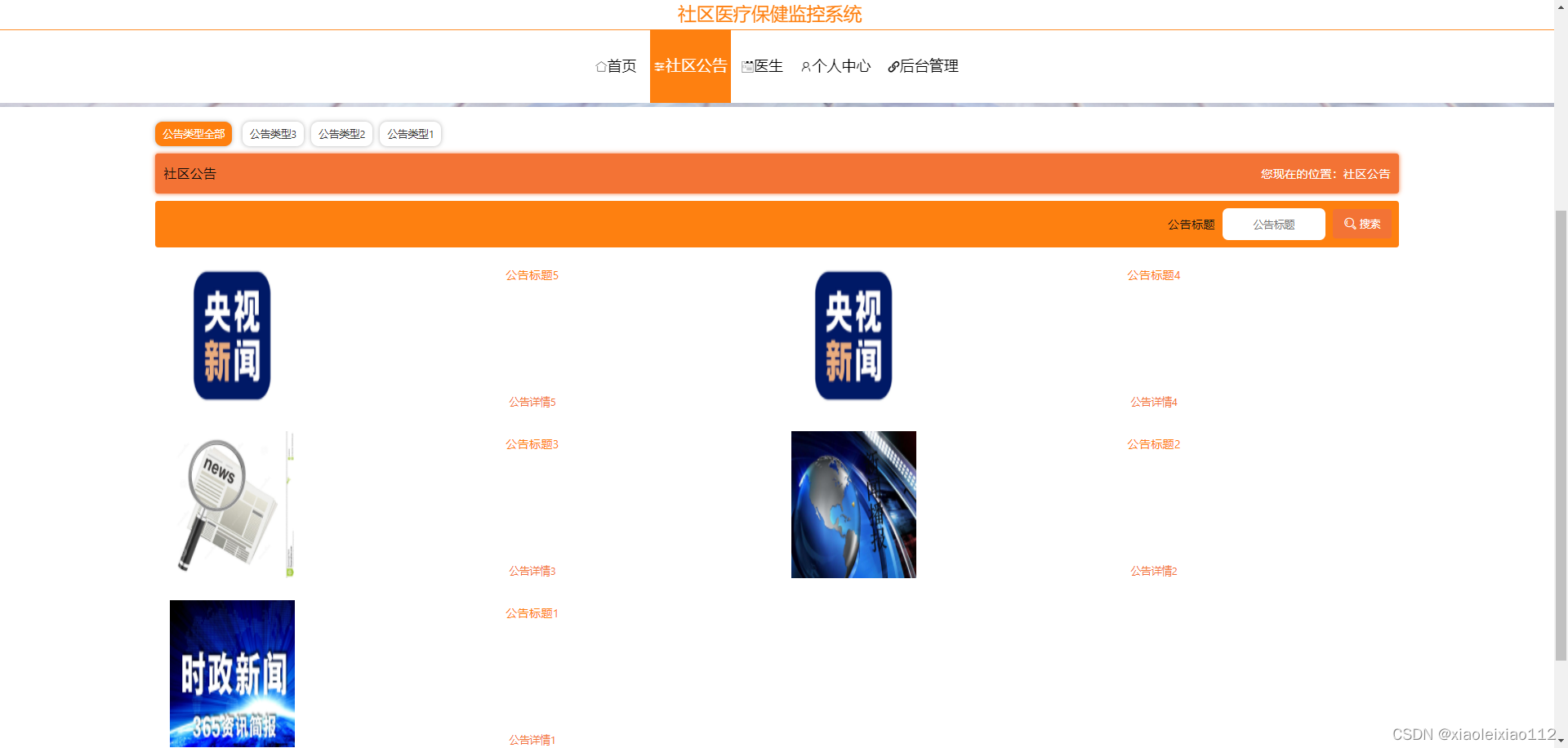
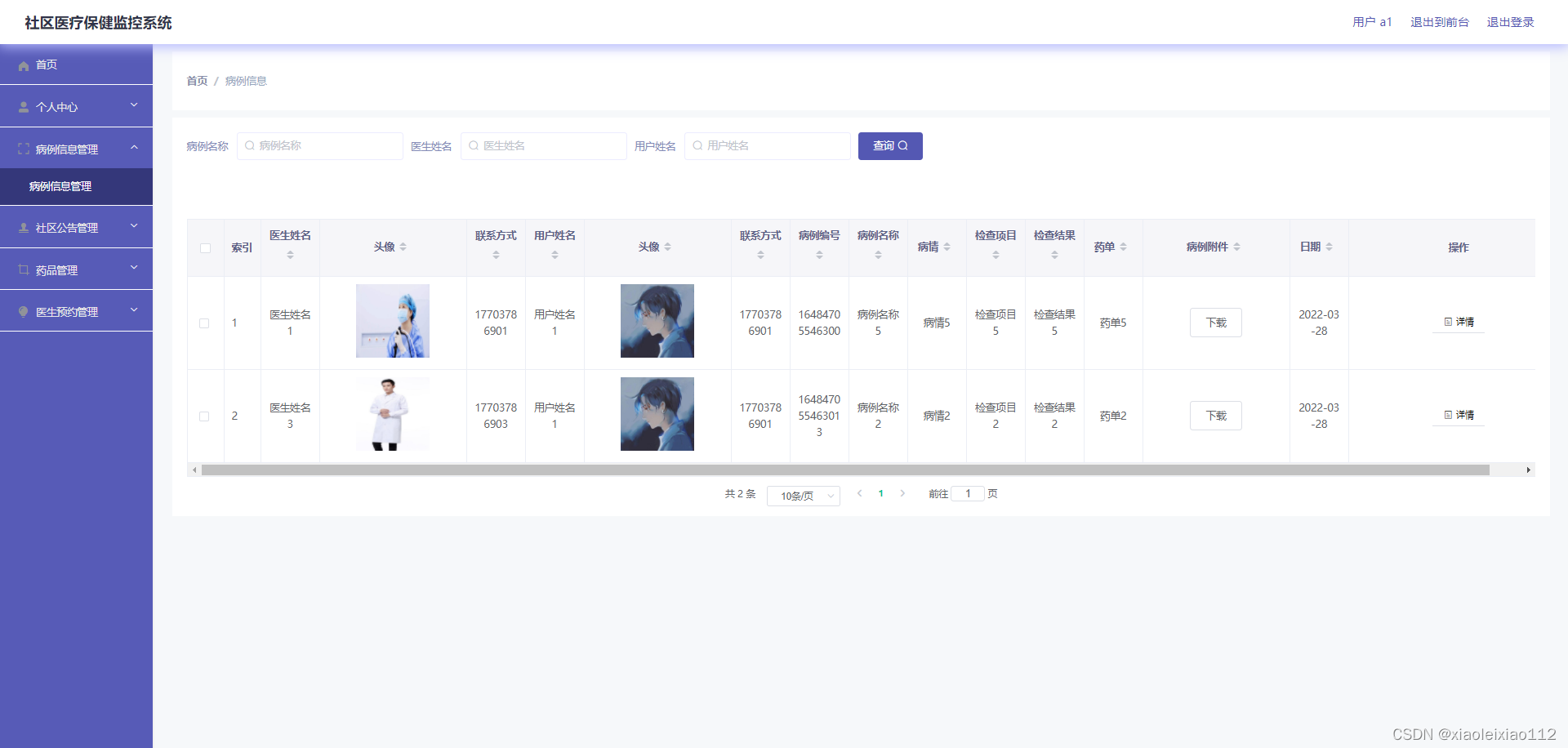
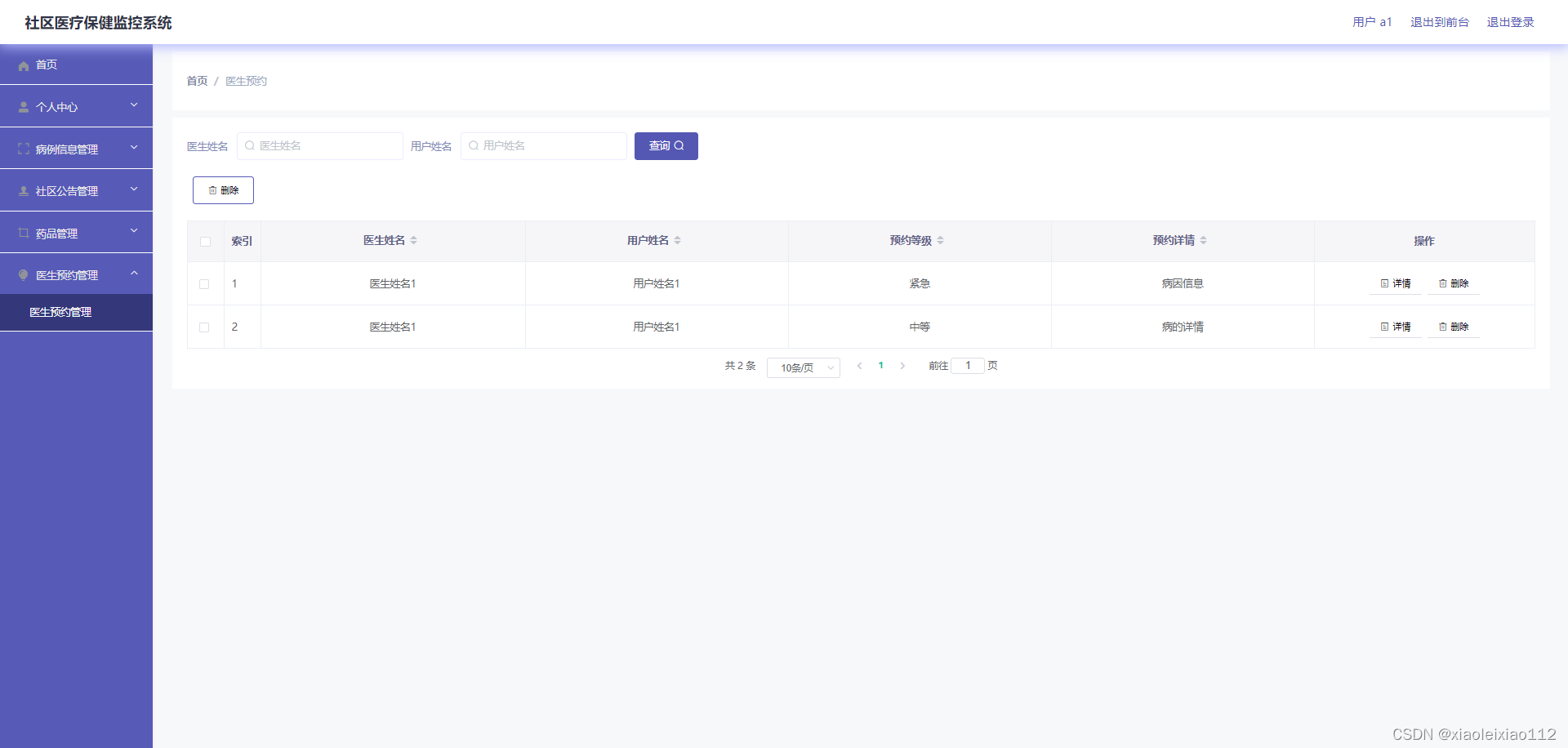
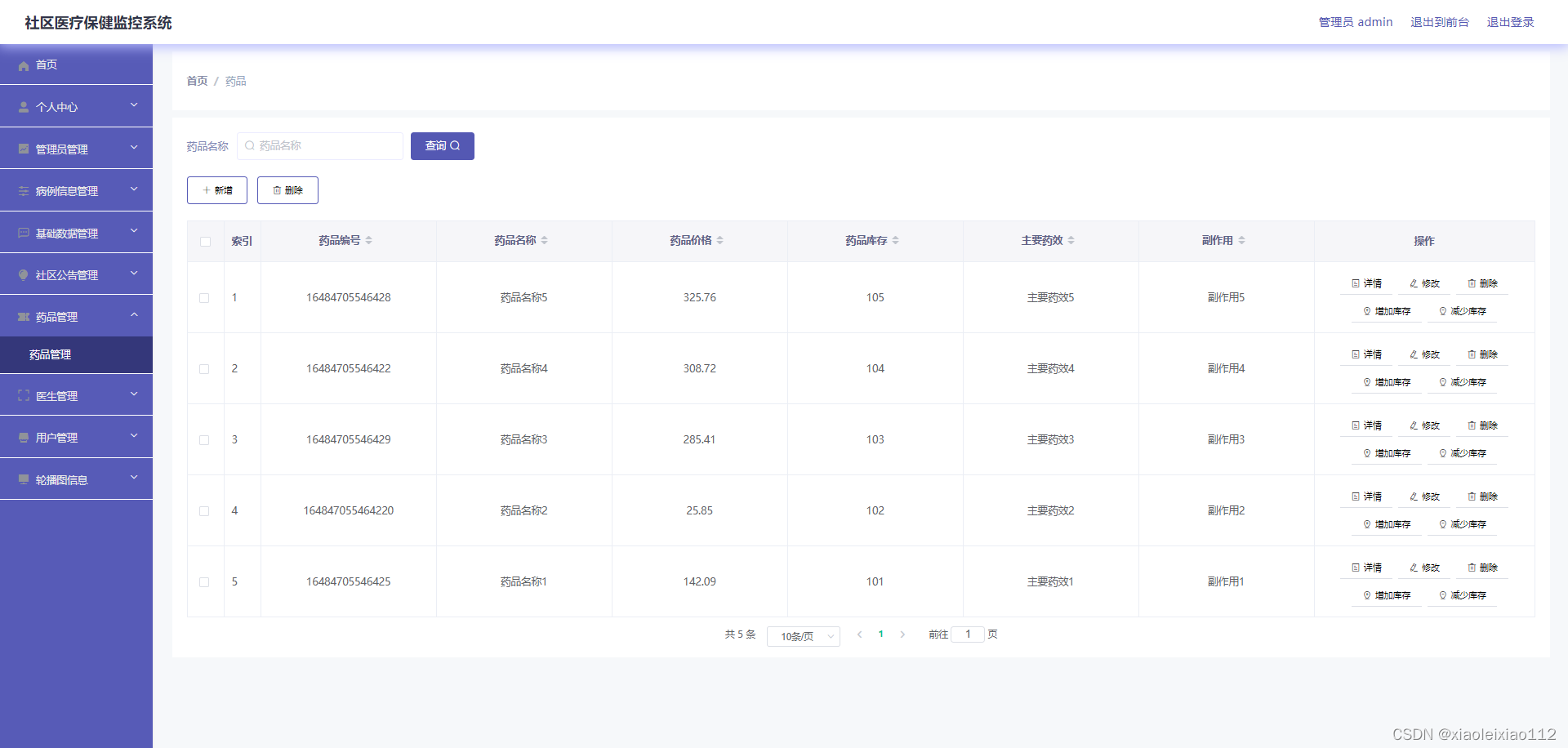
社区医疗保健监控系统实现的功能包括药品信息管理,医生管理,病例信息管理,社区公告管理,用户管理,医生预约信息管理等功能。该系统采用了Mysql数据库,Java语言,SSM框架等技术进行编程实现。
社区医疗保健监控系统可以提高社区医疗保健信息管理问题的解决效率,优化社区医疗保健信息处理流程,保证社区医疗保健信息数据的安全,它是一个非常可靠,非常安全的应用程序。
关键词:社区医疗保健监控系统;Mysql数据库;Java语言
2.2 功能模块
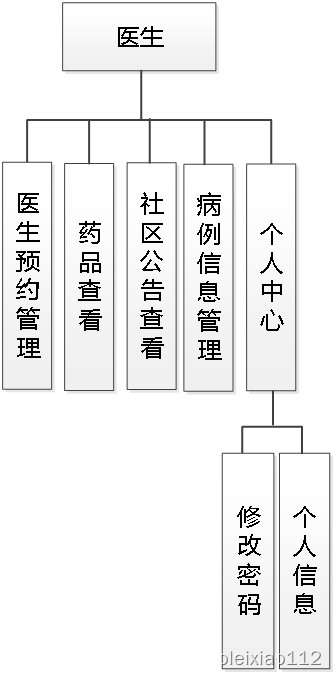
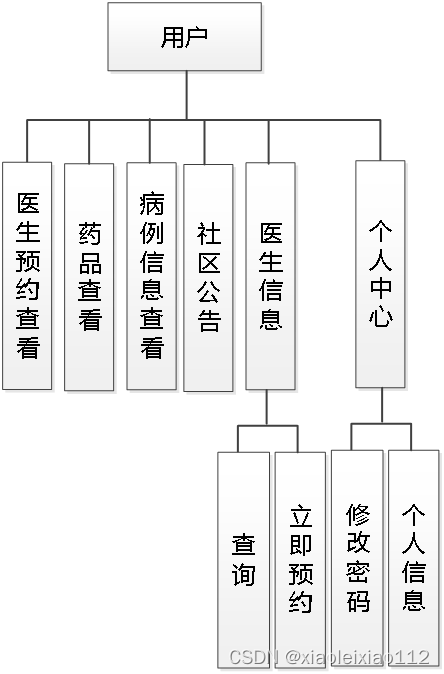
三、ssm602社区医疗保健监控系统+vue【以测试】-系统展示
3.1部分功能图文展示
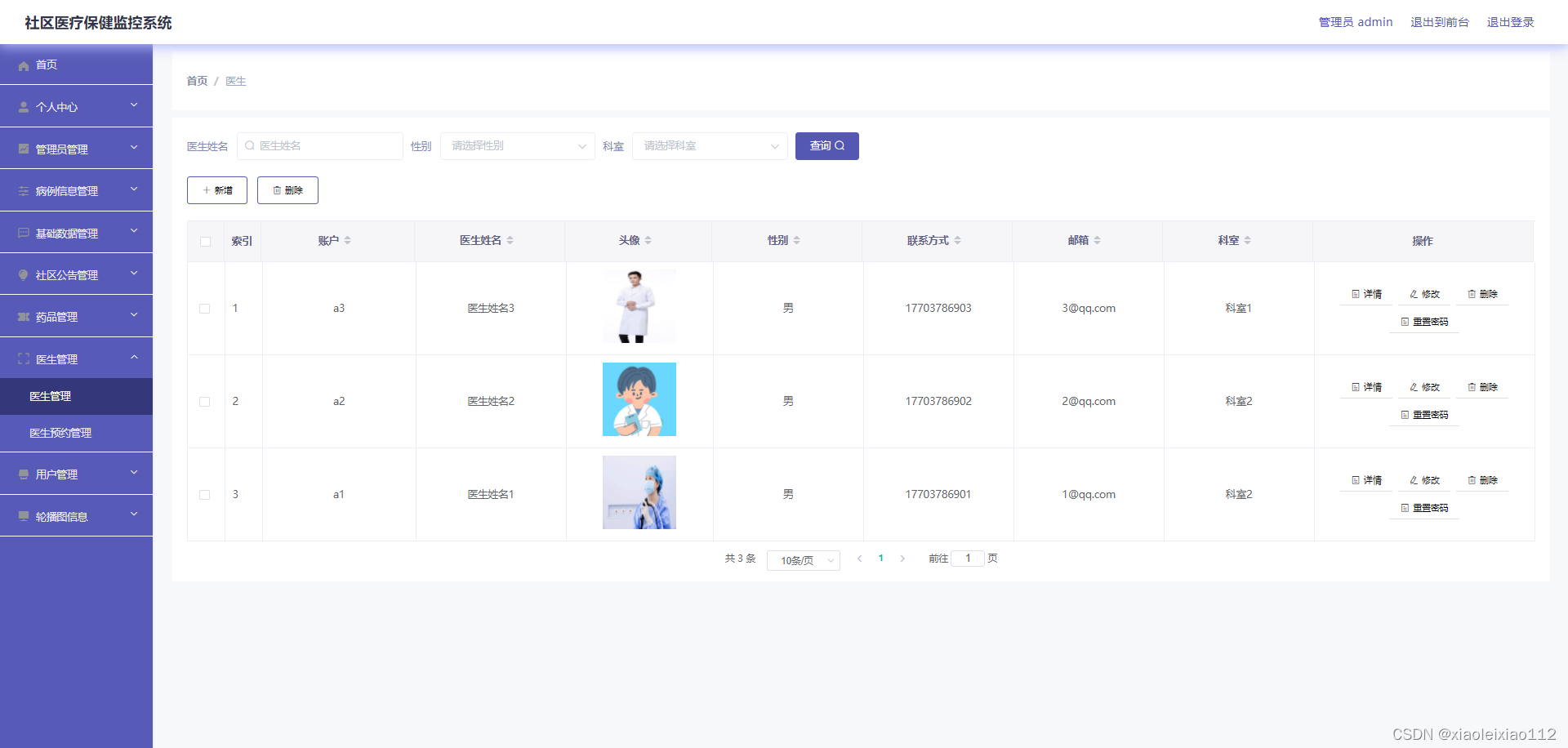
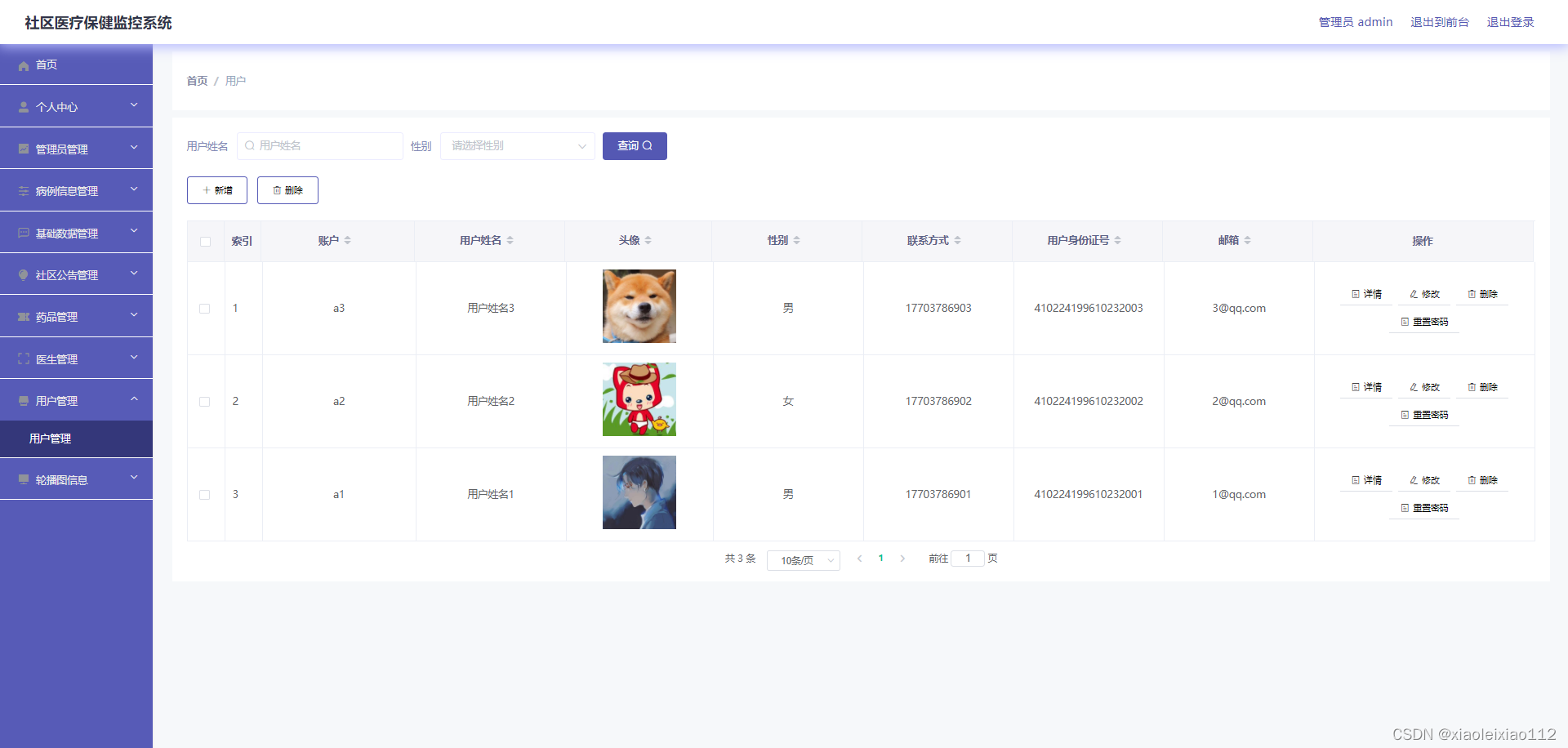
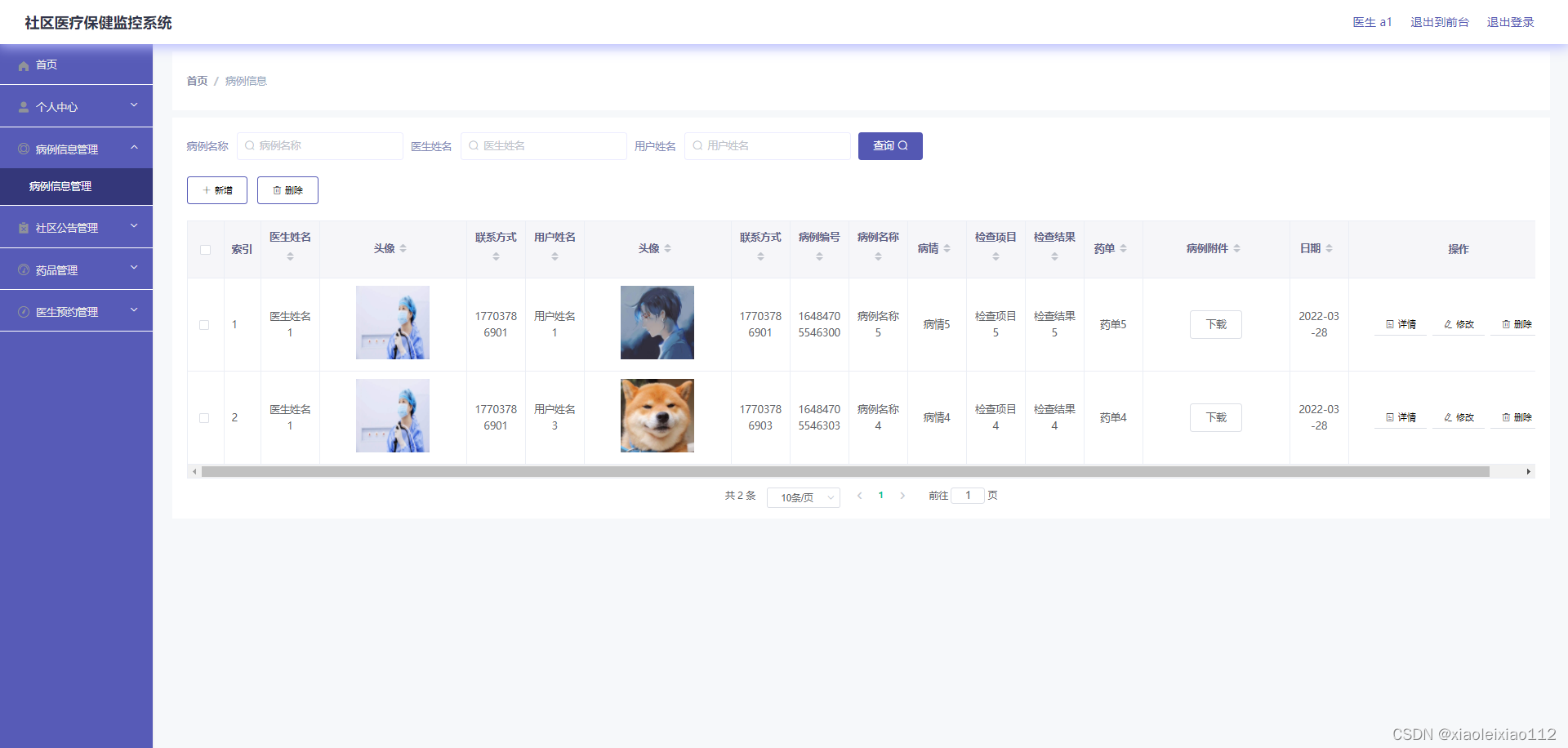
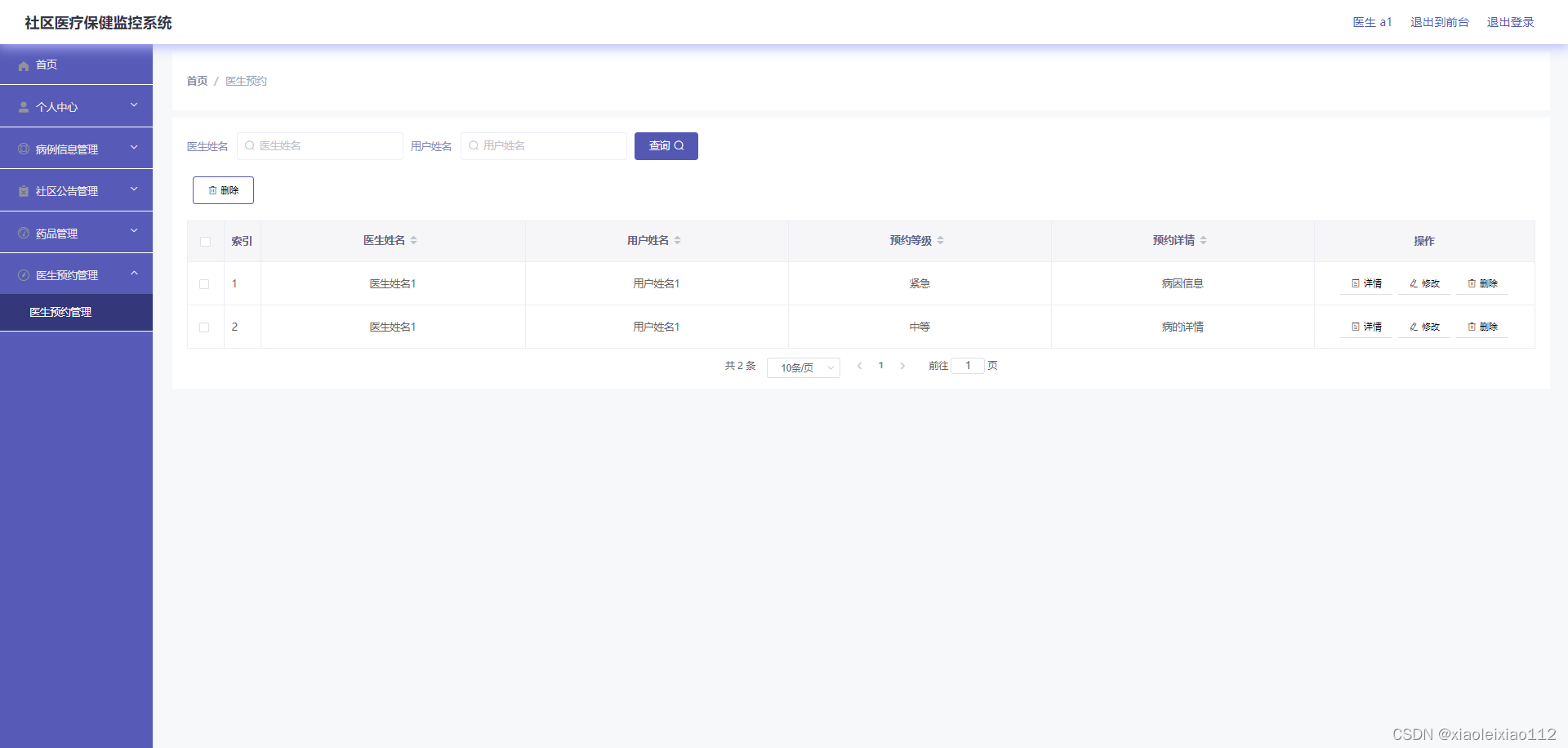
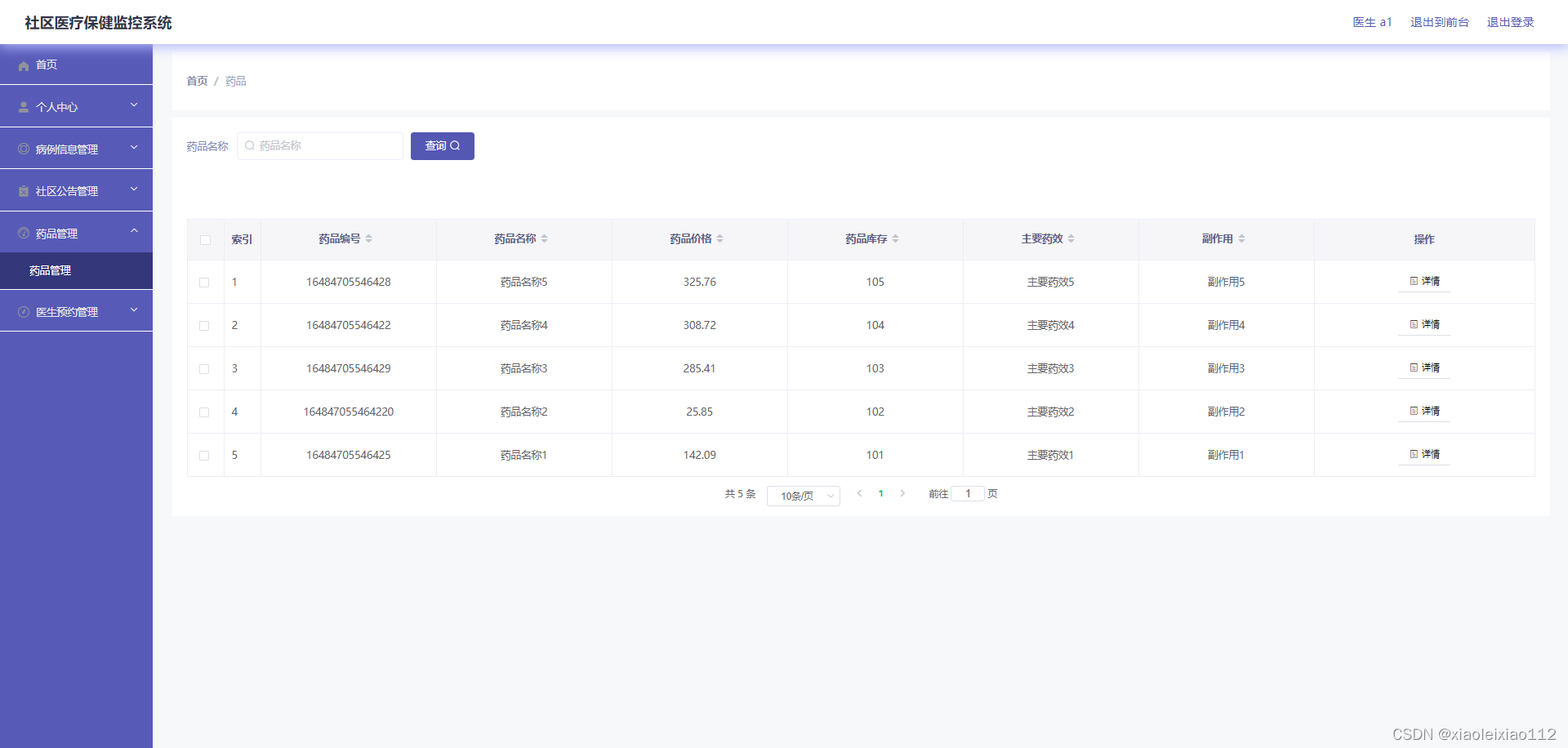
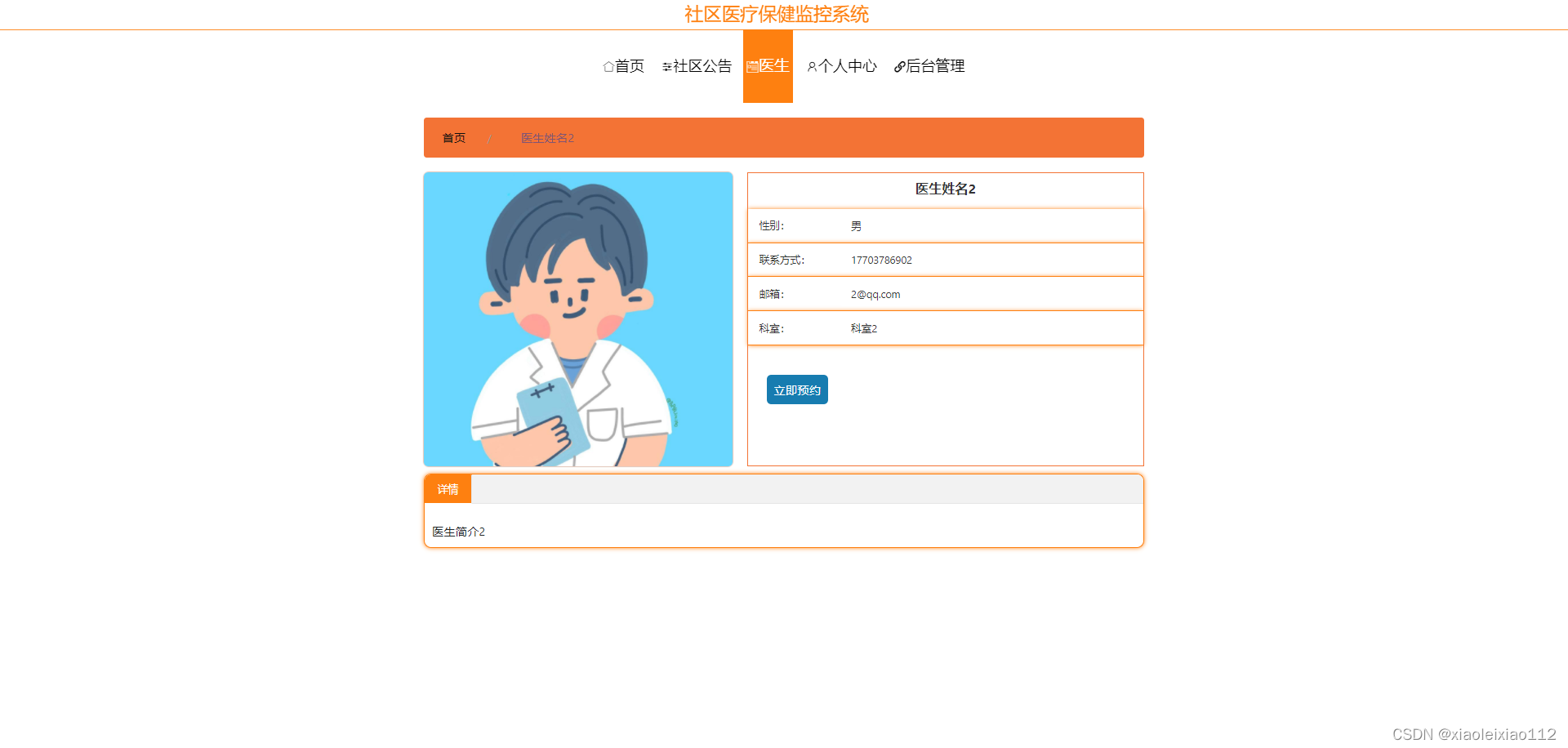
四、ssm602社区医疗保健监控系统+vue【以测试】-部分代码设计
4.1.部分代码如下:
package com.controller;

import java.io.File;
import java.math.BigDecimal;
import java.net.URL;
import java.text.SimpleDateFormat;
import com.alibaba.fastjson.JSONObject;
import java.util.*;
import org.springframework.beans.BeanUtils;
import javax.servlet.http.HttpServletRequest;
import org.springframework.web.context.ContextLoader;
import javax.servlet.ServletContext;
import com.service.TokenService;
import com.utils.*;
import java.lang.reflect.InvocationTargetException;

import com.service.DictionaryService;
import org.apache.commons.lang3.StringUtils;
import com.annotation.IgnoreAuth;
import org.slf4j.Logger;
import org.slf4j.LoggerFactory;
import org.springframework.beans.factory.annotation.Autowired;
import org.springframework.stereotype.Controller;
import org.springframework.web.bind.annotation.*;
import com.baomidou.mybatisplus.mapper.EntityWrapper;
import com.baomidou.mybatisplus.mapper.Wrapper;
import com.entity.*;
import com.entity.view.*;
import com.service.*;
import com.utils.PageUtils;
import com.utils.R;
import com.alibaba.fastjson.*;

/**
 * 社区公告
 * 后端接口
 * @author
 * @email
*/
@RestController
@Controller
@RequestMapping("/news")
public class NewsController {
    private static final Logger logger = LoggerFactory.getLogger(NewsController.class);

    @Autowired
    private NewsService newsService;


    @Autowired
    private TokenService tokenService;
    @Autowired
    private DictionaryService dictionaryService;

    //级联表service

    @Autowired
    private YishengService yishengService;
    @Autowired
    private YonghuService yonghuService;


    /**
    * 后端列表
    */
    @RequestMapping("/page")
    public R page(@RequestParam Map<String, Object> params, HttpServletRequest request){
        logger.debug("page方法:,,Controller:{},,params:{}",this.getClass().getName(),JSONObject.toJSONString(params));
        String role = String.valueOf(request.getSession().getAttribute("role"));
        if(false)
            return R.error(511,"永不会进入");
        else if("医生".equals(role))
            params.put("yishengId",request.getSession().getAttribute("userId"));
        else if("用户".equals(role))
            params.put("yonghuId",request.getSession().getAttribute("userId"));
        if(params.get("orderBy")==null || params.get("orderBy")==""){
            params.put("orderBy","id");
        }
        PageUtils page = newsService.queryPage(params);

        //字典表数据转换
        List<NewsView> list =(List<NewsView>)page.getList();
        for(NewsView c:list){
            //修改对应字典表字段
            dictionaryService.dictionaryConvert(c, request);
        }
        return R.ok().put("data", page);
    }

    /**
    * 后端详情
    */
    @RequestMapping("/info/{id}")
    public R info(@PathVariable("id") Long id, HttpServletRequest request){
        logger.debug("info方法:,,Controller:{},,id:{}",this.getClass().getName(),id);
        NewsEntity news = newsService.selectById(id);
        if(news !=null){
            //entity转view
            NewsView view = new NewsView();
            BeanUtils.copyProperties( news , view );//把实体数据重构到view中

            //修改对应字典表字段
            dictionaryService.dictionaryConvert(view, request);
            return R.ok().put("data", view);
        }else {
            return R.error(511,"查不到数据");
        }

    }

    /**
    * 后端保存
    */
    @RequestMapping("/save")
    public R save(@RequestBody NewsEntity news, HttpServletRequest request){
        logger.debug("save方法:,,Controller:{},,news:{}",this.getClass().getName(),news.toString());

        String role = String.valueOf(request.getSession().getAttribute("role"));
        if(false)
            return R.error(511,"永远不会进入");

        Wrapper<NewsEntity> queryWrapper = new EntityWrapper<NewsEntity>()
            .eq("news_name", news.getNewsName())
            .eq("news_types", news.getNewsTypes())
            ;

        logger.info("sql语句:"+queryWrapper.getSqlSegment());
        NewsEntity newsEntity = newsService.selectOne(queryWrapper);
        if(newsEntity==null){
            news.setInsertTime(new Date());
            news.setCreateTime(new Date());
            newsService.insert(news);
            return R.ok();
        }else {
            return R.error(511,"表中有相同数据");
        }
    }

    /**
    * 后端修改
    */
    @RequestMapping("/update")
    public R update(@RequestBody NewsEntity news, HttpServletRequest request){
        logger.debug("update方法:,,Controller:{},,news:{}",this.getClass().getName(),news.toString());

        String role = String.valueOf(request.getSession().getAttribute("role"));
//        if(false)
//            return R.error(511,"永远不会进入");
        //根据字段查询是否有相同数据
        Wrapper<NewsEntity> queryWrapper = new EntityWrapper<NewsEntity>()
            .notIn("id",news.getId())
            .andNew()
            .eq("news_name", news.getNewsName())
            .eq("news_types", news.getNewsTypes())
            ;

        logger.info("sql语句:"+queryWrapper.getSqlSegment());
        NewsEntity newsEntity = newsService.selectOne(queryWrapper);
        if("".equals(news.getNewsPhoto()) || "null".equals(news.getNewsPhoto())){
                news.setNewsPhoto(null);
        }
        if(newsEntity==null){
            newsService.updateById(news);//根据id更新
            return R.ok();
        }else {
            return R.error(511,"表中有相同数据");
        }
    }

    /**
    * 删除
    */
    @RequestMapping("/delete")
    public R delete(@RequestBody Integer[] ids){
        logger.debug("delete:,,Controller:{},,ids:{}",this.getClass().getName(),ids.toString());
        newsService.deleteBatchIds(Arrays.asList(ids));
        return R.ok();
    }


    /**
     * 批量上传
     */
    @RequestMapping("/batchInsert")
    public R save( String fileName, HttpServletRequest request){
        logger.debug("batchInsert方法:,,Controller:{},,fileName:{}",this.getClass().getName(),fileName);
        Integer yonghuId = Integer.valueOf(String.valueOf(request.getSession().getAttribute("userId")));
        SimpleDateFormat sdf = new SimpleDateFormat("yyyy-MM-dd HH:mm:ss");
        try {
            List<NewsEntity> newsList = new ArrayList<>();//上传的东西
            Map<String, List<String>> seachFields= new HashMap<>();//要查询的字段
            Date date = new Date();
            int lastIndexOf = fileName.lastIndexOf(".");
            if(lastIndexOf == -1){
                return R.error(511,"该文件没有后缀");
            }else{
                String suffix = fileName.substring(lastIndexOf);
                if(!".xls".equals(suffix)){
                    return R.error(511,"只支持后缀为xls的excel文件");
                }else{
                    URL resource = this.getClass().getClassLoader().getResource("../../upload/" + fileName);//获取文件路径
                    File file = new File(resource.getFile());
                    if(!file.exists()){
                        return R.error(511,"找不到上传文件,请联系管理员");
                    }else{
                        List<List<String>> dataList = PoiUtil.poiImport(file.getPath());//读取xls文件
                        dataList.remove(0);//删除第一行,因为第一行是提示
                        for(List<String> data:dataList){
                            //循环
                            NewsEntity newsEntity = new NewsEntity();
//                            newsEntity.setNewsName(data.get(0));                    //公告标题 要改的
//                            newsEntity.setNewsTypes(Integer.valueOf(data.get(0)));   //公告类型 要改的
//                            newsEntity.setNewsPhoto("");//详情和图片
//                            newsEntity.setInsertTime(date);//时间
//                            newsEntity.setNewsContent("");//详情和图片
//                            newsEntity.setCreateTime(date);//时间
                            newsList.add(newsEntity);


                            //把要查询是否重复的字段放入map中
                        }

                        //查询是否重复
                        newsService.insertBatch(newsList);
                        return R.ok();
                    }
                }
            }
        }catch (Exception e){
            e.printStackTrace();
            return R.error(511,"批量插入数据异常,请联系管理员");
        }
    }


    /**
    * 前端列表
    */
    @IgnoreAuth
    @RequestMapping("/list")
    public R list(@RequestParam Map<String, Object> params, HttpServletRequest request){
        logger.debug("list方法:,,Controller:{},,params:{}",this.getClass().getName(),JSONObject.toJSONString(params));

        // 没有指定排序字段就默认id倒序
        if(StringUtil.isEmpty(String.valueOf(params.get("orderBy")))){
            params.put("orderBy","id");
        }
        PageUtils page = newsService.queryPage(params);

        //字典表数据转换
        List<NewsView> list =(List<NewsView>)page.getList();
        for(NewsView c:list)
            dictionaryService.dictionaryConvert(c, request); //修改对应字典表字段
        return R.ok().put("data", page);
    }

    /**
    * 前端详情
    */
    @RequestMapping("/detail/{id}")
    public R detail(@PathVariable("id") Long id, HttpServletRequest request){
        logger.debug("detail方法:,,Controller:{},,id:{}",this.getClass().getName(),id);
        NewsEntity news = newsService.selectById(id);
            if(news !=null){


                //entity转view
                NewsView view = new NewsView();
                BeanUtils.copyProperties( news , view );//把实体数据重构到view中

                //修改对应字典表字段
                dictionaryService.dictionaryConvert(view, request);
                return R.ok().put("data", view);
            }else {
                return R.error(511,"查不到数据");
            }
    }


    /**
    * 前端保存
    */
    @RequestMapping("/add")
    public R add(@RequestBody NewsEntity news, HttpServletRequest request){
        logger.debug("add方法:,,Controller:{},,news:{}",this.getClass().getName(),news.toString());
        Wrapper<NewsEntity> queryWrapper = new EntityWrapper<NewsEntity>()
            .eq("news_name", news.getNewsName())
            .eq("news_types", news.getNewsTypes())
            ;
        logger.info("sql语句:"+queryWrapper.getSqlSegment());
        NewsEntity newsEntity = newsService.selectOne(queryWrapper);
        if(newsEntity==null){
            news.setInsertTime(new Date());
            news.setCreateTime(new Date());
        newsService.insert(news);
            return R.ok();
        }else {
            return R.error(511,"表中有相同数据");
        }
    }


}
表4.1 病例信息表
字段
注释
类型
空
id (主键)
主键
int(11)
否
bingli_uuid_number
病例编号
varchar(200)
是
bingli_name
病例名称
varchar(200)
是
yonghu_id
用户
int(11)
是
bingli_bingqing
病情
varchar(200)
是
jianchaxiangmu
检查项目
varchar(200)
是
jianchajieguo
检查结果
varchar(200)
是
yaodan_text
药单
text
是
bingli_file
病例附件
varchar(200)
是
bingli_time
日期
date
是
yisheng_id
医生
int(200)
是
create_time
创建时间
timestamp
是
表4.2 社区公告表
字段
注释
类型
空
id (主键)
主键
int(11)
否
news_name
公告标题
varchar(200)
是
news_types
公告类型
int(11)
是
news_photo
公告图片
varchar(200)
是
insert_time
公告时间
timestamp
是
news_content
公告详情
text
是
create_time
创建时间
timestamp
是
表4.3 管理员表
字段
注释
类型
空
id (主键)
主键
bigint(20)
否
username
用户名
varchar(100)
否
password
密码
varchar(100)
否
role
角色
varchar(100)
是
addtime
新增时间
timestamp
否
表4.4 药品表
字段
注释
类型
空
id (主键)
主键
int(11)
否
yaopin_uuid_number
药品编号
varchar(200)
是
yaopin_name
药品名称
varchar(200)
是
yaopin_new_money
药品价格
decimal(10,2)
是
yaopin_kucun_number
药品库存
int(11)
是
yaopin_zuoyong
主要药效
varchar(200)
是
fuzuoyong
副作用
varchar(200)
是
yaopin_content
药品详情
text
是
create_time
创建时间
timestamp
是
表4.5 医生表
字段
注释
类型
空
id (主键)
主键
int(11)
否
username
账户
varchar(200)
是
password
密码
varchar(200)
是
yisheng_name
医生姓名
varchar(200)
是
yisheng_photo
头像
varchar(255)
是
sex_types
性别
int(11)
是
yisheng_phone
联系方式
varchar(200)
是
yisheng_email
邮箱
varchar(200)
是
keshi_types
科室
int(11)
是
yisheng_content
医生简介
text
是
yisheng_delete
假删
int(11)
是
create_time
创建时间
timestamp
是
表4.6 医生预约表
字段
注释
类型
空
id (主键)
主键
int(11)
否
yonghu_id
用户
int(11)
是
yisheng_id
医生
int(11)
是
yisheng_order_types
预约等级
int(11)
是
yisheng_order_text
预约详情
text
是
create_time
创建时间
timestamp
是
表4.7 用户表
字段
注释
类型
空
id (主键)
主键
int(11)
否
username
账户
varchar(200)
是
password
密码
varchar(200)
是
yonghu_name
用户姓名
varchar(200)
是
yonghu_photo
头像
varchar(255)
是
sex_types
性别
int(11)
是
yonghu_phone
联系方式
varchar(200)
是
yonghu_id_number
用户身份证号
varchar(200)
是
yonghu_email
邮箱
varchar(200)
是
yonghu_delete
假删
int(11)
是
create_time
创建时间
timestamp
是
五、ssm602社区医疗保健监控系统+vue【以测试】-结束语
由于本人学习的是计算机方面的专业,学习了一定的开发知识,因此,对于开发一款已经确定了课题的社区医疗保健监控系统,从功能需求,功能模块划分,数据库的选择与设计,编程语言的确定,系统界面的布局和设计等知识,我都有个大致的思路。我运用已经具备的理论知识,加上后期从网络渠道获取的相关技术知识,能够在系统完成开发后期,编写相应的系统文档。
社区医疗保健监控系统制作期间,我也遇到过一些难题,模块拆分不够精细,以及数据表需要设计几张表,还有对于开发技术的深度理论学习还不充分等,不过我能够通过网络或者通过学院提供的图书馆寻求解决办法。比如在不知道具体功能的情况下,我从网上下载了很多的与社区医疗保健监控系统相关的程序,分析了它们的功能之后,我再结合即将开发的社区医疗保健监控系统进行综合分析,选取了适合社区医疗保健监控系统的功能部分,再具体模块具体分析,设计专属项目功能。对于数据表的设计,先在图书馆学习,然后查看相似系统对于数据表的结构设计等知识,然后在本系统功能确定的情况下,结合本系统设计了配套的数据表,对于难度最大的开发技术部分,这是需要大量时间调试的,一般都是对基础数据的增加,更新,查询或修改方面的代码,然后把本系统能够运用的代码部分在简单更改后进行使用,又经过了简单的测试工作,最终呈现出一个完整的能够解决用户实际问题的社区医疗保健监控系统。该系统唯一不足的就是代码方面还有很多重复的部分,不够精简,还有用户操作本系统,对于用户的误操作行为,本系统还不能及时反馈,这也是一大缺点。
社区医疗保健监控系统完成了,其相应的配套文档也需要进行编写,该文档主要描述社区医疗保健监控系统是如何进行分析,设计以及实现的,让其他阅读本文档的人增加对该系统的了解,编写文档过程中,由于自己平时对于办公软件的操作不是很频繁,根据学院要求的文档排版格式进行编辑也花了很多时间,在不断学习排版技巧以及对本系统配套文档的反复修改之后,最终在学院规定的时间内进行了文档定稿。
毕业项目各个工作进行到此,我也是收获颇丰,正因为自己努力学习知识,积极寻求解决办法,才让我能够提交一个完整的作品。制作毕业项目让我又得到了成长,不仅是专业知识的增加,也学到了解决问题的能力和方法。